Table of Contents
Start your free trial.
Start your free trial.

Start your free trial.



Table of Contents
Executive Summary
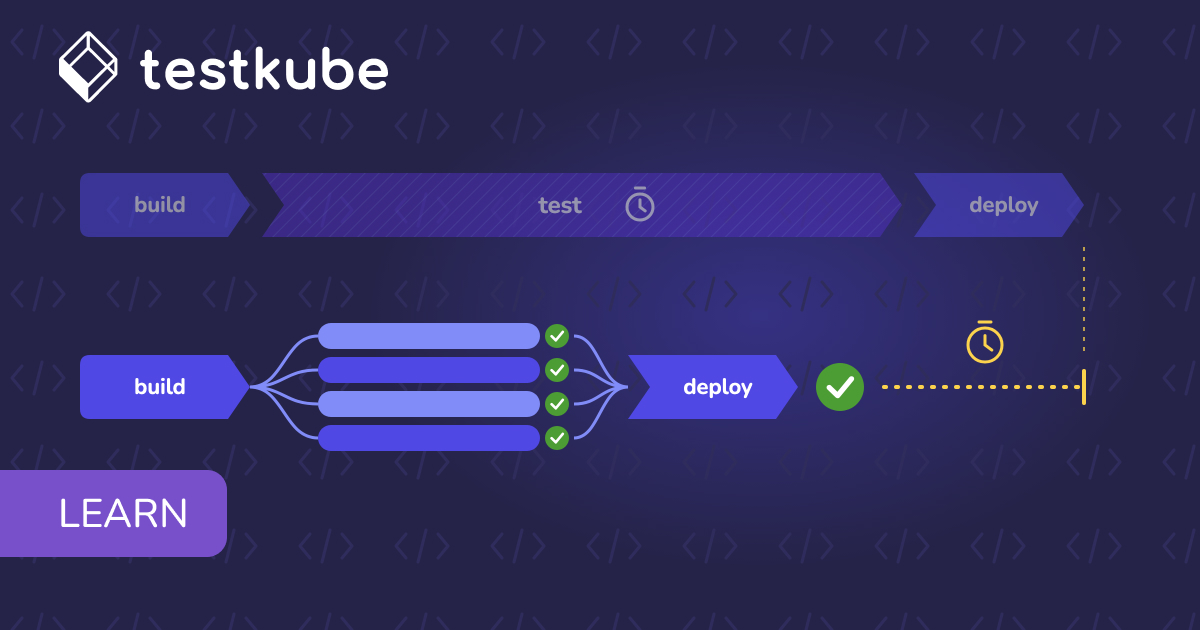
How much of your CI/CD pipeline time is spent running tests rather than building and deploying software? As applications grow, the number of services, features, and environments that need validation increases. Every change introduces testing requirements, and larger test suites take longer to execute. What starts as a few minutes of validation can gradually become the longest stage in the delivery pipeline.
The symptoms are familiar: test stages account for a growing share of pipeline duration, test jobs increase with every service added, and teams start trimming test coverage to meet release deadlines.
Running fewer tests might reduce execution time, but it also means accepting gaps in coverage. A better approach is to look at how tests are executed, how much setup work they require, and which tasks can run independently.
In this article, we'll look at how tests run in CI, how Testkube executes them, and how to reduce pipeline time through step ordering, dependency caching, selective execution, parallel workflows, and sharding.
Why Tests Take So Long in CI
How CI Runs Tests Today
In a typical CI pipeline, test suites run as scripted steps inside a job, often on a single runner in a fixed sequence. The job checks out the repository, installs dependencies, prepares the environment, and executes the tests. Each stage waits for the previous one to finish.
This model is straightforward, but setup overhead can accumulate across jobs. Different jobs may clone the same repository, install identical dependencies, and initialize similar environments. The runner remains occupied throughout execution, and results are often collected separately for each job.
There can also be a gap between the application and its tests. The application may run inside Kubernetes while the CI runner executes tests elsewhere, requiring network access and additional environment configuration. As teams add services and suites, serial execution increases pipeline duration. More tests can mean more minutes on every run, even when some setup work could be reused.
Where the Minutes Go
Pipeline duration is not determined by test execution alone. Time spent preparing environments, downloading dependencies, waiting for shared resources, and collecting results can add significantly to the total. These costs accumulate across jobs and workers, making it important to understand where time is being spent before changing how tests run. The main sources of overhead include:
- Environment and data setup: Databases, brokers, mocks, and seeded data must be initialized and checked for readiness. This work can recur across jobs.
- Cold-start overhead: Repository clones, image pulls, browser installations, and dependency downloads consume time before tests begin. Each worker may repeat this cost.
- Long-running tests and coupling: The slowest suite or spec file determines completion time. Tests that share state, depend on ordering, or use fixed sleeps are harder to split safely.
- Shared environment contention: Limited runners or a single staging environment create queues before execution begins.
- Fragmented test execution and reporting: API, load, and browser tests may have separate commands, result formats, and artifact-handling steps.
- Late feedback: Slow suites placed before inexpensive checks delay the first failure signal.
- Whole-suite execution: Small changes may trigger every test, while retries repeat successful tests alongside failures.
Each bottleneck calls for a different response. Caching can reduce repeated downloads and setup work, while reusing prepared environments can avoid initializing the same dependencies for every job. Test selection and execution order can reduce unnecessary work and surface failures earlier. Parallelism and sharding can shorten execution time by distributing independent tests across available workers, provided the overhead of coordinating those workers does not outweigh the gains.
The first step is to establish a baseline. Measure how long tests spend waiting in queues, preparing environments, executing test cases, and collecting results. Then identify which stages contribute most to the total duration and address those first. A pipeline dominated by dependency downloads needs a different solution from one held back by a slow integration suite or limited staging capacity. Measuring the impact of each change helps determine whether it actually improves pipeline performance without compromising test coverage or reliability.
Reducing Pipeline Time Without Sacrificing Coverage
The goal is to keep the test suite and its coverage intact while changing how and when the work executes.
Three principles provide a starting point:
- Avoid repeated work. Reuse prepared data and dependencies instead of repeating setup across jobs and workers.
- Run independent work concurrently. Execute independent API, browser, and load suites in parallel when their dependencies allow it.
- Split large suites into shards. Distribute a long-running suite across workers when its tests can execute independently.
Testkube supports these approaches through workflow reuse, orchestration, caching, parallel execution, and sharding.
Measuring Before Changing Anything
Before optimizing a pipeline, identify where it spends the most time. Separate the total wall-clock duration into queue time, environment setup, and test execution. This breakdown helps distinguish delays caused by limited capacity from those caused by repeated preparation or slow tests.
Testkube provides step-level duration metrics and Insights capabilities for examining supported JUnit, JMeter, and k6 results. Queue-depth and scheduler metrics can also help identify contention when executions are waiting for available capacity. Use these measurements to establish a baseline for the slowest pipeline. After changing the workflow, compare its new duration and test results against that baseline. This makes it easier to determine whether caching, step ordering, parallel execution, or sharding has reduced waiting time without sacrificing test coverage.
How Testkube Runs Tests
Workflows, Runners, and the Control Plane
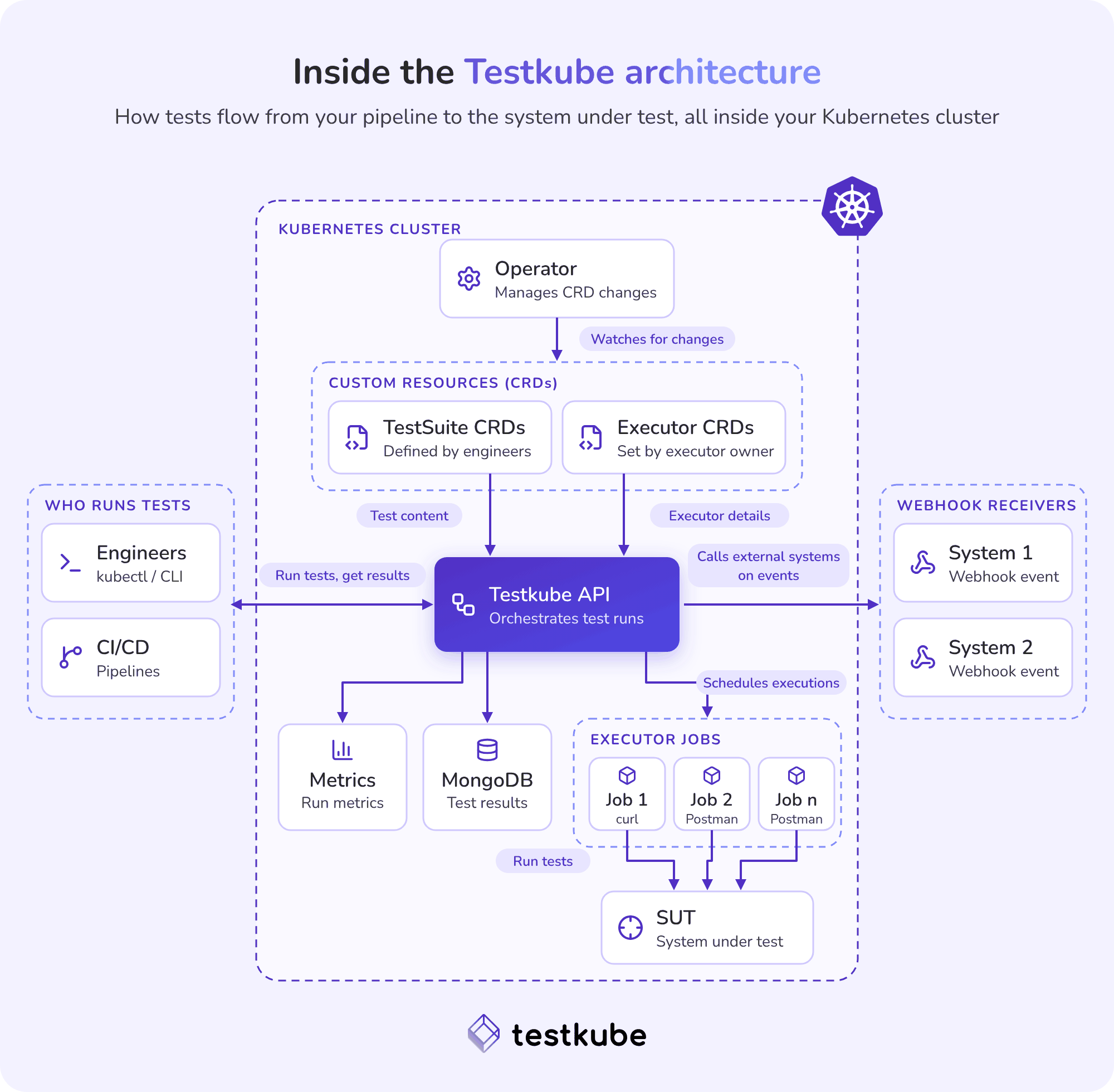
Testkube uses Kubernetes resources to define and execute tests. A TestWorkflow declares test content, a container image, configuration, and an ordered list of steps. Content can come from a Git repository or supplied files.
Each execution runs as a Kubernetes Job. Steps within an execution can share a data volume, with repository content typically available under /data/repo, but they do not share root filesystems. The Runner schedules and executes workflows in the cluster. The Control Plane manages orchestration and provides access to logs, artifacts, results, and Insights.
Parallel steps run in separate Jobs and pods, with their own filesystems. Prepared files and dependencies therefore need to be transferred to workers that require them. Workflow templates and framework-specific examples for Playwright, Cypress, k6, Postman, and JMeter provide reusable building blocks.
Triggering a Workflow from GitHub Actions
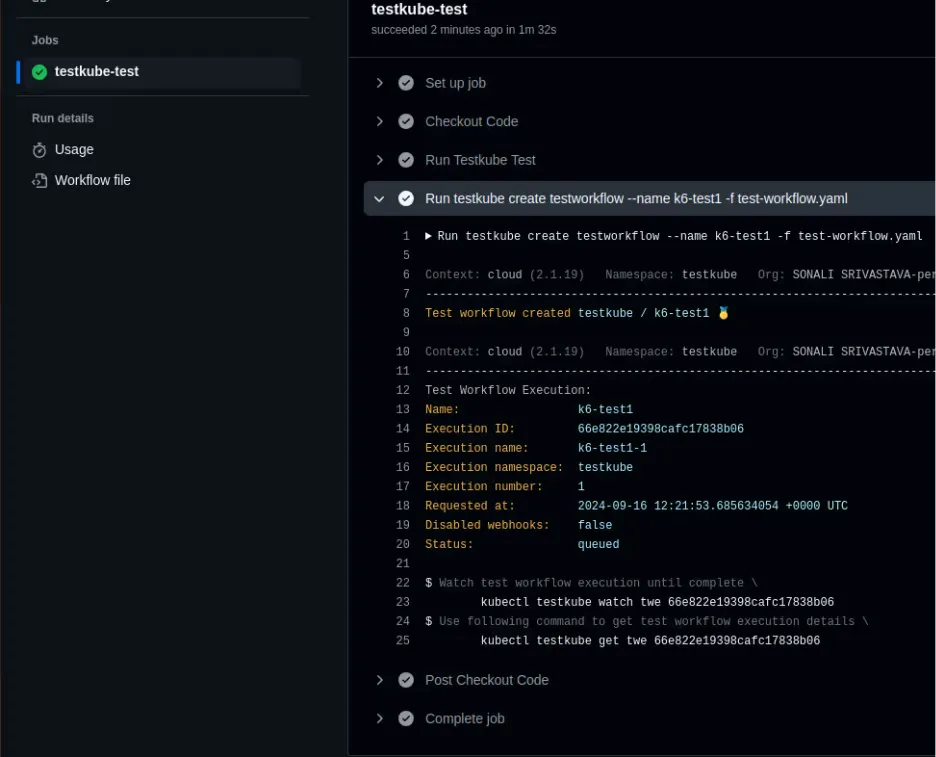
Teams can keep GitHub Actions as their entry point and invoke Testkube through its CLI. The kubeshop/setup-testkube@v1 action sets up the CLI, followed by a command such as testkube run testworkflow NAME -f.
For Testkube Cloud, the organization ID, environment ID, and API token can be configured through GitHub secrets. The Actions runner does not need a kubeconfig. The older kubeshop/testkube-run-action is deprecated. For a full walkthrough, see Automate and Enhance CI/CD Testing with GitHub Actions and Testkube.
The workflow result determines the outcome of the Actions job, allowing failed test executions to gate subsequent release steps. One trade-off remains: the Actions runner stays occupied while Testkube executes the workflow. Wall-clock time may fall, but the job still consumes Actions minutes.
Running Tests Without an Actions Job
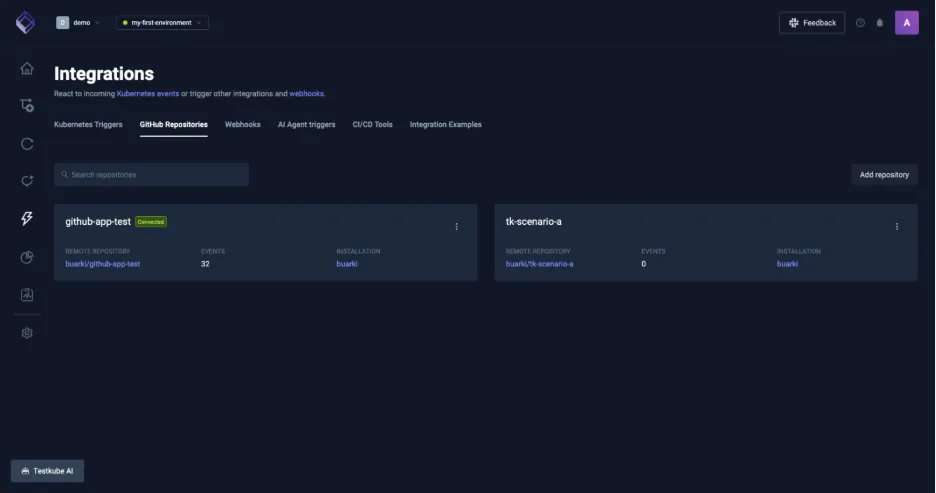
Testkube's GitHub integration can trigger workflows directly from repository events and report results back to GitHub.
Supported events include pull requests being opened, marked ready for review, or synchronized, pushes, tag pushes, releases, and newly created pull-request comments containing @testkube. Existing workflows can be attached to a repository, or Testkube can propose workflows based on detected frameworks such as Playwright, Cypress, k6, Postman, JMeter, Maven, Gradle, Go, and Node.
Results appear as an aggregate check run on pull requests or a commit status for other supported events. Required checks can block merging when a workflow fails and branch protection is configured accordingly. The integration requires a connected Control Plane and Runner (version 2.13.1 or later), plus the Testkube GitHub App. Required permissions include:
- Contents: read
- Metadata: read
- Pull requests: read and write
- Checks: read and write
- Issues: read, for the comment trigger
Unlike CLI-triggered execution, this integration replaces the dedicated Actions test job and frees the Actions runner. Keep Actions for build, lint, and deployment if needed, while moving test execution to Testkube.
What Needs a Control Plane
Some orchestration capabilities depend on your Testkube deployment mode. Features such as parallel steps, matrix execution, sharding, composite Execute workflows, concurrency policies, and rerunning failed tests may be unavailable or have limited support in Standalone Mode.
For example, Testkube's docs on parallel steps note that they are not available on a standalone Runner. Check which capabilities your deployment supports before designing your workflow around them.
How to Cut Test Time in Your CI/CD Pipeline
Do the Setup Once and Order the Steps
To make tests run faster, move shared preparation into a sequential setup step. Clone the repository and install dependencies once, then reuse the prepared content through shared data between steps.
Next, order execution to provide useful feedback sooner. Run inexpensive checks before slow integration or browser suites. With execute orchestration and conditions, expensive suites can run only after cheaper checks pass, or a workflow can branch based on the result.
Step ordering improves time to first failure without changing which tests run. The complete required suite should still execute when earlier checks pass.
Caching Dependencies
Testkube supports a step-level cache block with keys derived from files using hash_files(), optional restoreKeys prefixes, and explicit paths to cache.
For example, an npm workflow can cache the package store using a key derived from package-lock.json:
cache:
  key: 'npm-{{ hash_files("package-lock.json") }}'
  restoreKeys:
    - "npm-"
  paths:
    - /root/.npm/_cacache
Cache what the package manager consumes, not simply the installed tree. In particular, npm ci removes node_modules before installing, so restoring that directory first consumes time. Caching npm's _cacache allows the installation to reuse downloaded packages. Go's download cache and Maven's ~/.m2/repository are other candidates.
There are a few important behaviors to account for when caching dependencies:
- A cache is restored before the step and saved only after the step succeeds.
- Entries are immutable, so change the key when cached content or its structure changes.
- Cache entries expire after one day by default.
- A cache miss or cache failure does not fail the step; installation can continue normally.
- Scope is set to
workflowby default. Setting scope toenvironmentshares cache entries across workflows and therefore expands the trust boundary.
Pull-request cache isolation depends on Testkube knowing that an execution came from a Git trigger with pull-request metadata. Such runs read from their own namespace first and then the shared cache, but write to their own namespace. Runs started through an external CI system or API without that metadata are treated as trusted and can write to the shared namespace. Use exact keys and carefully chosen cache paths when that isolation is not available.
Running Only What You Need
Running every test for every code change can waste time when only a small part of the application has changed. Instead, organize tests into execution tiers using workflow labels and selectors. A smaller suite can run on pull requests to catch common regressions quickly, while the full suite runs before a merge or release. This approach shortens the initial feedback loop without removing the coverage required at release time.
You can also use Git triggers to run tests only when relevant files change. Path filters and pathsIgnore patterns help prevent unrelated changes from triggering unnecessary executions. Git triggers poll the repository at a configurable interval, which defaults to one minute, unlike the webhook-driven GitHub integration. Kubernetes events and GitHub integration events provide additional ways to trigger workflows.
Retries can also be made more efficient by rerunning only the tests that failed, provided the testing framework supports reliable filtering. This requires retrieving the previous execution's report from its artifacts, identifying the failed test cases, and passing the appropriate filter to the runner. There is no universal rerun-failed option because each framework handles test selection differently. For example, Playwright's --last-failed option relies on the previous run's test-results/.last-run.json file.
Selective execution should not silently reduce required coverage. Define which tests must pass at each stage, and ensure the complete required suite still runs before a release.
Running Workflows Side by Side
Suites that do not depend on each other do not need to wait for each other. The execute step can start several workflows together, and parallelism caps how many run at once so the cluster is not overwhelmed. A composite workflow can group independent API, load, and browser suites behind a single trigger, which removes the sequential hand-offs between them and gives one place to see the results.
The gain depends on two things. The suites have to be genuinely independent, with no shared state or data, and the cluster needs enough capacity to run them side by side.
Sharding a Single Suite
Running separate suites concurrently helps when a pipeline contains independent workloads. However, if one large suite accounts for most of the execution time, that suite may remain the bottleneck. Sharding addresses this problem by splitting a suite into smaller groups that can run on multiple workers, a form of test parallelization.
Parallel steps support a configurable worker count, along with matrix and shard parameters. Workers can use index and count expressions to determine which portion of the test suite they should execute.
Some frameworks provide their own sharding mechanisms. Playwright, for example, supports the --shard option. For Cypress, test files can be distributed across shards so that each worker receives a selected subset.
Because parallel workers run in separate pods with independent filesystems, workflows must handle repository content, dependencies, and test artifacts explicitly:
transfercopies prepared repository content or dependencies to worker pods when they need access to files created elsewhere.fetchretrieves reports and artifacts from workers so that results can be collected after execution.paused: truecan synchronize worker starts when coordinated execution is necessary.- Caching must be configured on the parallel step itself so that worker pods can use cached dependencies. This is particularly important because dependency caching in parallel steps applies to the pods where the workers actually execute.
Sharding is also possible for tools that do not provide native support. However, shards are not automatically balanced using historical execution times. One alternative is to create more small shards than the number of workers allowed to run concurrently. As workers finish, they can take on additional shards, allowing shorter groups to finish without waiting for the longest-running group assigned to a worker.
When Parallel Is Not Faster
Parallelism adds worker startup, file transfer, report collection, and execution-tracking overhead. Small suites may finish faster on one adequately sized runner. More pods can also compete for CPU, memory, databases, and staging capacity.
Testkube provides controls to manage concurrency:
spec.concurrency.maxlimits concurrent executions of a workflow.spec.concurrency.groupallows concurrency limits to be shared across workflows.- The documented default Runner concurrency limit is 250 executions.
- The documented default environment queue limit is 1,000 executions.
failFast: trueon a parallel step aborts remaining workers after the first failure.
Queue and per-step timeouts help prevent excessive waiting. Failure information can also help distinguish test failures from infrastructure, configuration, and cancellation issues.
Resource requests and limits should reflect the number of workers and their resource demands. Equal test counts do not guarantee equal shard durations, so one slow shard can still determine the total execution time.
Before increasing concurrency, compare queue duration, CPU and memory usage, and step-level timings against your baseline. This helps establish whether additional workers will reduce execution time or add more overhead.
Conclusion
Reducing CI/CD pipeline time without cutting test coverage starts with understanding where the time goes. Measure the slowest pipeline, identify repeated setup, and establish queue, setup, and execution baselines.
A practical order of operations is to prepare shared setup once, cache dependency stores, order and tier the work, parallelize independent suites, and shard the remaining long-running tests. Measure each change because extra workers and shared-resource contention can erase the expected gains.
Start by pulling step-level duration metrics for your slowest pipeline. Use that baseline to identify the largest source of delay, then optimize the execution path without removing the tests that protect your releases.
Get started with Testkube to run and orchestrate your tests on Kubernetes, reduce pipeline time, and keep test execution and results visible in one place.
Frequently Asked Questions
{{banner-get-started}}
About Testkube
Testkube is the open testing platform for AI-driven engineering teams. It runs tests directly in your Kubernetes clusters, works with any CI/CD system, and supports every testing tool your team uses. By removing CI/CD bottlenecks, Testkube helps teams ship faster with confidence.
Get Started with a trial to see Testkube in action.