Table of Contents
Start your free trial.

Table of Contents
Executive Summary
A testing platform is a privileged machine identity. It runs code that may not be reviewed line by line, holds secrets for real systems, and often sits inside the cluster. Yet many teams review it like ordinary tooling, even though it has production reach. That gap usually shows up during a security questionnaire.
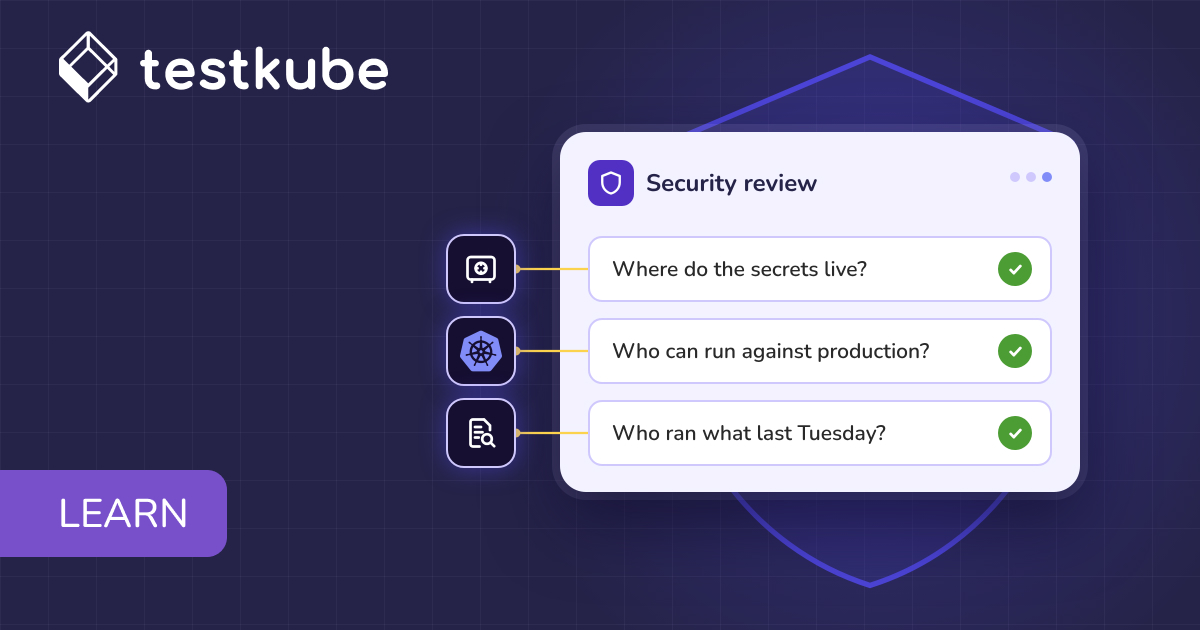
Sooner or later, a security reviewer sends over a long questionnaire for the testing platform. Three of its questions come first: where the secrets live, who can run against production, and who ran what last Tuesday. Nobody on the platform team has a ready answer to all three, and that is when the platform's security posture becomes a project.
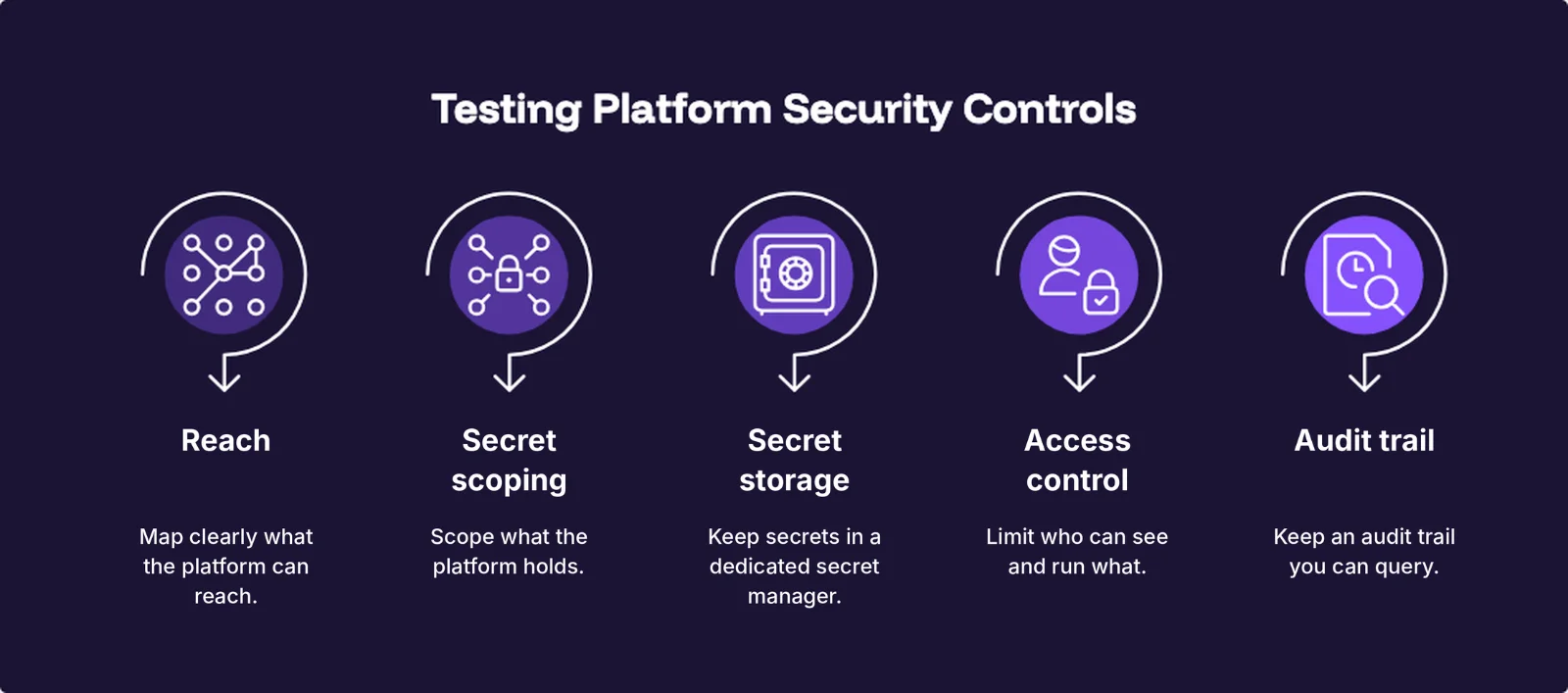
The fix is to treat the testing platform like other privileged automation: map what it can reach, scope the secrets it holds and keep them in a dedicated store, limit who can see and run what, and keep an audit trail of what it does.
This guide covers the main threats, a control for each, how Testkube applies those controls, and a checklist of the questions a security reviewer is likely to ask. It focuses on securing the testing platform itself. To use tests to validate Kubernetes security controls instead, start with our Kubernetes security testing guide.
Why Testing Platforms Are a Security Concern
Testing platforms collect three things attackers look for: secrets, broad access, and a trusted position in the cluster.
Secrets are a requirement for many test types, because a test is only meaningful against real systems: a load test needs an API key, and an integration test needs a database password. Broad access is also a requirement, since the platform has to reach many systems, often across environments. Finally, the platform needs a trusted position in the cluster: it runs there, executes code for many teams, and is expected to be there. None of the three can be removed, so each has to be controlled.
Two things make this worse. Testing platforms are often reviewed less closely than production services, so a weakness in one can go unnoticed for longer. And there are more of them every year: Palo Alto Networks' 2026 Identity Security Landscape report found that machine identities, including AI agents, now outnumber human identities 109 to 1, and expects AI agents to grow by 85% this year. A testing platform is one of those machine identities, often with more reach than anyone wrote down.
Those three requirements produce five threats, one for each control in the next section:
- Unmapped reach. A runner, the component that executes tests inside the cluster, holds more cluster permissions than it needs, makes outbound connections no one listed, and writes logs and artifacts to storage nobody reviewed.
- Secrets in the wrong places. Tests need real secrets, and those end up in workflow YAML, environment variables and logs.
- Secrets that are copied and never rotated. Every copy the platform holds is another one to track and rotate, and a leaked copy stays usable for a long time: Verizon's 2025 Data Breach Investigations Report puts the median time to remediate a secret leaked to a GitHub repository at 94 days.
- Over-broad access. A contractor, or a team that owns one service, can see or run workflows that touch production.
- Invisible activity. Nobody can say who triggered a load test against a production-like system at 2am, or which token did it.
None of these threats is solved by the vendor alone. A vendor can ship good controls on its side, and your team can still end up exposed, because the outcome depends on which secrets you store, which roles you grant and what gets logged in your environment. That is why proof of vendor controls, such as a SOC 2 report, is only part of the picture: it covers the vendor's own controls and says nothing about how the platform is configured in your cluster.
How to Secure a Testing Platform in Your Cluster
Five controls answer the five threats, in the same order. The first four lock things down, and the fifth is how you prove they held.
Map What the Platform Can Reach
The blast radius of a testing platform is whatever it can reach, so the first control is to map out everything it has access to in one place: namespaces, service accounts, Kubernetes permissions, storage and outbound connections. Without that list there is nothing to approve.
A good setup keeps permissions namespaced where possible, runs production and non-production on separate runners, documents its egress destinations, and sends logs and artifacts to storage you chose. It also starts every connection from inside the cluster, so a stateful firewall needs no inbound rules.
Compare two runners that execute the same tests. One has cluster-wide rights even though it serves a single namespace, and the other is scoped to that namespace. If the first runner is compromised, the damage can extend beyond the workload it was meant to test. If the second is compromised, the impact is limited to one namespace.
The same logic applies across environments. Suppose dev and staging share one runner and production has its own. If the dev and staging runner is compromised, it has no secrets for production and no network path to it, because each runner only has access to its own environment.
Scope the Secrets the Platform Holds
The platform holds the secrets for the systems it tests, so who can read them back, and how narrowly each one is scoped, decides how bad a leak gets.
A good setup keeps secrets out of workflow definitions and encrypts them at rest. It gives each environment its own secrets, so a key from staging is useless against production. It narrows scope from the organization down to a single workflow, prefers secrets that expire, and has a plain answer on how and when they rotate. Whoever can run a workflow can use the secrets it references, so execution access needs the same scoping, which the access control section covers.
A staging database password committed to a workflow file stays in Git history permanently. By contrast, a reference to a secret scoped to one environment never puts the value in Git, and the secret can be rotated without editing any workflow.
Keep Secrets in a Dedicated Secret Manager
Every copy of a secret that the platform holds is another copy to protect, audit and rotate. A dedicated secret manager keeps one authoritative copy, with its own policies, rotation and audit.
A good setup first separates secrets from configuration: hostnames and feature flags can stay plain, and anything that grants access is a secret. It then stores a reference to each secret, so the secret manager stays the source of truth.
There are two ways to get a secret from the secret manager into a test. Syncing copies it into a Kubernetes Secret, which is what the External Secrets Operator and the Vault Secrets Operator do. Mounting delivers it to the pod at run time, which is what the Vault sidecar injector and the Secrets Store CSI driver do. Syncing is simpler to set up, but it puts the value in etcd, which Kubernetes does not encrypt by default. Mounting keeps it out of etcd at the cost of more moving parts.
With mounting, a test workflow that needs a database password gets it from Vault at run time, so rotating it in Vault needs no workflow change.
Limit Who Can See and Run What
A testing platform often spans multiple environments, so a single broad access role could reach production. A contractor, or a team that owns one service, should only see and run workflows that touch the systems they are responsible for.
A good setup assigns roles per environment and lets you group workflows that span environments, so a team can be granted a whole group at once. It takes identity from your IdP, so offboarding is automatic, and it states where enforcement lives, because anything outside that boundary needs its own controls.
Picture a frontend team whose workflows exist in dev, staging and production. The team should run them in dev and staging, but not in production. If its group grant covers the frontend workflows everywhere while its production environment grant does not, the two grants conflict. The stricter one should win, which keeps the team out of production.
Role checks inside the platform do not cover someone with direct kubectl access to the cluster, so the cluster needs its own Kubernetes role-based access control (RBAC) as well. If you manage workflow definitions through GitOps, syncing them into the cluster from a Git repository, you can line the two up: when each team's GitOps runner watches only that team's namespace, Kubernetes RBAC on that namespace decides who can change the team's workflow definitions.
Keep an Audit Trail You Can Query
When an incident occurs, the audit trail has to answer the last of the three opening questions: who ran what, and when. If it cannot, incident response becomes guesswork.
A good audit trail answers who, what and when, and lets you filter and export the answers to your own tooling. It keeps events as long as your policy requires, and it attributes machine and AI-tool activity to an identity rather than an anonymous token.
Take the load test from the threat list that hit a production-like system at 2am. A good audit trail answers it with one filter on event type and time window, which returns the person or the token that triggered it.
A platform's audit trail only records what passes through the platform. Changes made directly with kubectl appear in the Kubernetes audit log instead, so the two together are the full record.
How Testkube Applies the Five Controls
The five controls apply to any testing platform. Testkube is a test orchestration platform with two parts. The control plane hosts the dashboard, schedules workflows and stores results; Testkube runs it on Cloud, or you run it on-prem. Runners execute the workflows inside your cluster. Each runner belongs to a Testkube Environment, the workspace that holds a set of workflows, runners and access grants. Because runners are deployed in your own cluster, each control maps to something you configure. Runners can be limited to a namespace and tied to an environment. Credentials are scoped and referenced by name, with values held encrypted in Testkube, in Vault (on-prem Enterprise), or in Kubernetes Secrets in your cluster. Roles, resource groups, SSO and SCIM decide who can see and run what, and the audit log records who did it.
The parts below follow the same five controls, each with a short example and a link to the docs for the full setup.
Reach
Testkube runners execute in the cluster or namespace where they are deployed and connect to the control plane to run workflows, listen for events and sync resources. Results, logs and artifacts reach storage through presigned URLs, short-lived upload links signed by the control plane, so only the control plane holds the storage keys. For the full setup, see Architecture and Runners.
By default, a runner that listens for Kubernetes events watches the whole cluster. Multi-namespace mode limits it to the namespaces you list, with a Role in each instead of a ClusterRole, which gives you the namespaced runner from the two-runner comparison under Map What the Platform Can Reach. Environments add the extra boundary: run production and non-production on separate runners, even in separate clusters, and tie each runner to its own Testkube Environment.
With the Cloud control plane, a runner needs two egress destinations, both on port 443: agent.testkube.io for its connection to the control plane, and storage.googleapis.com for logs and artifacts. That means on Cloud, logs and artifacts are stored outside your environment, in Cloud Storage on GCP. To keep them on storage you chose, run the control plane on-prem, where both destinations are hosts you run. On-prem installs can also be air-gapped for clusters with no route to the internet.
Secret Scoping
Testkube stores secrets as credentials of three types: Secret (encrypted and hidden in the UI), Variable (plaintext configuration) and Vault (on-prem Enterprise only, covered under Secret Storage).
Credentials can be scoped to the organization, an environment, a resource group or one workflow. When the same name is defined at more than one scope, the most specific wins.
Rotation, the plain answer the general section asked for, works like this. A Secret credential rotates by updating its value once, and every workflow that references it by name picks up the new value. Runner keys, the secret each runner uses to authenticate to the control plane, rotate with a grace period (24 hours by default, 7 days at most), and API tokens can carry an expiration date. On-prem, the master password protects encrypted credentials and cannot be recovered, so rotate it deliberately.
Workflows pick up a credential by name, so the value never appears in the YAML:
spec:
  container:
    env:
      - name: API_KEY
        value: '{{credential("my-api-key")}}'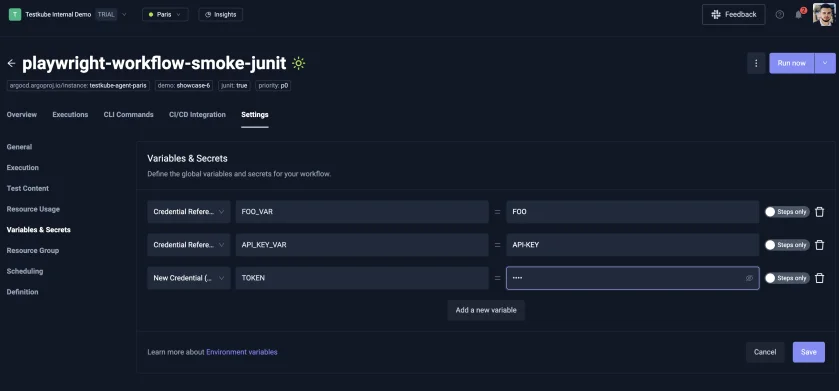
Secret Storage
Testkube works with both methods described under Keep Secrets in a Dedicated Secret Manager. Workflows can read Kubernetes Secrets that the External Secrets Operator or the Vault Secrets Operator has synced into the cluster, and a workflow template can use the Vault sidecar injector to mount a secret at run time. On-prem Enterprise installs also have the Vault credential type, which writes the value to Vault KV v2 and keeps only the path reference. The control plane reads the value at execution time, and runners never talk to Vault directly. For production, authenticate with Vault's Kubernetes auth method, configured in the Helm chart:
testkube-cloud-api:
  credentials:
    backends:
      vault:
        enabled: true
        addr: "http://vault.vault.svc.cluster.local:8200"
        mountPath: "secret"
        pathPrefix: "testkube"
        authMethod: "kubernetes"
role: "testkube-cp"Access Control
Testkube has Owner and Admin roles with access to everything, and Member access set per environment (Read, Run, Write or Admin). Resource groups are Testkube's group grant: they gather workflows across environments. Where a resource group role and an environment role conflict, the less permissive applies, so a resource group cannot widen access to a critical environment. Within either layer, a member who gets roles from several teams receives the most permissive one, so team membership deserves the same review as the grants themselves.
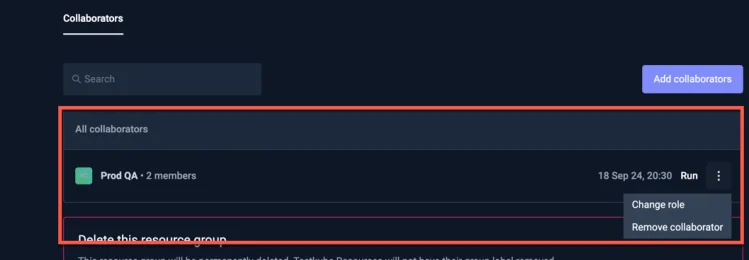
With SSO and SCIM provisioning from your identity provider, access is removed when a user leaves the IdP, and SCIM can assign environment roles directly. This payload gives a user Admin in development, Write in staging and Read in production:
{
  "roles": [
    "urn:testkube:role:environment:development:admin",
    "urn:testkube:role:environment:staging:write",
    "urn:testkube:role:environment:production:read"
  ]
}
Testkube resources live in the control plane, so kubectl only reaches them when a GitOps runner syncs them from the cluster. Teams that don't need GitOps can manage resources entirely in the control plane and keep kubectl out. Teams that use it can line the two layers up: a GitOps runner watches only the namespace it is deployed in, so one runner per team namespace lets Kubernetes RBAC on that namespace govern who changes the team's workflow definitions. With GitOps Resource Ownership turned on, other runners cannot overwrite what a runner has claimed.
Audit Trail
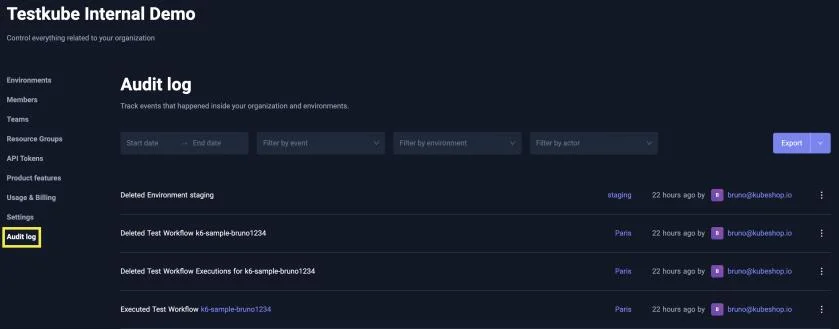
Owners and Admins can open the audit log, filter by date range, event type, environment and actor, and export to CSV or JSON when a reviewer wants evidence. The 2am load test from the threat list is one filter: event type Test Workflow Executed and a date range, with the actor column showing the person or token that ran it. On-prem installs can configure retention through Helm. Testkube's MCP Server, which lets AI tools act in Testkube, writes its operations to the same log, attributed to the user (via OAuth) or the API token, which gives the AI-tool attribution described under Keep an Audit Trail You Can Query. The docs do not yet publish a complete list of recorded events, so a reviewer who needs one should request a trial export.
Security Review Checklist for Your Testing Platform
A security review of a testing platform usually comes down to about a dozen questions. The answer matters as much as the question. Use the checklist below with a vendor or internal platform team, and treat weak answers as decision signals: block approval, attach a condition, or require a compensating control.
| Control | Question | Good answer | If weaker |
|---|---|---|---|
| Reach | What permissions does the platform need in my cluster, and are they namespaced? | A documented, minimal list with a namespaced option. | Treat unexplained cluster-wide rights as a condition at minimum. |
| Reach | Which connections are inbound and which are outbound? | Egress only, with hosts and ports listed so firewall and proxy requests can be raised. | Inbound access needs a compensating control such as source restrictions. |
| Reach | Can it run on-prem or air-gapped, with my storage? | Yes, with a documented offline path. Some regulated environments require one. | A no blocks those environments and is acceptable elsewhere. |
| Secret scoping | Where are secrets stored, and who can read them back? | Encrypted storage, write-only values in the UI and named owners. | A vague answer should block approval. |
| Secret storage | Can I keep secrets in my own secret manager? | Reference-only support with no copy held, which lowers the data classification of what the platform holds. | If a copy is held, classify the platform as holding secrets and require the controls above. |
| Access control | Is access enforced in one place or two? | The answer names where enforcement lives and what sits outside it. | If the answer is "RBAC covers everything", make cluster-side RBAC a condition. |
| Access control | How are people and tokens provisioned and removed? | SSO, SCIM and expiring, scoped tokens, so offboarding does not depend on a manual step. | Manual removal needs a compensating control such as periodic access reviews. |
| Access control | How is access by AI tools and agents governed? | The same RBAC, with attribution and audit. | If agent access sits outside RBAC, leave agents out of scope at launch. |
| Audit trail | What does the audit log capture, who can read it, and how long is it kept? | A documented event list, export and configurable retention, enough for an auditor to sample evidence. | Without an event list, require a trial export before approval. |
| Beyond the five controls | What leaves the cluster? | A list of results, logs, metadata and artifacts with destination and format, so you can tell whether a data processing review is needed. | Without that list, approval waits. |
| Beyond the five controls | Are secrets masked in logs and artifacts? | Masking by default, with a stated limit on what masking cannot catch. | No masking means shorter retention and tighter log access. |
| Beyond the five controls | What attestations exist, and what do they cover? | The report type, period, scope and the plan it applies to. | A badge with no report behind it proves nothing. |
The last three questions sit outside the five controls, but they come up in nearly every review.
Conclusion
The next security review will start with the same three questions: where the secrets live, who can run against production, and who ran what last Tuesday. Five controls answer all three, and most of the checklist with them: a map of what the platform can reach, secrets that are scoped and kept in a dedicated secret manager, access limited per environment, and an audit trail you can query.
For the full setup behind each control, see the Testkube documentation, or contact the team to walk through it against your own security review.
Frequently Asked Questions
A testing platform holds secrets for real systems, needs broad access across environments, and runs with a trusted position inside the cluster. Testing platforms are also often reviewed less closely than production services, so a weakness can go unnoticed for longer.
Map what the platform can reach, scope the secrets it holds, keep those secrets in a dedicated secret manager, limit who can see and run what, and keep an audit trail you can query. The first four lock things down, and the audit trail proves they held.
No. A SOC 2 report covers the vendor's own controls. It says nothing about how the platform is configured in your cluster, such as which secrets you store, which roles you grant and what gets logged.
Syncing, with the External Secrets Operator or the Vault Secrets Operator, is simpler to set up but puts the value in etcd, which Kubernetes does not encrypt by default. Mounting, with the Vault sidecar injector or the Secrets Store CSI driver, keeps the value out of etcd at the cost of more moving parts.
Yes. Workflows can read Kubernetes Secrets synced from Vault, and a workflow template can use the Vault sidecar injector to mount a secret at run time. On-prem Enterprise installs also have a Vault credential type that keeps only the path reference in Testkube; the control plane reads the value at execution time, and runners never talk to Vault directly.
Owners and Admins can filter the audit log by date range, event type, environment and actor, and export it to CSV or JSON. Operations from the Testkube MCP Server are attributed to the user or API token that made them. The docs do not yet publish a complete list of recorded events, so request a trial export if your review needs one.
{{banner-get-started}}
About Testkube
Testkube is the open testing platform for AI-driven engineering teams. It runs tests directly in your Kubernetes clusters, works with any CI/CD system, and supports every testing tool your team uses. By removing CI/CD bottlenecks, Testkube helps teams ship faster with confidence.
Get Started with a trial to see Testkube in action.