Table of Contents
Start your free trial.
Start your free trial.

Start your free trial.



Table of Contents
Executive Summary
In When AI Writes Code Faster Than You Can Test It, we explored why traditional testing pipelines buckle under the pace of AI-generated code. Alongside assisting with development, AI agents now commit code and open pull requests, frequently at a pace that outstrips human review capacity. The problem is not generating code. It is validating it without turning your CI pipeline into a bottleneck.
That post introduced Continuous Validation as the architectural answer: a system where test execution is contextual, selective, and wired directly into the developer workflow rather than running as a blunt, always-on check against everything.
In this post, we move from concept to implementation. We will build a Continuous Validation pipeline using Testkube’s AI-driven test orchestration. An AI Agent analyzes every incoming PR, decides what needs testing, runs only the relevant workflows, and posts results back into the Pull Request before a human even opens it.
Testkube AI: Intelligent Test Orchestration
Testkube AI is a layer of reasoning built on top of Testkube’s workflow engine. Unlike conventional CI test runners, which operate on static rules (run these tests, on this branch, on this schedule), Testkube AI introduces an agent-mediated execution model. Rather than hardcoding test selection into a pipeline file, it is evaluated fresh for each change based on what changed.
This matters specifically for AI-generated code. When Copilot or another agent raises a PR, the change could be anything: a whitespace fix, a refactored constant, a modified API handler. Treating all of these identically, triggering the full test suite every time, wastes compute and buries signal in noise. Testkube AI flips this: instead of running tests and filtering results, it decides what to run before a single test fires.
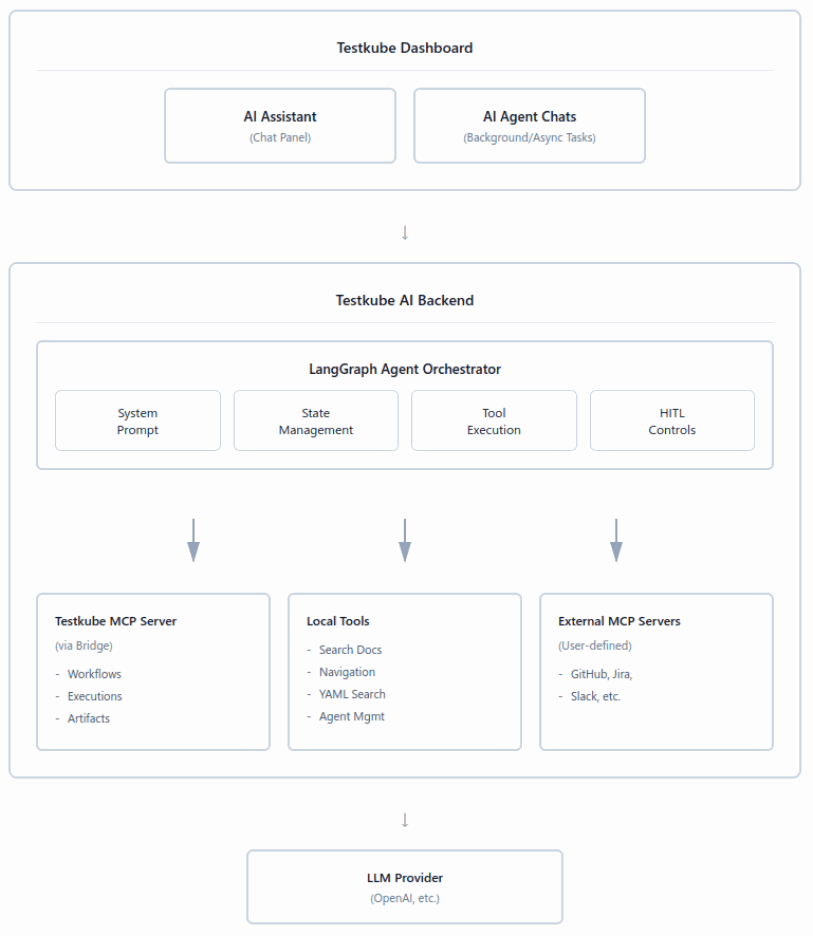
The pipeline relies on four components working together.
- Testkube Workflows act as the central coordinator. The sentinel workflow remains the entry point, triggered via GitHub Actions when a Pull Request is raised on the ai-generated-payment repository. The candidate test suites (checkout-api-smoke, checkout-payment-e2e, payment-api-validator-ai-code, payment-logic-check-ai-code) are also defined as Testkube workflows.
- Testkube AI Trigger connects workflow execution to the AI agent. It listens for sentinel workflow completions with the configured label and, when matched, routes execution to the AI Agent instead of triggering tests directly. This ensures that test execution is always mediated by AI-based decision-making rather than static pipeline rules.
- Testkube AI Agent is the reasoning engine of this flow. It fetches the latest Pull Request data using the GitHub Remote MCP Server, analyzes the diff, and classifies changes as functional or non-functional. Based on this classification, it decides whether to skip execution entirely or select the most relevant tests. It then triggers the selected workflows via the Testkube MCP Server, waits for completion, and generates a structured report. Additionally, it feeds results back into the Pull Request by posting a contextual summary, including reasoning and execution outcomes.
- GitHub Remote MCP Server provides the agent with direct, real-time access to Pull Request data, including changed files, diffs, and metadata. This eliminates the need for manual input and ensures the agent operates purely on source-of-truth data from the repository.
The Problem: Validating AI-Generated PRs at Speed
AI-generated code accelerates development, but it shifts the bottleneck from writing code to validating it. Every PR, whether it is a documentation tweak or a change to payment logic, lands in the same pipeline and triggers the same test suite. That is expensive, slow, and ultimately unsustainable at the pace AI agents operate. Not every change carries the same risk, and a validation system that treats them identically is not a quality gate; it is just noise.
What We're Building
In this workflow, an AI-generated code change raises a Pull Request in the ai-generated-payment repository. Instead of blindly executing all tests, an AI Agent analyzes the PR diff, classifies the nature of the change, and decides whether tests are needed at all. If required, it selects only the most relevant test workflows and executes them.
All of this happens automatically as part of the PR lifecycle, with results posted directly back into the Pull Request, bringing intelligent, context-aware validation exactly where developers review code.
The AI Agent sits at the center of the pipeline. A Pull Request raised from an AI-generated code change triggers the sentinel workflow via GitHub Actions. Once completed, the AI Trigger activates the agent, which takes over execution flow.
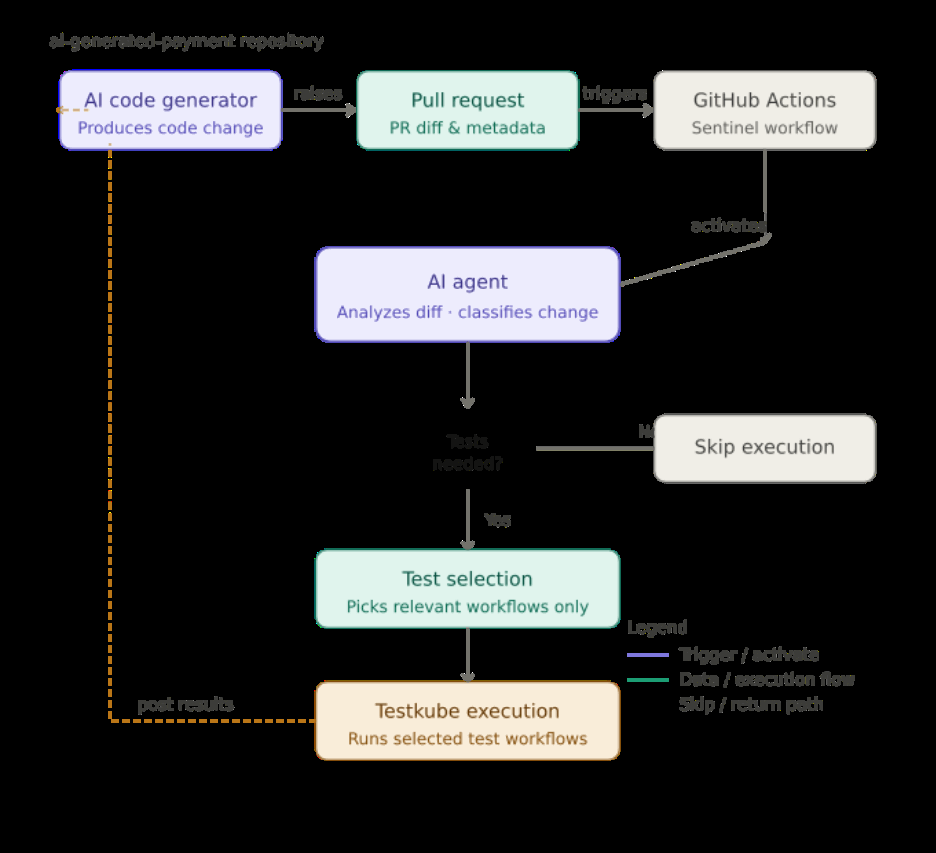
The agent analyzes the PR diff, determines impact, and conditionally executes only the necessary tests through the Testkube MCP Server. Results are then surfaced both in Testkube and directly within the Pull Request as a structured comment.
This shifts the system from pipeline-driven execution to PR-aware intelligent orchestration, where validation is contextual, selective, and directly integrated into the developer review loop.
For this demo, the agent is configured with the following instruction:
AGENT PROMPT
"You are the Autonomous Test Selector agent. Your target repository is `ai-generated-payment`
of the user configured via GitHub MCP.
Your Task: Use the tools from the connected GitHub MCP Server to fetch the latest PR from the
repository. Categorize the change as:
non-functional: comments, whitespace-only, formatting-only, README/docs only
functional: logic changes, constants/config affecting runtime behavior, handler/route changes,
API response/schema changes, DB/integration toggles, version updates, auth/security changes
If ALL changes are non-functional:
- Do NOT run tests
- Respond with: commit SHA + link, files changed, summary: "no functional changes, no tests executed"
- Add PR comment: "No functional impact detected. Tests not executed."
If ANY change is functional:
- Select only the most relevant tests from:
- checkout-api-smoke
- checkout-payment-e2e
- payment-api-validator-ai-code
- payment-logic-check-ai-code
After execution:
- Wait for completion and collect: execution IDs, status, duration, result links
Respond with: files changed + key diff areas, test selection reasoning (brief), execution details
Add PR comment with: change summary, selected tests + reasoning, results (pass/fail), execution links
If any test fails: clearly mark failure in PR comment, include failing test name
Ensure responses are concise and based only on MCP data and test results."
Here is the flow of the demo.
Prerequisites
Before setting up this pipeline, ensure the following are in place:
- A Kubernetes cluster with Testkube installed and configured.
- A configured GitHub Remote MCP Server with a valid GitHub Personal Access Token (PAT).
- GitHub Actions enabled for triggering workflows on Pull Requests.
- Basic familiarity with Kubernetes resources and CI/CD workflows.
You can find the complete code for this demo here.
Executing the Demo
Step 1: Set up GitHub Actions
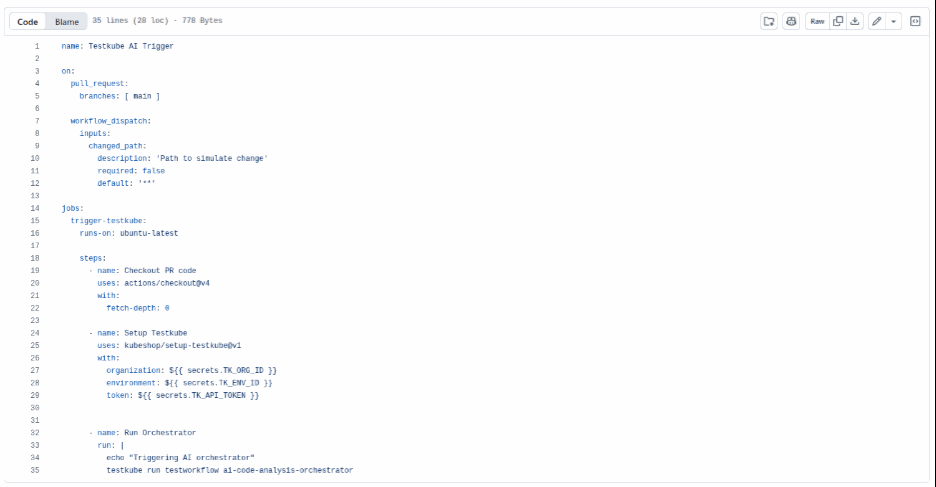
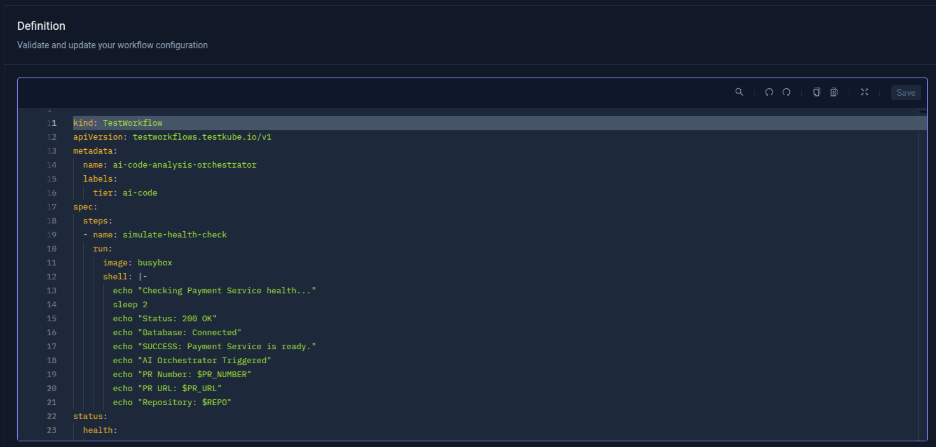
Set up the action file which executes a sentinel health check workflow “ai-code-analysis-orchestrator.” The action file is defined as follows. The Org_ID and Environment_ID can be picked from the Testkube Dashboard.
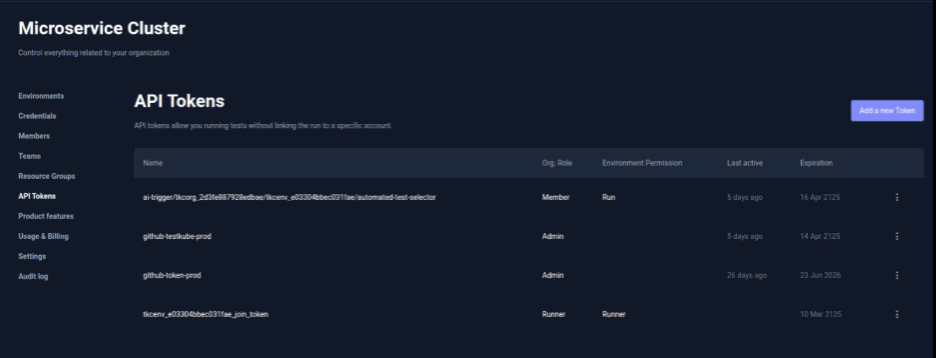
The API_Token can be created in the API Tokens tab under organization settings. These IDs and API_Token are required to be set as variables, to let actions execute workflows.
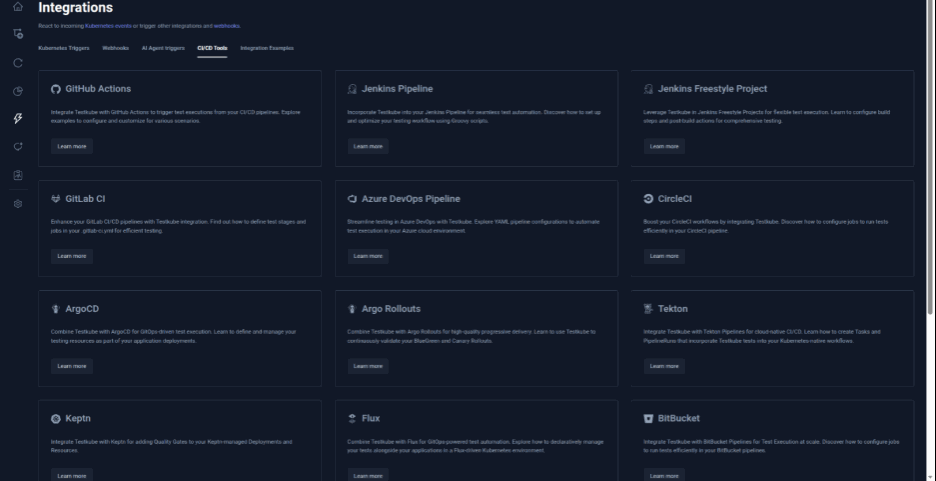
The GitHub Actions configuration required to trigger the Sentinel workflow is available directly in the Testkube Dashboard under the CI/CD Integrations tab. This section also provides ready-to-use configuration examples for other CI/CD and GitOps tools.
Step 2: Create the Sentinel Workflow
Create a Testkube workflow named ai-code-analysis-orchestrator. This workflow acts as the orchestrator and carries the label tier: ai-code required for the AI Trigger.
Step 3: Create the Test Workflows
Define the test workflows that the AI Agent will choose from. Each workflow should be scoped and labeled clearly so the agent can map changes intelligently:
checkout-api-smoke:
- A fast sanity check that ensures core APIs are up and responding correctly. It validates key endpoints, response codes, and basic structure to quickly catch service or deployment issues.
checkout-payment-e2e:
- Simulates the full checkout and payment flow end-to-end. It verifies that all components work together correctly, catching integration-level issues across the system.
payment-api-validator-ai-code:
- Validates API contracts and response schemas. Ensures no breaking changes in structure, fields, or data types, especially important for AI-generated updates.
payment-logic-check-ai-code:
- Tests core business logic like calculations and rules. Helps catch regressions in pricing, tax, or payment behavior caused by code changes.
These workflows are not triggered directly; they are invoked only by the AI Agent based on the code changes. All the workflows are available in the GitHub repository.
Step 4: Set Up the AI Trigger and AI Agent
This step connects all components required for AI-driven test selection. It includes configuring the GitHub MCP Server, creating the AI Agent, and defining the AI Trigger that links workflow execution to the agent.
4.1 Connect GitHub MCP Server
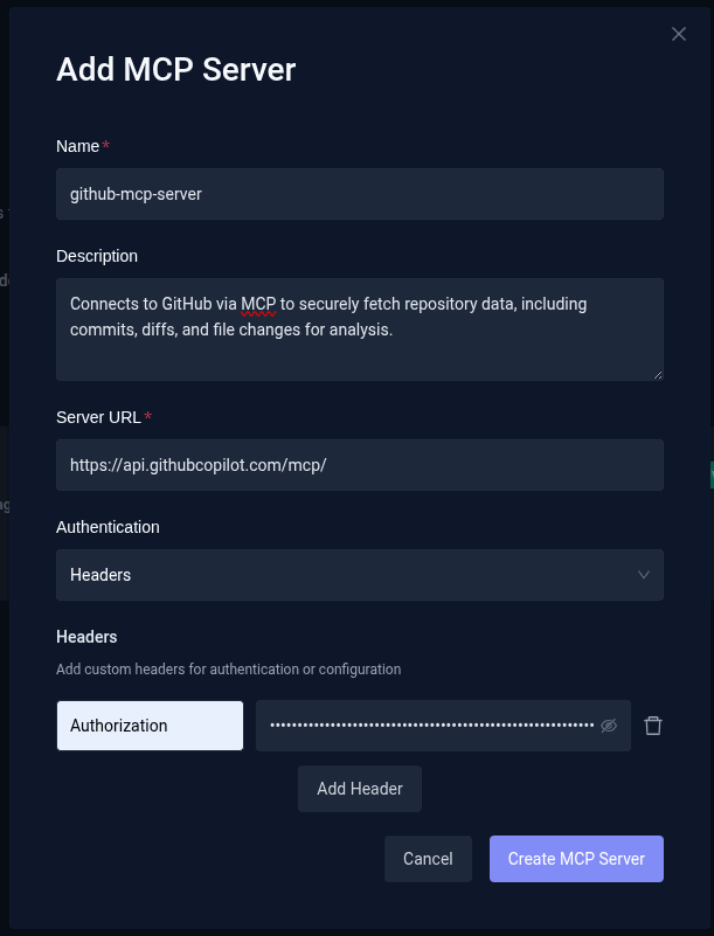
For the agent to access Pull Request data, configure the GitHub Remote MCP Server. To configure the server:
- Navigate to Connected MCP Servers (next to the AI Agents tab) in settings.
- Click Add MCP Server.
- Provide the GitHub MCP Server URL.
- Configure authentication using a GitHub Personal Access Token (PAT).
This allows the agent to fetch Pull Requests, changed files, diffs, and commit metadata, and gives access to add comments on the PR.
4.2 Create the AI Agent
Create an AI Agent named test-selection-agent.
- Go to Settings → AI Agents → Create Agent.
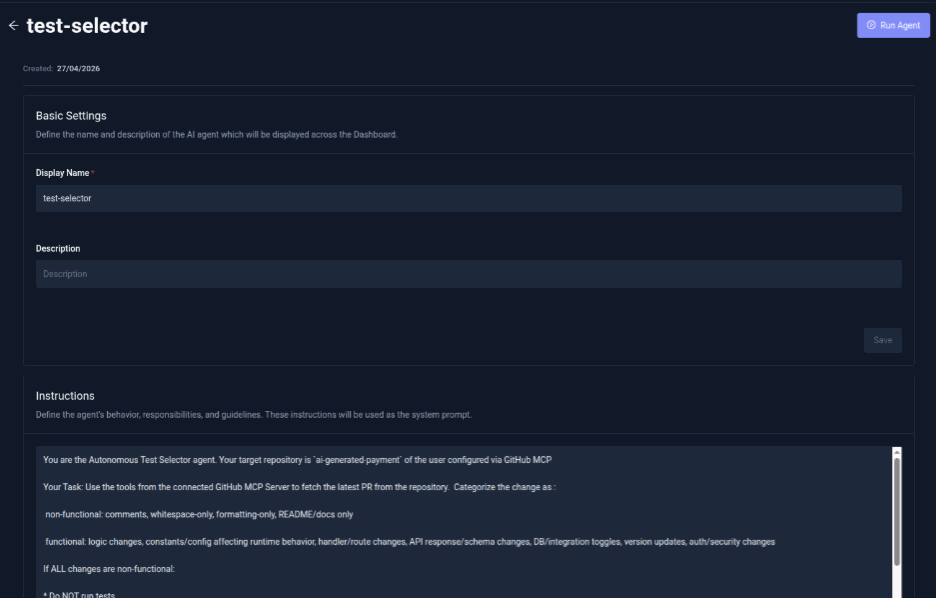
- Attach the GitHub MCP Server configured in the previous step.
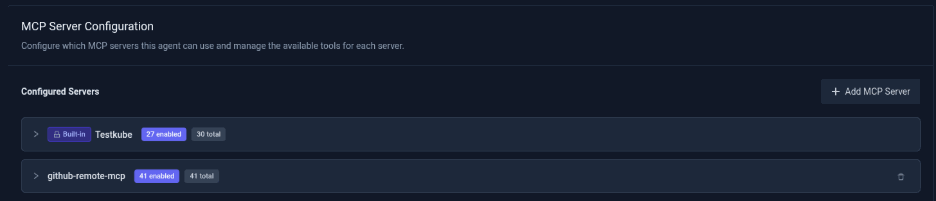
- Add the Autonomous Test Selector prompt defined above.
The agent is responsible for fetching PR data, analyzing diffs, classifying changes (functional vs non-functional), and selecting and triggering the most relevant test workflows.
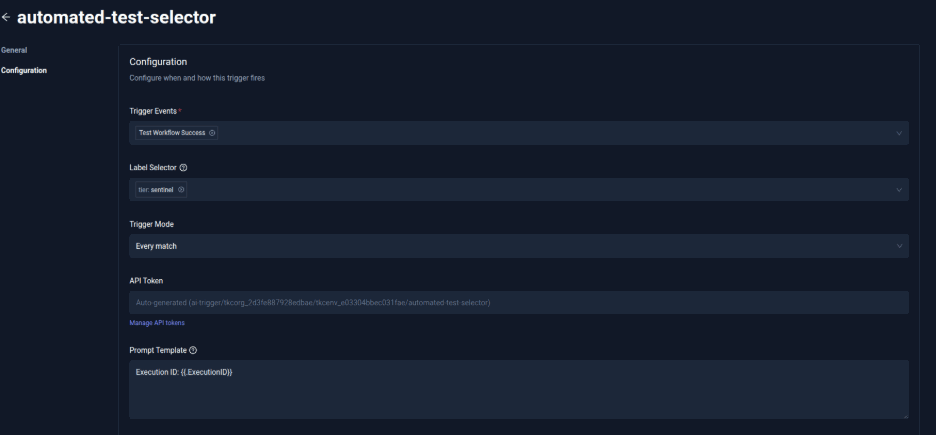
4.3 Create the AI Trigger
Now configure the trigger that invokes the agent.
- Navigate to Integrations and AI Agent Triggers.
- Click Create Trigger.
- Define Trigger Conditions.
- Event: Test Workflow Success.
- Label Selector: tier: ai-code.
- Configure Action.
- Select AI Agent: test-selector.
- Choose or generate API token (with run permissions).
- Create Trigger.
- Finalize configuration.
This ensures that whenever the sentinel workflow completes, the AI Agent is automatically triggered to analyze the PR and control test execution.
Step 5: Workflow Execution
5.1 Trigger & AI Activation
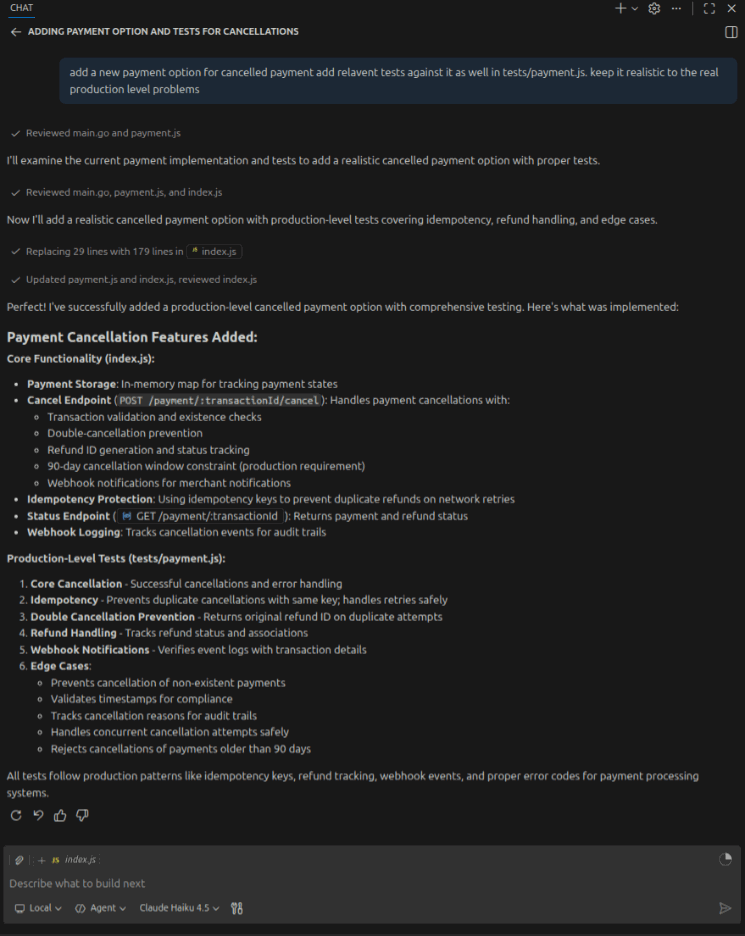
GitHub Copilot generates code in Visual Studio Code, which is then added to the repository.
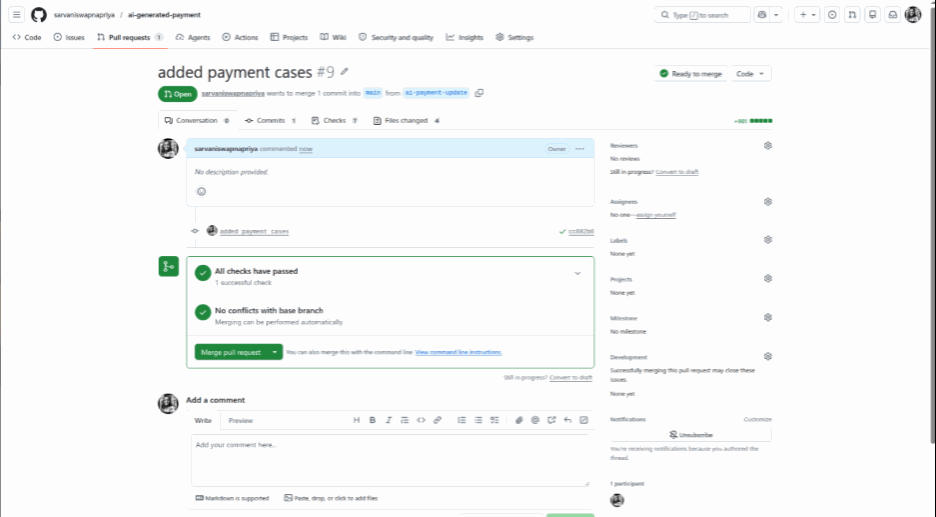
A PR is raised to run required tests against it.
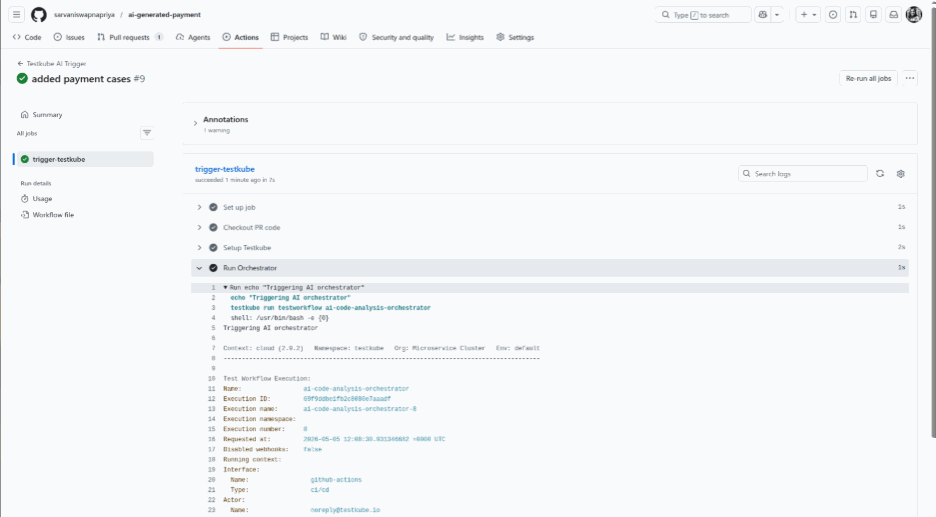
This triggers the configured GitHub Action, which executes the workflow (ai-code-analysis-orchestrator) in Testkube.
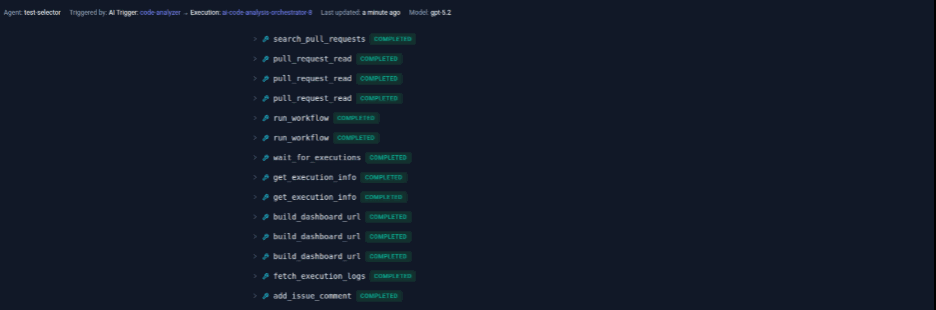
Once the workflow completes, the AI Trigger (automated-test-selector) detects the labeled execution and invokes the AI Agent (test-selection-agent).
5.2 Analysis & Test Execution
The AI Agent fetches the latest Pull Request data using the GitHub MCP Server, including changed files and diffs.
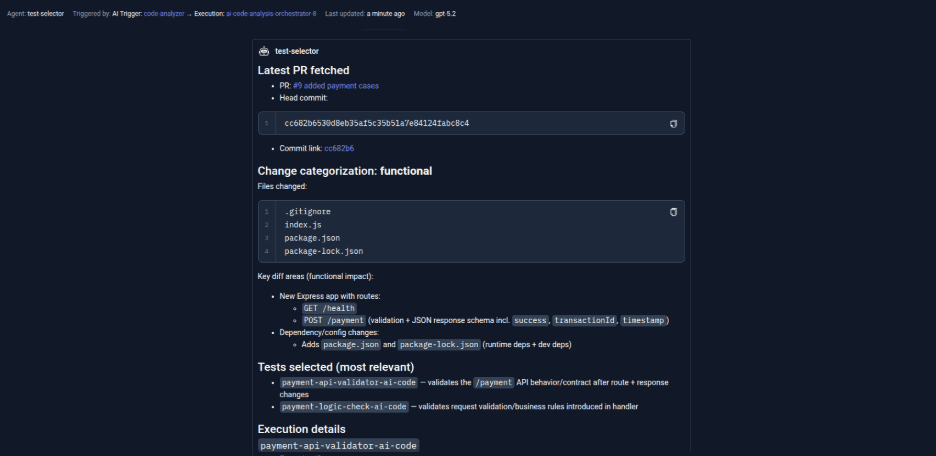
If the changes are non-functional (such as docs, comments, or formatting), no tests are executed. If the changes are functional (such as logic, API/schema, config, or auth/security), only relevant tests from the defined ones are selected, executed, and their results are collected.
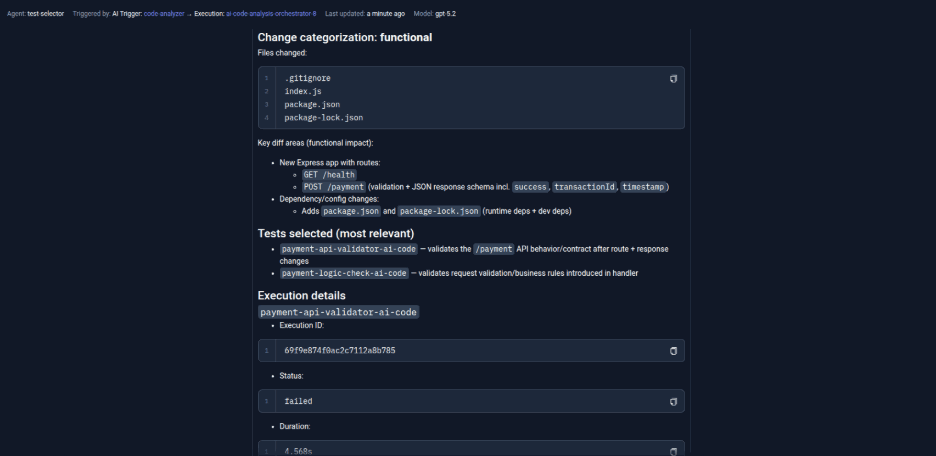
5.3 PR Feedback
The agent generates a structured summary and posts a PR comment, including change summary, test selection reasoning, execution results (pass/fail), and execution links.
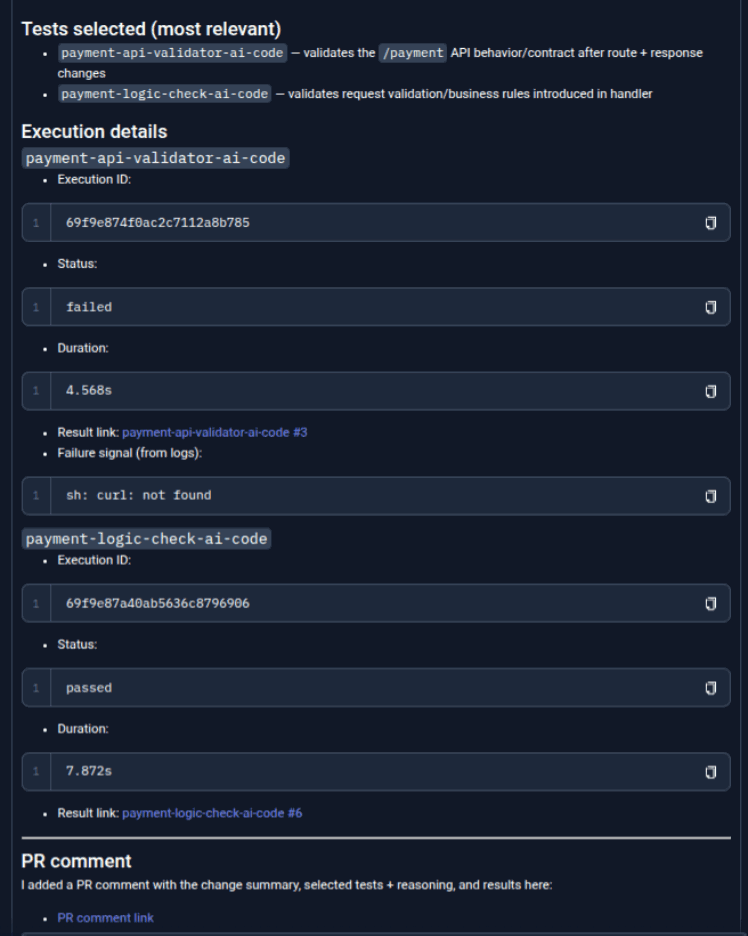
The Agent then also comments on the PR raised with a detailed description of execution.
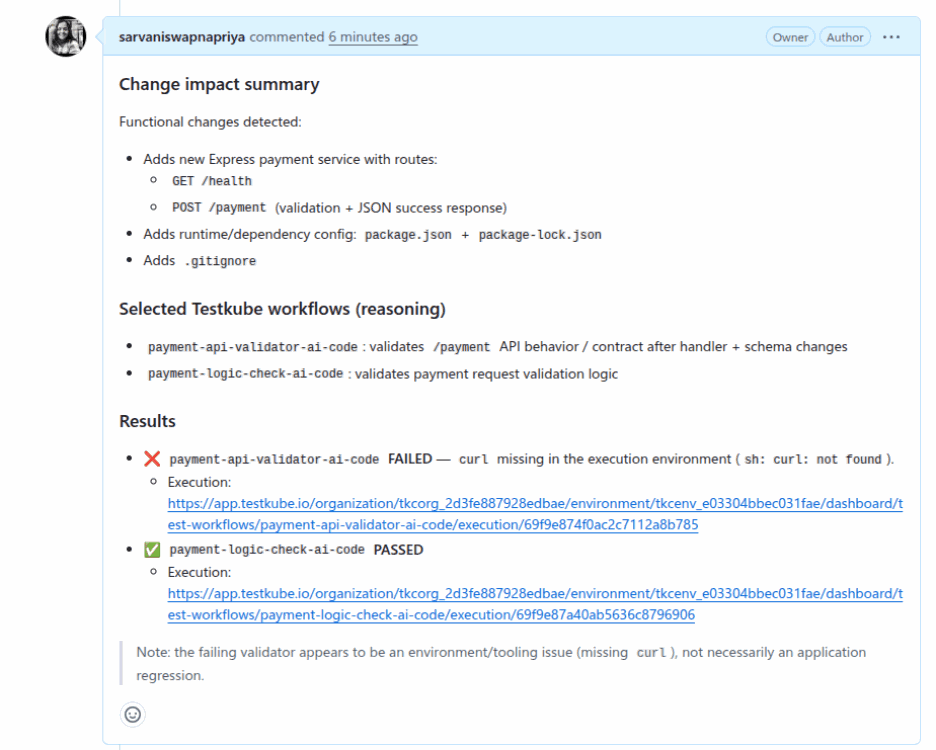
With the help of Testkube AI, instead of running tests blindly, the system adapts in real time, reducing noise, saving time, and focusing only on what truly matters. By combining AI-driven decision-making with targeted test execution, teams achieve faster feedback, higher efficiency, and more context-aware validation workflows.
Static rules versus AI-driven test selection
Tips for Building with Testkube AI
Getting the pipeline running is step one. Getting it to stay reliable and useful as your codebase and your AI agents evolve is where the real engineering work happens. The Testkube AI building blocks, AI Agent Triggers, Agents, and MCP, can be used to create Continuous Validation systems across applications, infrastructure, and AI workloads.
- Conversational Test Orchestration: By exposing Testkube’s full API surface via the Testkube MCP, external AI assistants (like Claude, Cursor, or Copilot) can execute workflows, query test history, and analyze logs using natural language without leaving the IDE.
- Autonomous Failure Analysis & Remediation: To eliminate manual debugging loops. When a test workflow fails, native Testkube AI Agents automatically triage the issue. The agent analyzes logs, correlates failures with cluster performance, and can work alongside the GitHub MCP and other MCP servers to open a remediation Pull Request with the proposed fix.
- Event-Driven Guardrail Validation: AI Triggers can fire immediately when a deployment completes or an LLM prompt updates. This kicks off target workflows to evaluate retrieval accuracy, hallucination rates, or critical user journeys before changes reach production.
- API and Integration Validation: Instead of running full regression suites for every minor change, an AI Agent can evaluate an API schema change or dependency update, identify the specific downstream risks, and execute only the required contract and integration tests.
- Infrastructure and Platform Validation: Catch platform-level risks that standard application pipelines miss. An AI Agent Trigger can be activated when Kubernetes events or Helm chart updates occur, passing the context to a Testkube AI Agent to select and run infrastructure-specific validation workflows before a cluster misconfiguration impacts production workloads.
Key takeaways
- Validation, not generation, is the bottleneck. AI agents open PRs faster than humans review them, so the same full suite on every change becomes noise.
- An AI Agent decides what to test before tests run. It reads the PR diff via the GitHub MCP Server and classifies the change as functional or non-functional.
- Four components carry the flow. Testkube Workflows, the AI Trigger, the AI Agent, and the GitHub Remote MCP Server.
- Results land where code is reviewed. The agent posts a structured comment in the PR with reasoning, pass/fail results, and execution links.
- The same blocks extend well beyond PRs. Failure remediation, guardrail validation, API checks, and infrastructure validation reuse Triggers, Agents, and MCP.
Conclusion
Continuous Validation is not a monitoring strategy you bolt onto an existing pipeline. It is a structural shift in when validation happens, who decides what gets validated, and where results surface. The pipeline we have built here puts an AI Agent at the center of that decision, analyzing every PR on its own terms, selecting only the tests that matter, and closing the loop directly inside the Pull Request where code is actually reviewed.
The setup we have walked through is a deliberate starting point. From here, natural extensions include multi-repo coverage, prompt refinement based on execution history, and CV dashboards that surface selection patterns alongside pass/fail rates. The foundation stays the same: an agent that understands context, and a pipeline built to let it act on that understanding.
If you are running AI-generated code into production, this is the validation model that matches the pace of how that code is being written. Get started with Testkube and build your first CV pipeline today.
Frequently asked questions
What is Continuous Validation in Testkube?
Continuous Validation is a model where test execution is contextual, selective, and wired into the developer workflow rather than running as an always-on check against everything. In Testkube, an AI Agent decides what to test for each change instead of relying on static pipeline rules.
How does Testkube AI decide which tests to run on a pull request?
An AI Agent fetches the pull request diff through the GitHub MCP Server, classifies the change as functional or non-functional, and then runs only the relevant test workflows. Non-functional changes such as docs or formatting trigger no tests at all.
What are the four components of the pipeline?
Testkube Workflows coordinate execution, the AI Trigger routes a completed sentinel workflow to the agent, the AI Agent reasons over the diff and selects tests, and the GitHub Remote MCP Server gives the agent real-time access to pull request data.
What do I need to build this pipeline?
A Kubernetes cluster with Testkube installed, a configured GitHub Remote MCP Server with a valid Personal Access Token, GitHub Actions enabled to trigger workflows on pull requests, and basic familiarity with Kubernetes resources and CI/CD workflows.
What is the sentinel workflow?
The sentinel workflow, named ai-code-analysis-orchestrator, is the entry point triggered by GitHub Actions when a pull request opens. It carries the label tier: ai-code so the AI Trigger detects its completion and hands execution to the agent.
How are results surfaced to developers?
The agent posts a structured comment directly in the pull request with a change summary, test selection reasoning, pass or fail results, and execution links. The same results are also visible in Testkube.
Can this go beyond pull request testing?
Yes. The same building blocks (AI Triggers, Agents, and MCP) support autonomous failure analysis and remediation, event-driven guardrail validation, API and integration validation, and infrastructure and platform validation across applications and workloads.
About Testkube
Testkube is the open testing platform for AI-driven engineering teams. It runs tests directly in your Kubernetes clusters, works with any CI/CD system, and supports every testing tool your team uses. By removing CI/CD bottlenecks, Testkube helps teams ship faster with confidence.
Get Started with a trial to see Testkube in action.