Table of Contents
Start your free trial.
Start your free trial.

Start your free trial.



Table of Contents
Executive Summary
End-to-end testing has evolved rapidly, and Playwright has emerged as one of the most reliable and developer-friendly frameworks for validating modern web applications. Developers love it for good reasons: intuitive APIs, reliable cross-browser automation, fast feedback loops during local development, and now a powerful MCP Server for integrating Playwright into AI-driven workflows.
As applications expand with new features and wider browser coverage, testing quickly moves from optional to mandatory automation. But the moment Playwright is pushed into CI/CD for scale, the test runners start exhausting CPU and memory, making parallel execution unstable. Pipelines slow down, retries pile up, and build costs quietly climb.
This is where a Kubernetes-native testing platform like Testkube becomes essential. Testkube adds a scalable, distributed, and standardized test execution layer to any CI/CD pipeline, making Playwright test execution predictable, repeatable, and cost-efficient at any scale.
In this blog, we’ll walk through the core challenges of scaling Playwright and how Testkube simplifies distributed Playwright testing without you having to redesign your existing test suites.
Challenges of Scaling Playwright Tests
As teams add more flows, run multi-browser validations, or test complex UIs, the following are some of the challenges introduced in scaling:
Local Execution Bottlenecks
When teams start scaling Playwright, they often stitch together a patchwork of container images, scripts, and custom runners. Environment drifts between team members. Over time, this creates fragmentation: different pipelines run slightly different versions of browsers; dependencies drift, and onboarding becomes slow. Parallel workers are often reduced just to keep the local machine usable, which slows feedback loops and leads to inconsistent results across different developer setups.
CI/CD Pipeline Constraints
In CI, Playwright recommends running with workers set to 1 to ensure reproducibility and avoid resource contention, but this forces sequential execution by default. To enable parallel tests with Playwright, you are required to build a powerful self-hosted CI system. Wider parallelization is only supported if you can configure sharding, which is another manual effort to distribute tests across multiple CI jobs.
Cloud Testing Platform Trade-offs
Cloud-based test platforms offer instant scaling, but they introduce their own operational and financial constraints. Parallelization costs more as you scale, and vendors often impose limits on browser images, network dependencies, and resource configurations. The limited visibility into resource usage makes it difficult to tune test performance.
Introducing Testkube: Kubernetes-Native Test Orchestration
What is Testkube
Testkube is a Kubernetes-native test orchestration platform that transforms how you run, manage, and scale any type of test in your cloud-native infrastructure. Unlike traditional CI/CD platforms that treat tests as just another build step, or cloud providers that offer testing as a service, Testkube is purpose-built for test execution on Kubernetes.
Testkube provides:
- Native Kubernetes integration that leverages the full power of container orchestration for test workloads.
- Declarative test workflows defined in YAML, following Kubernetes conventions and compatible with GitOps principles.
- Support for any testing script or framework that can be dockerized, including Playwright, Cypress, Selenium, K6, Postman, and more
- Automatic parallelization and sharding without complex configuration
- Centralized artifact management for logs, reports, videos, and traces
Why you need to consider Testkube for running your Playwright tests
Scaling Playwright tests across larger suites and teams introduce complexity and bottlenecks that quickly become hard to manage. Testkube simplifies this by handling parallelization, sharding, and resource orchestration natively within Kubernetes.
Parallelization and Sharding with Testkube
Built-in parallelization and sharding with minimal configuration are perhaps Testkube's most compelling advantages for Playwright users. While traditional CI/CD platforms require complex scripting and manual test distribution, Testkube handles parallelization natively. You define how many shards you want in your test workflow YAML, and Testkube automatically:
- Creates the specified number of pods (containers)
- Distribute your Playwright tests using Playwright's native sharding
- Provisions the resources each shard needs
- Collects and aggregates logs and artifacts produced by each node
- Handles resource lifecycle (creation, execution, cleanup)
What might take days to implement and maintain in a traditional CI/CD pipeline becomes a few lines of YAML configuration with Testkube.
Test Workflows as Code
Testkube uses declarative YAML TestWorkflows instead of complex scripts to bring an infrastructure-as-code philosophy to test orchestration. Whether you're running tests on your local development cluster, in your CI/CD environment, or in production, Testkube uses the same workflow definition and executes in the same Kubernetes environment. The Playwright version, browser versions, system dependencies, and execution context are identical. Your entire test configuration is defined in Kubernetes-native YAML files that are:
- Version-controlled alongside your application code
- Reviewable through standard pull request processes
- Reproducible across any Kubernetes cluster
- Following patterns your infrastructure team already understands
This ensures consistent test results regardless of where tests are run and takes away the developer’s effort to maintain custom bash scripts that distribute tests, collect artifacts, and merge reports, and enhances its productivity.
Resource Management
Automatic distribution of tests and resource provisioning means Testkube handles all the orchestration complexity your developers otherwise manage manually. When you execute a test workflow, Testkube:
- Schedules pods across available nodes in your cluster
- Ensures each pod gets the requested CPU and memory
- Manages networking between pods for data transfer
- Handles pod lifecycle (creation, execution, cleanup)
- Monitors execution status and resource utilization
- Collects logs and artifacts automatically
Your developers focus on writing tests and defining desired parallelization. Testkube handles everything else.
Artifact Management
Unified observability, logs, and centralized artifact collection provide visibility that's difficult to achieve with traditional approaches. Testkube gives you:
- Real-time execution dashboards showing which shards are running
- Resource utilization metrics (CPU, memory) for each test pod
- Centralized log aggregation from all parallel executions
- Automatic artifact storage for reports, videos, traces, and screenshots
- Historical trends showing test duration, failure rates, and flakiness
- API access to all execution data for custom integrations
Instead of manually downloading artifacts from multiple CI/CD jobs or parsing through scattered logs, everything is centralized and accessible through a single user-friendly interface.
How Testkube handles Parallelization
Testkube orchestrates parallel Playwright test execution natively on Kubernetes, making large suites run faster and more reliably.
Testkube Matrix and Sharding
Matrix execution allows you to run the same tests multiple times with different parameters. For example, you might run your Playwright test suite across multiple browsers (Chromium, Firefox, WebKit) or against different environments (staging, production) simultaneously. Testkube creates separate pods for each matrix combination and executes them in parallel. For example,
parallel:
  matrix:
    browser:
      - chromium
      - firefox
      - webkit
    config:
      - smoke
      - regression
This configuration will trigger 6 instances with the following combinations:
You can explore more matrix patterns and advanced combinations in the Testkube documentation.
Sharding lets you split test data across multiple parallel instances to speed up execution. You define how many instances to run using count (fixed number) or maxCount (up to a maximum, adjusted automatically based on available shard data). Like matrix, shards can be static lists or generated dynamically using Test Workflow expressions. For example,
parallel:
  count: 5
With this configuration, Testkube creates 5 separate instances for parallel execution, which can then be further configured to execute Playwright tests using Playwrights’ native sharding capabilities.
Playwright-Specific Capabilities by Testkube
Shard-based execution for large test suites
Playwright’s `--shard` flag splits your test suite into balanced shards. Testkube builds on this by automatically generating shard identifiers using `{{ index + 1 }}/{{ count }}` and provisioning parallel Kubernetes pods for each shard. With this combination, you only define the parallelism level, and both Playwright and Testkube handle the entire distribution workflow without custom logic.
Support for Playwright Blob Reporter
The Playwright blob reporter is optimized for parallel runs by producing lightweight binary outputs instead of full HTML reports per shard. Testkube integrates cleanly with this reporter, allowing each shard to generate compact artifacts that are easy to transfer and merge later. This ensures you avoid fragmented HTML reports and get a streamlined workflow tailored for distributed execution.
Automatic merging of shard-level reports
Testkube automatically fetches all shard-generated blob reports once execution completes. It then runs Playwright’s `merge-reports` command (even on failures) to combine them into a unified, high-fidelity HTML report. The final report includes all test results, traces, videos, and screenshots as if the suite ran sequentially but completed much faster.
Fine-grained resource controls for each test pod
Different Playwright tests demand different levels of CPU and memory, and Testkube lets you tune resources precisely for each execution. You can define resource requests and limits globally or override them per step to optimize cost and stability. This prevents unnecessary over-provisioning and reduces flakiness caused by resource starvation in heavier UI or visual tests.
Rerun failed tests
Playwright’s `--last-failed` flag enables fast reruns by executing only the tests that failed in the previous run. Testkube supports this workflow by using its artifact retrieval to pull `.last-run.json` from the previous execution and make it available to Playwright. With this pattern, you can rerun playwright failed tests with Testkube even in sharded runs, while keeping the same level of parallelization and resource control.
Running Playwright Tests in Production with Testkube
Let’s see how you can run Playwright test with Testkube using the above-mentioned features. In this use case, you will see splitting a multi-test Playwright suite into two shards, get an understanding of resource utilization in the process, and observe the merged artifacts.
Prerequisites
- Testkube configured in Connected Mode on a Kubernetes cluster.
- Playwright test in a GitHub repository.
Write a TestWorkflow
apiVersion: testworkflows.testkube.io/v1
kind: TestWorkflow
metadata:
  name: example-sharded-playwright-with-merged-report
spec:
  content:
    git:
      uri: https://github.com/kubeshop/testkube
      paths:
        - test/playwright/playwright-project
  container:
    image: mcr.microsoft.com/playwright:v1.38.0-focal
    workingDir: /data/repo/test/playwright/playwright-project
  steps:
    - name: Install dependencies
      shell: 'npm install --save-dev @playwright/test@1.38.0 && npm ci'
    - name: Run tests
      parallel:
        count: 2
        transfer:
          - from: /data/repo
        fetch:
          - from: /data/repo/test/playwright/playwright-project/blob-report
            to: /data/reports
        container:
          resources:
            requests:
              cpu: 1
              memory: 1Gi
        shell: |
          npx playwright test --reporter blob --shard {{ index + 1 }}/{{ count }} --trace on
    - name: Merge reports
      condition: always
      shell: 'npx playwright merge-reports --reporter=html /data/reports'
      artifacts:
        paths:
          - 'playwright-report/**'
In this manifest:
- `parallel.count: 2`: Testkube will create 2 pods.
- `parallel.fetch` and `parallel.transfer`: Testkube retrieves the `blob-report` directory from that pod and copies it to `/data/reports` on the main execution pod. This consolidates blob reports from all shards in one location for merging.
- {{ index }}: Testkube substitutes this with 0, 1 (for 2 shards)
- {{ count }}: Testkube substitutes this with 2 (the total shard count)
- Shard 1 runs: `npx playwright test --reporter blob --shard 1/2 --trace on`
- Shard 2 runs: `npx playwright test --reporter blob --shard 2/2 --trace on`
- The `condition: always` ensures report merging happens regardless of test outcomes.
Create a TestWorkflow in Testkube
- In Testkube Dashboard, select Workflows and click Add a new Test Workflow.

- Click on Create and Run. Testkube performs the test execution and here is the complete flow.
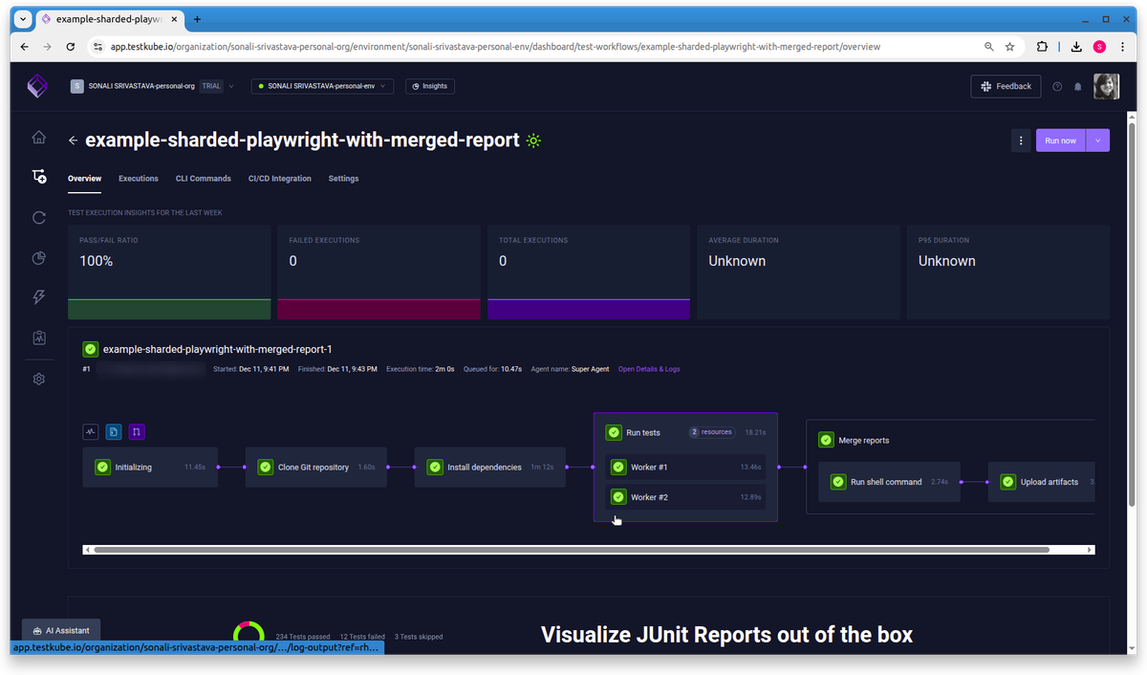
Here, the test execution has been completed successfully with two workers created by Testkube to perform the test.
- Select the worker to view logs.
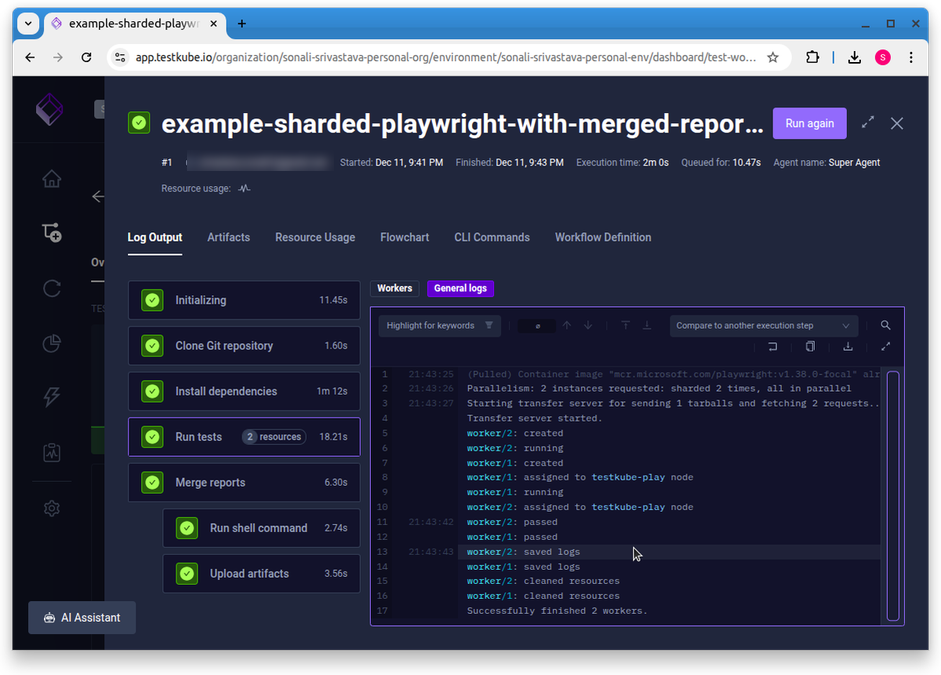
In the logs, you can see that parallelism has invoked 2 instances.
- Select the Artifacts and view the merged reports.
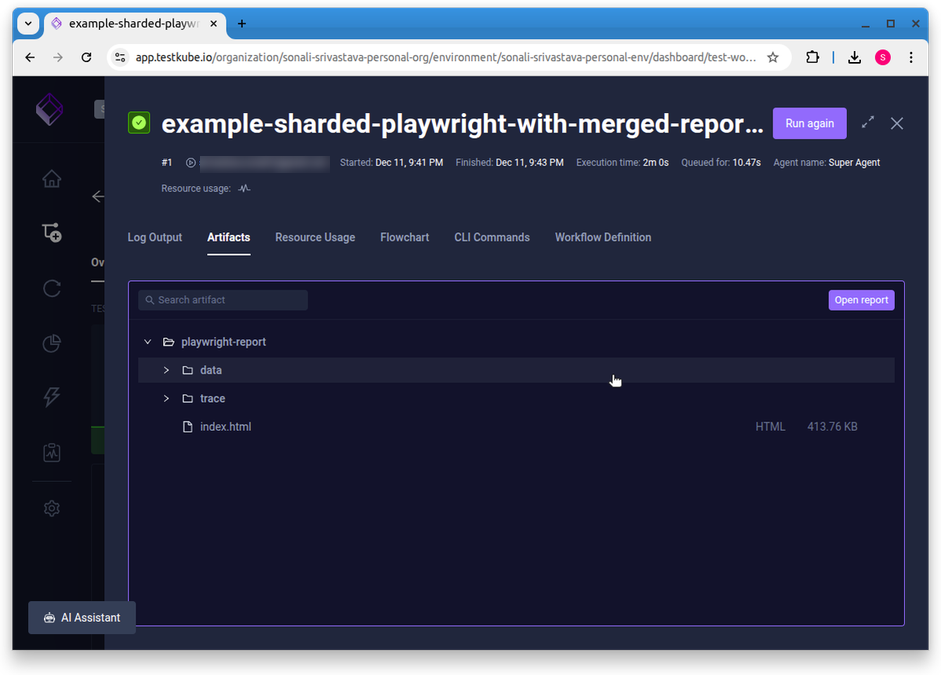
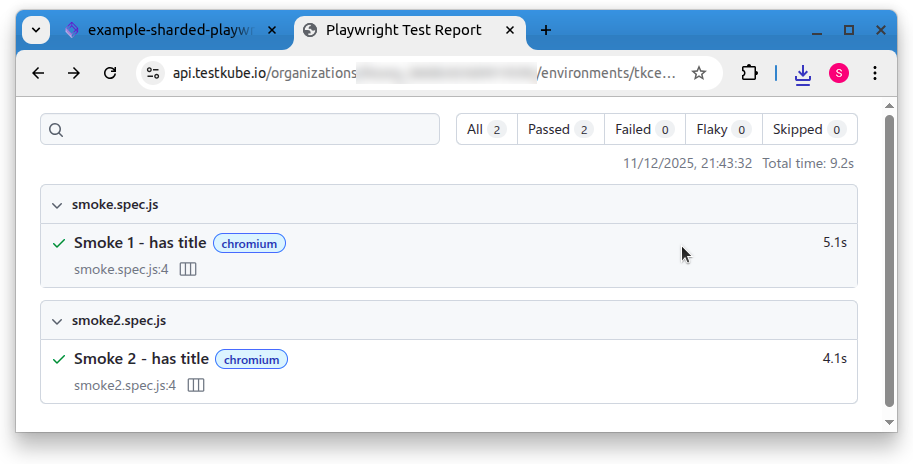
- Analyse the resource consumption for test execution.
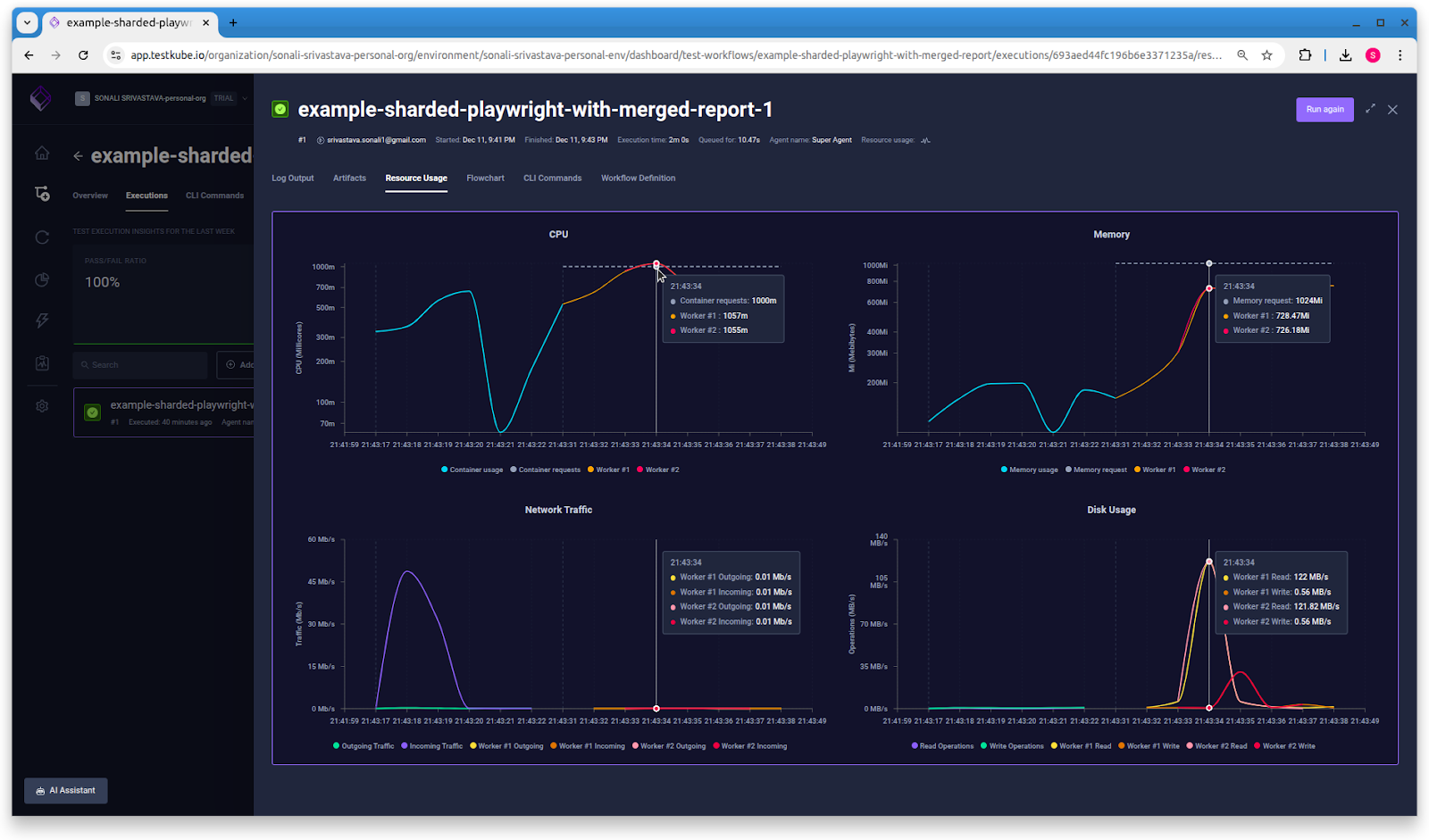
The above charts show the CPU utilization, memory usage, network traffic, and disk usage for both workers.
This example shows how Testkube elevates Playwright from a fast local test tool to a scalable, Kubernetes-native testing workflow. By combining sharding, blob reporting, report merging, and fine-grained resource control, you get a setup that runs faster, stays consistent across environments, and remains easy to operate as your test suite grows.
Conclusion
Scaling Playwright isn’t just about adding more runners. It’s about creating a testing workflow that behaves predictably as your application and teams grow. Testkube gives you that structure by letting you define test execution, parallelism, and environments the same way you define the rest of your Kubernetes stack: declaratively, version-controlled, and reproducible.
In this blog, you have gained an understanding of splitting a multi-test Playwright suite into shards, gathering and managing artifacts, and observing the resource consumption, all using Testkube.
Attempting to scale Playwright tests using native CI functionality is unpredictable, has long feedback cycles, and costs that could quietly spike when your test infrastructure starts to drift.
With Testkube in place, Playwright becomes easier to run at scale, easier to debug, and easier to trust across development, staging, and production environments. And when you ask yourself whether you can afford comprehensive testing, the real question is whether you can afford the alternative.
About Testkube
Testkube is the open testing platform for AI-driven engineering teams. It runs tests directly in your Kubernetes clusters, works with any CI/CD system, and supports every testing tool your team uses. By removing CI/CD bottlenecks, Testkube helps teams ship faster with confidence.
Get Started with a trial to see Testkube in action.