Table of Contents
Start your free trial.
Start your free trial.

Start your free trial.


Table of Contents
Executive Summary
If you run automated browser tests, you probably already know Selenium. It has been the go-to open-source framework for web browser automation since 2004, and for good reason: it supports multiple programming languages (Java, Python, C#, JavaScript, Ruby), works across every major browser, and runs on Windows, macOS, and Linux. It is free under the Apache 2.0 license, backed by a large community, and integrated into most CI/CD pipelines.
But Selenium is not one tool. It is a suite of tools, each built to solve a different problem at a different point in the project's history. Understanding those components (and why they exist) matters when you are deciding how to structure your test infrastructure, especially if you are running tests in Kubernetes.
This guide covers what Selenium is, how each component works, the history behind them, and why running Selenium Grid on Kubernetes creates real operational headaches. We will also walk through how Testkube takes a different approach: running Selenium tests natively inside your cluster, without requiring Grid at all.
Why Automated Testing Matters for Web Applications
Automated testing is not optional if you ship web applications with any regularity. It catches regressions before they reach users, validates that features work across browsers, and gives developers fast feedback when something breaks. Without automation, you are stuck with manual testing cycles that slow down releases and miss edge cases.
The types of testing Selenium handles well include functional testing (do features work as expected?), regression testing (did the latest commit break something that was working?), cross-browser testing (does the app behave the same in Chrome, Firefox, Safari, and Edge?), and user flow validation (can a user complete a checkout, submit a form, or navigate a multi-step wizard?).
Selenium fits into this picture because it lets you write scripts that programmatically interact with web elements: clicking buttons, filling forms, reading page content. When you integrate those scripts into a CI/CD pipeline (Jenkins, GitLab CI, GitHub Actions), tests run automatically on every code change. That feedback loop is what makes Agile and DevOps workflows actually work. Without it, "continuous" deployment is just continuous hope.
A Brief History of Selenium
Selenium started in 2004 at ThoughtWorks in Chicago. Jason Huggins, tired of manually testing an internal time-and-expenses app, wrote a JavaScript tool called "JavaScriptTestRunner" to automate browser interactions. The name "Selenium" was a joke: selenium is an antidote to mercury poisoning, and the competitor at the time was Mercury Interactive's QuickTest Professional.
The initial tool (later called Selenium Core) worked, but it ran into the browser's Same Origin Policy, which blocks JavaScript from controlling a browser when the script comes from a different domain than the app under test. Paul Hammant solved this by creating Selenium RC (Remote Control), which used a Java server as an HTTP proxy to inject JavaScript into the browser, bypassing the restriction. Around the same time, Shinya Kasatani built Selenium IDE as a Firefox extension for record-and-playback testing.
The real architectural shift came between 2006 and 2009 when Simon Stewart created WebDriver. Instead of injecting JavaScript through a proxy, WebDriver communicated directly with browsers through their native automation APIs. It was faster, more stable, and more accurate. The Selenium project merged WebDriver with RC in 2011 to create Selenium 2, with WebDriver as the new core. Selenium 3 followed in 2016, and Selenium 4 formalized the W3C WebDriver Protocol as the standard for browser automation.
Patrick Lightbody developed Selenium Grid to handle parallel test execution across multiple machines and browsers. Each of these components addressed a specific limitation of its predecessor, and understanding that lineage helps explain why Selenium looks the way it does today.
Selenium Components: What Each One Does
Selenium IDE
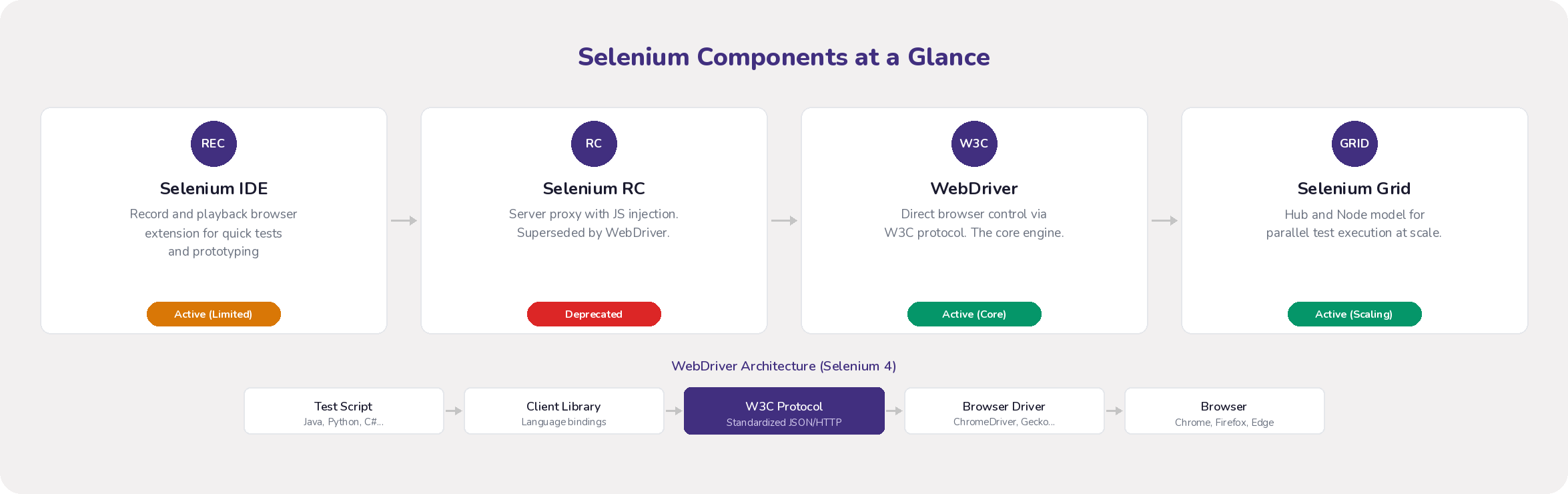
Selenium IDE is a browser extension (Chrome and Firefox) that records your interactions (clicks, form inputs, navigation) and replays them as automated tests. It requires no programming knowledge, which makes it a reasonable starting point for learning Selenium basics or quickly prototyping a test idea.
That said, IDE is not built for production test suites. It struggles with dynamic web elements (attributes that change between page loads), has no real support for loops, conditionals, or data-driven testing, and breaks easily when the UI changes. If you need maintainable, scalable tests, you will outgrow IDE quickly.
Selenium RC (Deprecated)
Selenium RC was the first component to support writing tests in multiple programming languages. It worked by running a Java server that proxied commands between your test script and the browser, injecting a JavaScript program (Selenium Core) into the browser to execute those commands.
RC is now deprecated. The JavaScript injection approach introduced latency, made tests flaky, and could not keep up with modern browser capabilities. Its API was also more complex than it needed to be. WebDriver replaced it entirely, and there is no reason to use RC for new projects.
Selenium WebDriver (The Core Engine)
WebDriver is the part of Selenium that matters most today. It provides a clean, object-oriented API for controlling browsers directly through their native automation interfaces. No JavaScript injection, no proxy server.
The architecture has four layers. Your test script uses a language-specific client library (selenium-java, selenium-python, etc.) to send commands over the W3C WebDriver Protocol to a browser-specific driver (ChromeDriver, GeckoDriver, EdgeDriver), which translates those commands into native browser calls. Since Selenium 4, this protocol is a W3C standard, which means consistent behavior across browsers.
Compared to RC, WebDriver is faster (no proxy overhead), more reliable (native events instead of injected JavaScript), and supports headless execution out of the box. It is what you should be using for any new Selenium test development.
Selenium Grid (Parallel Execution)
Selenium Grid distributes WebDriver tests across multiple machines, browsers, and operating systems simultaneously. Instead of running 500 tests one after another, you can run them in parallel, cutting total execution time proportionally.
The classic architecture uses a Hub-and-Node model. The Hub receives test requests and routes them to available Nodes based on desired capabilities (browser type, version, OS). Each Node runs browser instances and executes the actual tests. Grid 4 introduced a more modular architecture with separate Router, Distributor, Session Map, and Event Bus components, designed for better scalability in containerized environments.
Grid solves the parallelization problem, but it creates a new one: you now have to manage the Grid infrastructure itself. That trade-off becomes especially painful when you try to run Grid on Kubernetes.
Why Running Selenium Grid on Kubernetes Is Hard
Kubernetes is the default platform for deploying containerized applications, so it is natural to want your testing infrastructure running there too. In theory, you get unified management and better resource utilization. In practice, Selenium Grid and Kubernetes have an impedance mismatch that creates real operational pain.
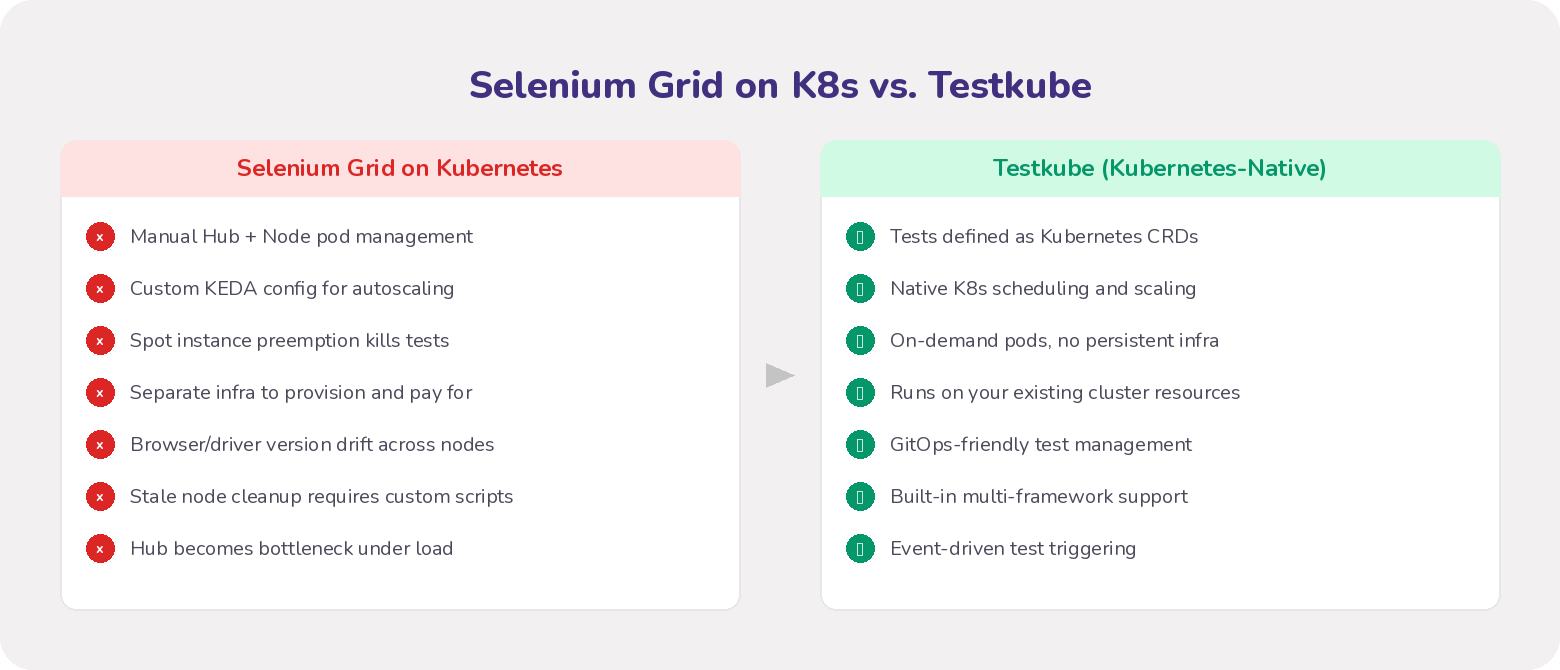
Setup and configuration complexity. Getting Grid running on Kubernetes means configuring Helm charts (or writing custom manifests), setting up Kubernetes networking (Services, Ingress) so the test runner can talk to the Hub and the Hub can talk to Nodes, and troubleshooting Node registration failures. None of this is trivial.
Resource management. Every browser instance in a Node pod eats significant CPU and memory. Under-provision and pods crash mid-test. Over-provision and you waste cluster resources. The Hub itself can become a bottleneck under heavy parallel load.
Scaling. Selenium Grid does not natively integrate with Kubernetes' Horizontal Pod Autoscaler. To scale Nodes based on test queue depth, you typically need KEDA (Kubernetes Event-driven Autoscaling) or custom scaling logic. That is another layer of tooling to configure and maintain.
Spot instance fragility. If you run Node pods on spot instances (which most teams do for cost reasons), a preemption event kills any test running on that node. Building self-healing around this usually involves brittle custom scripts.
Ongoing maintenance. Browser versions, driver executables, and Grid components need to stay in sync across all Node configurations. Stale or unresponsive nodes need periodic cleanup. Custom Docker images for Nodes (for SSL certs or other dependencies) add another maintenance surface.
The core problem is that Grid's relatively stateful architecture (a central Hub managing Node registrations) does not map well to Kubernetes' dynamic, ephemeral, stateless-oriented design. Kubernetes wants to manage container lifecycles through Deployments, Services, and HPA. Grid has its own internal session and node management logic. Bridging the two requires significant operational expertise and often custom tooling.
How Testkube Runs Selenium Tests Without Grid
Testkube takes a fundamentally different approach. Instead of deploying Selenium Grid on top of Kubernetes and managing its own scheduling, Testkube runs Selenium tests natively inside Kubernetes using the platform's own primitives.
Tests and test suites are defined as Kubernetes Custom Resource Definitions (CRDs). When a test runs, Testkube's control plane tells its in-cluster agent to launch execution pods as Kubernetes Jobs. Specialized container images (called Executors) handle specific test types, including Selenium WebDriver scripts. Testkube manages the full pod lifecycle: provisioning resources on demand, executing the tests, collecting results, and tearing everything down afterward.
There is no Hub. There are no persistent Node pools. Testkube does not recreate Grid inside Kubernetes. It replaces the need for Grid entirely by using Kubernetes itself as the orchestration layer.
This is not limited to Selenium either. Testkube is framework-agnostic. The same orchestration mechanism runs Postman collections, Cypress tests, k6 load tests, JMeter scenarios, Playwright scripts, and more. Complex multi-step workflows with dependencies, parallel execution, and setup/teardown can be defined using Testkube's Test Workflows feature.
What You Gain by Running Selenium on Testkube
Resource consolidation and cost savings. Tests run on the compute resources already in your Kubernetes cluster. No separate Grid infrastructure to provision, pay for, or keep running when no tests are executing. Resources are consumed on demand via Kubernetes Jobs, which means better cluster utilization and lower costs compared to an always-on Grid or per-minute cloud testing platforms.
On-premise execution for compliance. Everything runs inside your cluster. If that cluster is on-premise or in a private VPC, your test scripts, application traffic, and test data never leave your controlled environment. This matters for organizations under GDPR, HIPAA, or internal security policies that restrict data exposure to third-party services.
Simplified management. Instead of managing Helm charts, custom scaling configurations, and Node cleanup, you define tests as Kubernetes CRDs and manage them through GitOps workflows. Kubernetes handles scheduling, resource allocation, and reliability. The operational overhead drops significantly.
Decoupled CI/CD integration. Your CI/CD pipeline does not need to set up the test environment, manage browser instances, or collect results. It triggers a test execution via Testkube's API or CLI, and Testkube handles the rest inside the cluster. This keeps pipeline configurations simpler and makes it easy to trigger tests manually from the Testkube dashboard or CLI for ad-hoc debugging.
Centralized visibility. Testkube provides a single dashboard and CLI for managing and monitoring all tests running in your cluster, across frameworks. You get a unified view of logs, artifacts (screenshots, reports), and results without stitching together outputs from separate tools.
Wrapping Up
Selenium earned its place as the standard for web browser automation. WebDriver provides a powerful, W3C-standardized core for writing test scripts. Grid solves the parallel execution problem. But when your infrastructure runs on Kubernetes, Grid introduces operational complexity that works against the platform's strengths.
Testkube removes that friction by treating tests as first-class Kubernetes resources. You get the full power of Selenium WebDriver without maintaining a separate Grid infrastructure, with the added benefits of cost savings, compliance-friendly execution, and simplified management. If your team is already on Kubernetes, running Selenium tests through Testkube is the more practical path forward.
FAQs
What is Selenium used for?
Selenium automates web browser interactions for testing purposes. It lets you write scripts that click links, fill forms, and validate page content across browsers like Chrome, Firefox, Safari, and Edge.
What are the main components of Selenium?
The four components are Selenium IDE (record/playback browser extension), Selenium RC (deprecated proxy-based tool), Selenium WebDriver (the core engine for programmatic browser control), and Selenium Grid (for parallel test execution across multiple environments).
Why is Selenium Grid hard to run on Kubernetes?
Grid's stateful Hub-and-Node architecture does not map well to Kubernetes' dynamic, stateless-oriented design. You end up managing complex Helm configurations, custom autoscaling with tools like KEDA, spot instance recovery, and browser/driver version synchronization across Nodes.
What problem does Testkube solve for Selenium users?
Testkube eliminates the need to deploy and manage Selenium Grid on Kubernetes. It runs Selenium tests natively inside your cluster using Kubernetes primitives (CRDs, Jobs), handling resource provisioning, execution, and cleanup automatically.
How does Testkube run Selenium tests without Grid?
Testkube defines tests as Kubernetes Custom Resource Definitions and executes them in on-demand pods via Kubernetes Jobs. Specialized executor containers run your WebDriver scripts directly, using Kubernetes' own scheduling and resource management instead of Grid's internal Hub-and-Node coordination.
About Testkube
Testkube is the open testing platform for AI-driven engineering teams. It runs tests directly in your Kubernetes clusters, works with any CI/CD system, and supports every testing tool your team uses. By removing CI/CD bottlenecks, Testkube helps teams ship faster with confidence.
Get Started with a trial to see Testkube in action.