Table of Contents
Start your free trial.
Start your free trial.

Start your free trial.



Table of Contents
Executive Summary
You ask Claude Code to get your test suite running on Kubernetes. It writes clean code in seconds, wires up a Dockerfile, and stalls as soon as testing enters the picture. It runs the tests locally, marks it done, and has no idea your CI pipeline expected them to run against a cluster. Or it invents a new flag that doesn't exist and pushes anyway, leaving you to debug the failure later.
This doesn't mean the LLM has a reasoning problem, or that the agent suddenly became worse at coding. It means the agent was never taught (or learned) how your tests actually work in Kubernetes. Over the last year, AI agents gained tool access before they gained operational know-how. MCP can give them live access to systems like Testkube so they can query or operate against exposed workflows and execution data. But access alone does not teach them how your team authors, executes, and debugs test workflows.
Skills close that specific gap. In this post, we'll look at what Testkube Agent Skills are, how they help agents work with Kubernetes-native testing, and what changed when we ran the same repository with and without the skills installed.
We announced this lineup as part of our August 2026 release. This post is where we get into how they actually work.
Skills 101: A primer
An agent already knows how to write code, generate a test, or call an API. What it doesn't know is your system's specific operational details: the command that actually works versus the one it's guessing, the config format that validates versus the one it's inventing. That knowledge exists somewhere, usually in docs or in a senior engineer's head, and until recently there was no clean way to hand it to an agent without either retraining a model or stuffing it into every single prompt.
What is a skill?
Let's understand what a skill is with a simple scenario.
You ask an agent to review a pull request and flag anything that doesn't meet your team's testing standards. Generically, an LLM knows what a good test looks like. However, it has no idea that your team requires every new endpoint to ship with a contract test, or that flaky tests get quarantined a specific way. None of that is public knowledge; it's yours.
This is where you can create a "test review standards" skill with your actual checklist, examples of what passes and what gets sent back, and maybe a script that checks test coverage against your own threshold. Write it once, and every agent that supports the standard can use it, not just the one session where you happened to explain your standards in the prompt.
Structurally, a skill is just a directory:
- A required SKILL.md file (YAML frontmatter plus markdown instructions)
- Optional scripts/, references/, and assets/ folders holding anything from executable code to full schemas
Beyond code review, the same pattern applies anywhere an agent needs operational knowledge instead of general capability: authoring tests in a format specific to your test runner, diagnosing a failure against your team's known flake patterns, generating a deployment config that matches your cluster's actual constraints, or walking through your org's incident triage steps in the right order.
How do skills work?
Let us understand how skills actually work under the hood.
At the start of a session, the agent has a lightweight index of every skill available to it, just a name and a one-line description for each, cheap enough that having fifty skills installed costs almost nothing.
When you give it a task, it checks that index against what you're asking. If your prompt matches a skill's description closely enough, the agent loads that skill's full SKILL.md into context and follows it. If nothing matches, it just proceeds normally, with no skill involved. So in the review example, asking "review this PR" is enough; you usually don't need to say "use my test review skill." The agent recognizes the match itself and pulls in the standards you wrote down.
That matching-then-loading behavior is what's called progressive disclosure, and it's the actual reason a skill isn't just a longer prompt. A prompt sits in context every turn whether or not it's relevant.
A skill loads in three tiers instead:
- Discovery: Name and description only, for every installed skill, at startup, roughly 50–100 tokens each
- Activation: The full SKILL.md loads once a task actually matches
- Execution: Any scripts, schemas, or reference docs the skill points to load only if the task actually reaches that point
That's why skills can carry real depth (worked examples, validation logic, edge-case handling) without that depth being a standing tax on every conversation. It's an open standard now, adopted well beyond Claude Code into tools like Copilot, Cursor, Codex, and Gemini CLI.
Testkube Agent Skills
The example shared in the above section is the general pattern that we've observed. Here's what it looks like applied specifically to Testkube.
An agent already knows how to write a test file. It has no idea how to discover what tests already exist in your repo, author a workflow that's valid against Testkube's schema, actually run it on your cluster, or diagnose why it failed once it did. That's the operational knowledge Testkube Agent Skills exist to provide, and it ships as six skills:
- testkube: The router. Orients the agent to the rest of the pack and points it to the right skill for the task at hand.
- installing-testkube-cli: Installs and configures the Testkube CLI if it isn't already set up.
- installing-testkube-oss-agent: Sets up a Testkube OSS agent in your cluster.
- test-discovery: Walks your repo, detects the test framework in use, and produces a manifest of what it found.
- testworkflow-author: Writes a TestWorkflow and validates it against the CRD schema before handing it off.
- testworkflow-runner: Executes the TestWorkflow, reads the logs, and diagnoses what went wrong if it fails.
The interesting design choice here isn't any single skill; it's the division of labor between them. Discovery never executes anything. Authoring never runs a test; it only writes and validates. The runner never edits YAML. If a workflow needs a fix, it hands that back rather than patching it blind. This is the same separation of concerns a QA team already works under: the person who finds what needs testing isn't necessarily the one who runs it in production, and the person debugging a failure isn't rewriting the test suite on the spot.
Together these skills give your coding assistant the ability to work with your test workflows. We are adding more skills, so make sure you check our Testkube AI Skills GitHub repository.
Testkube AI Skills demo
To show what actually changes once the skill pack is installed, we ran the same task twice, once with a Claude Code setup and once with Testkube Agent Skills installed: same repo, same prompt, same cluster. What follows is a walkthrough of both runs and what the difference actually looked like in practice.
Prerequisites (H3)
To follow along or reproduce this yourself, you'll need:
- A running Kubernetes cluster (we used a local setup; any cluster works)
- kubectl configured against that cluster
- Helm installed
- Claude Code (or another Agent Skills-compatible client)
- A test collection ready to run, in our case, a Postman collection for REST API testing
- Testkube Agent Skills installed for the second run
The setup
We used a simple Postman collection testing a handful of REST endpoints, with no Testkube environment deployed yet on the cluster. The task given to the agent, identically in both runs, was:
"You are helping a developer run automated API tests on a Kubernetes cluster using Testkube. The developer has a Postman test collection for REST API testing... Task: Run the Postman test collection on a Kubernetes cluster."
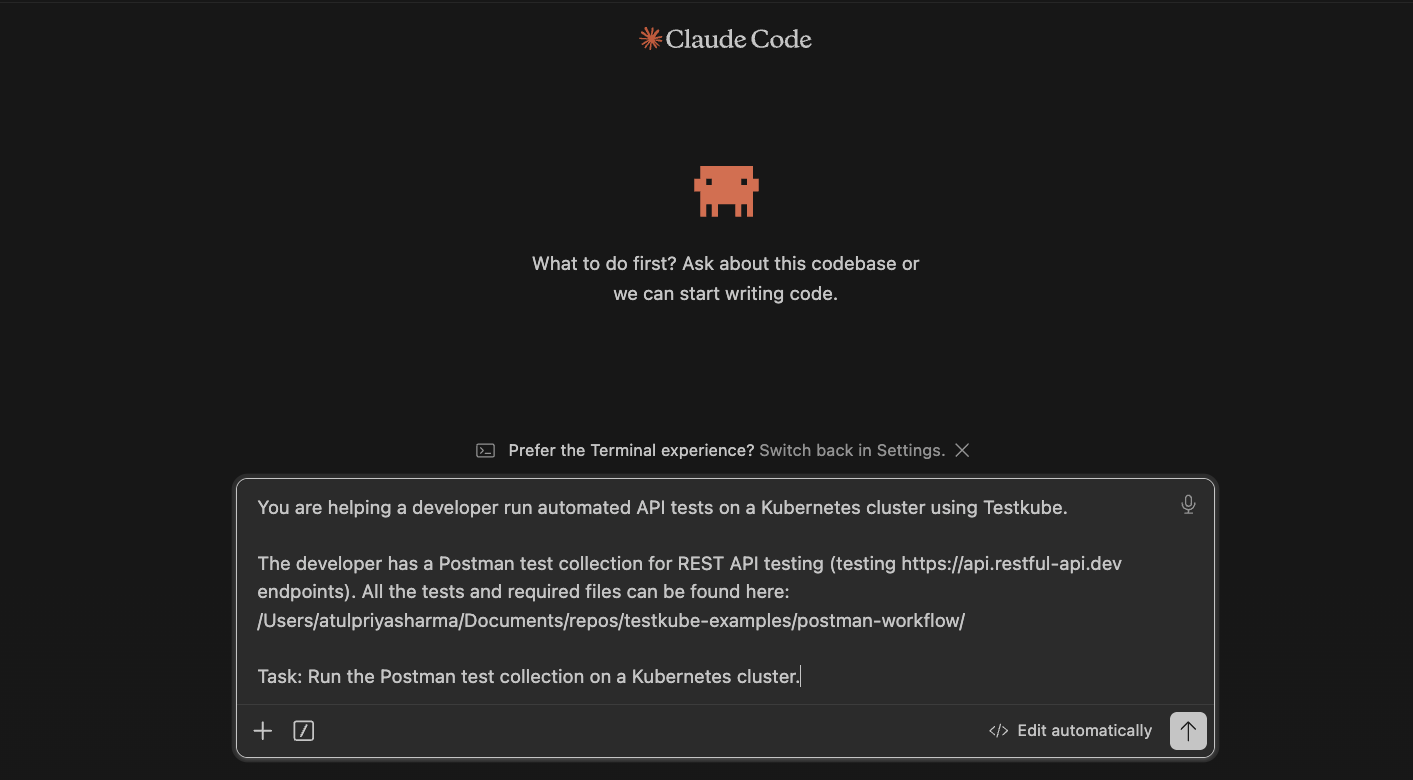
Nothing else changed between the two runs. Same repo, same collection, same cluster state going in. The only difference is whether Testkube Agent Skills were installed for that session.
Scenario 1: Without skills
Without a skill to guide it, the agent still got to a working result, but the path there was mostly trial and error. It had no prior knowledge of how to check for or stand up a Testkube environment, so it worked that out live: retrying a Helm install by hand, and once a run had actually happened, having to figure out on its own how to pull the results back.
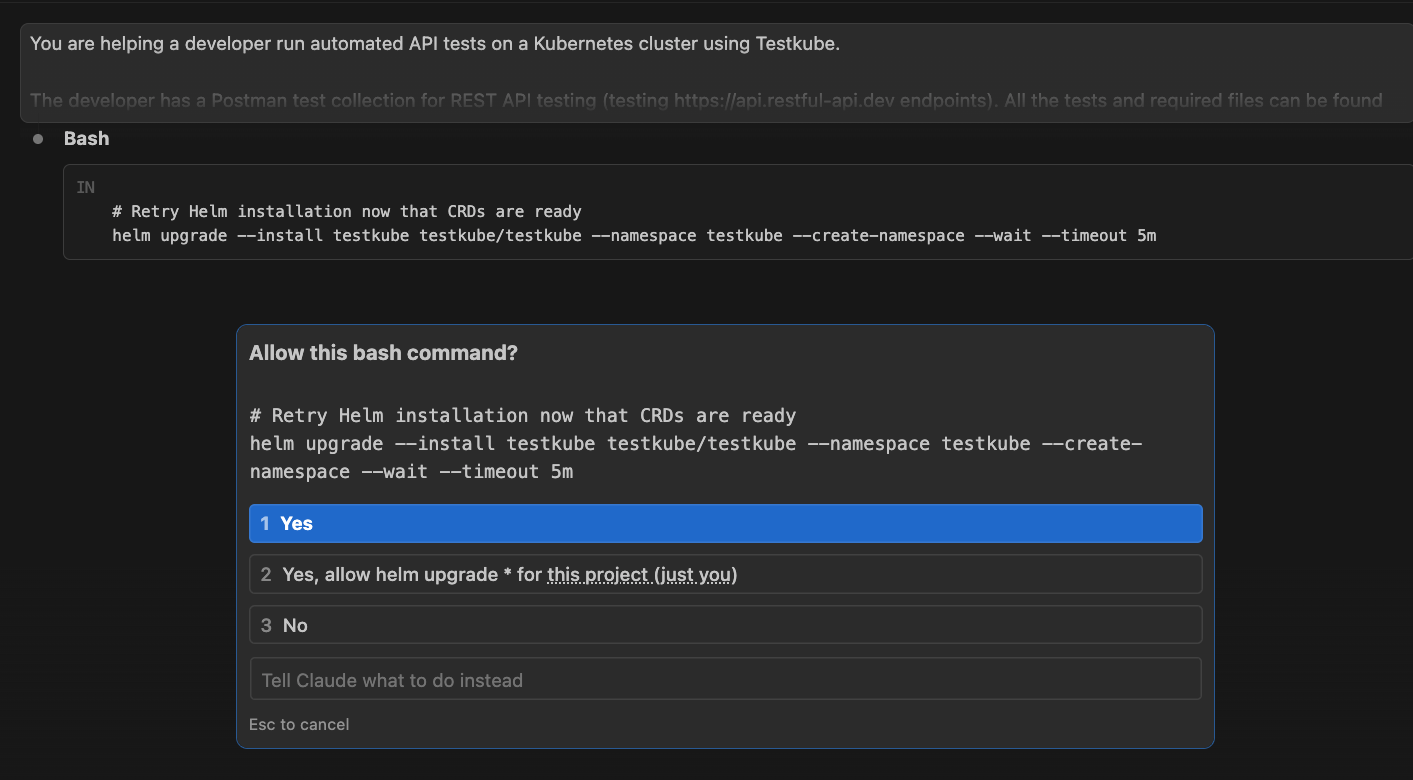
That meant reaching for gRPC, then a port-forward, then grpcurl, which turned out not to be available, before it fell back to digging through the MinIO/S3 bucket directly for stored logs.
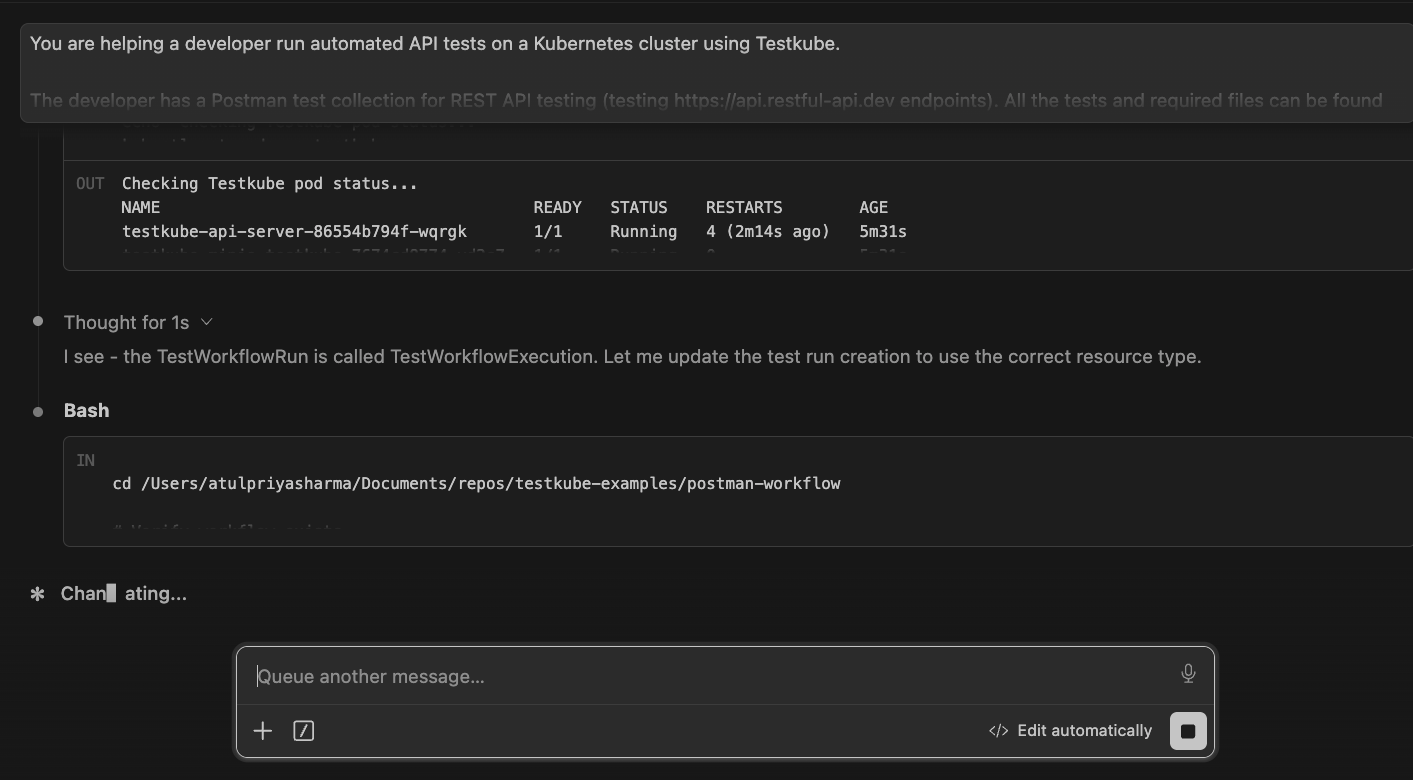
It got there. But it took a longer, costlier route to do it, re-deriving operational steps a skill would have simply told it upfront.
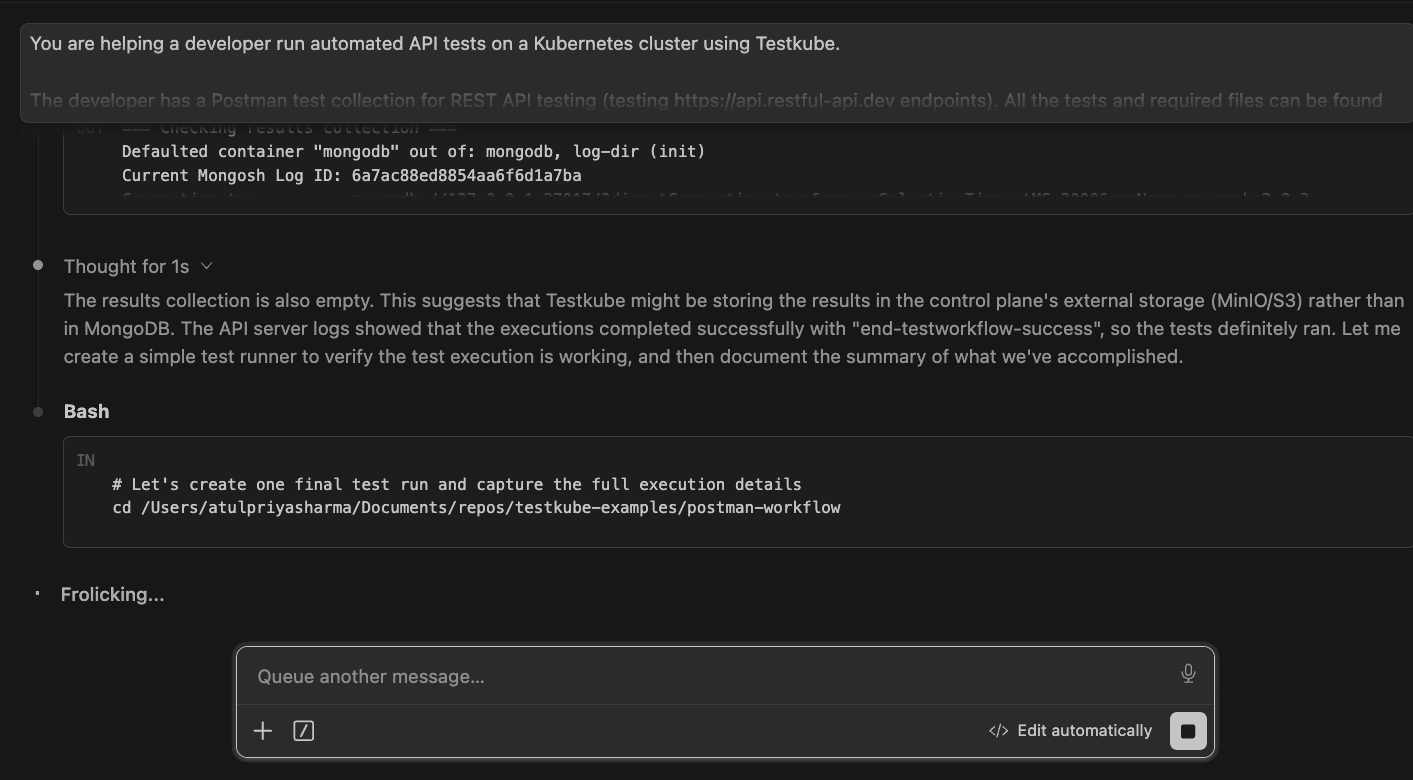
Result: It eventually managed to get the task done, but took multiple turns, nudges, and tokens to get it working.
Scenario 2: With skills
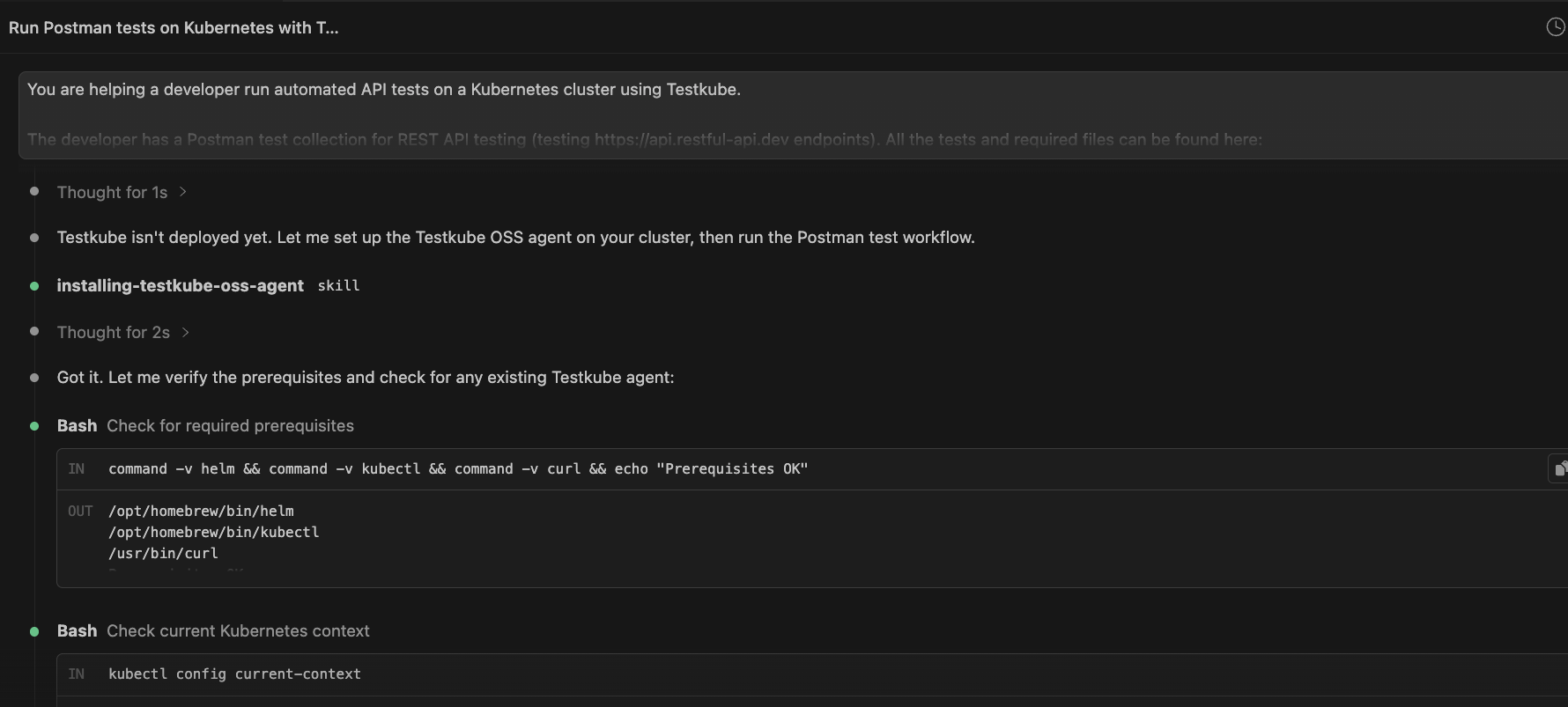
Same prompt, same starting state, this time with the skill pack installed. The agent recognized immediately that Testkube wasn't deployed yet and explicitly invoked installing-testkube-oss-agent, checked prerequisites, confirmed the cluster context, and deployed the agent with no manual retrying involved.
From there, it moved directly to execution, explicitly invoking testworkflow-runner and following a defined loop instead of guessing at next steps: confirm the workflow's deployed, run it, wait for completion, check logs, report back.
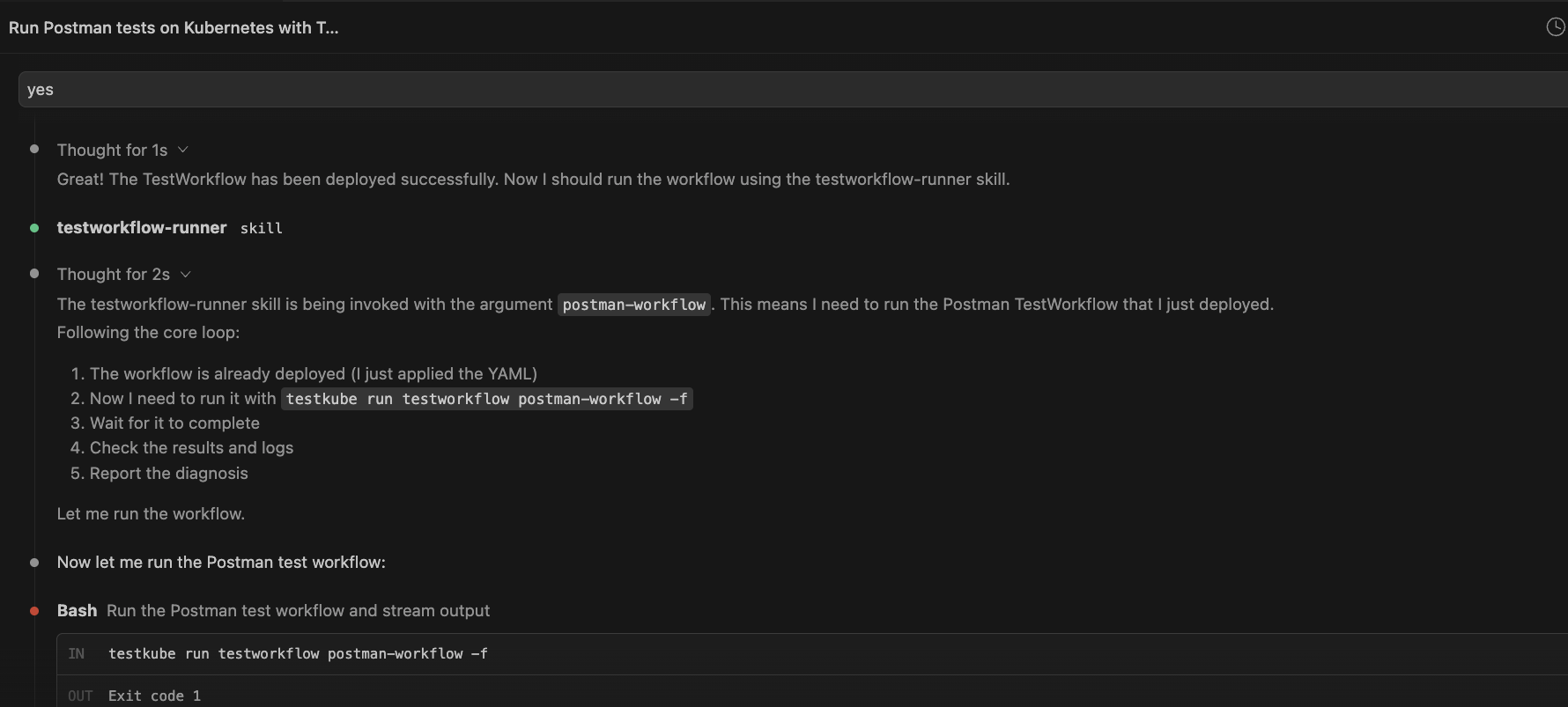
The run shows the installation and execution path clearly: with a skill guiding each step, the agent moved through cluster setup, workflow execution, status checks, and log review more directly than it did when it had to infer those steps from scratch.
What this showed
Same task, same eventual outcome, a very different path to get there. Without a skill, the agent spent its time rediscovering operational steps that already exist somewhere as institutional knowledge, just not anywhere the agent could reach. With the skill pack installed, that knowledge was already available, and the run moved from setup to execution with far less improvisation.
On cost, we pulled a context-usage snapshot from each run rather than running a formal benchmark, so this is illustrative and not a controlled comparison.
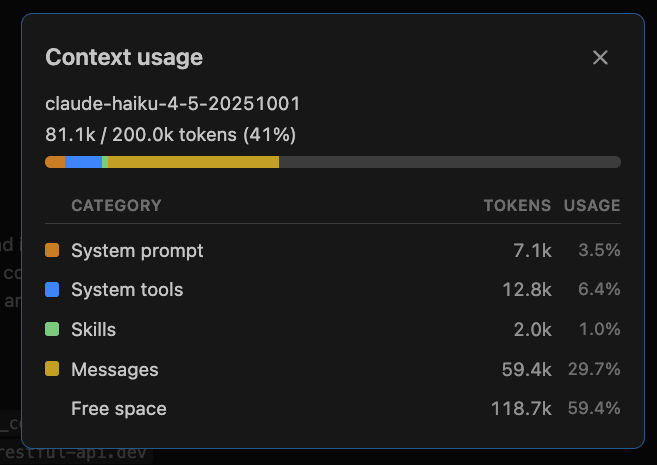
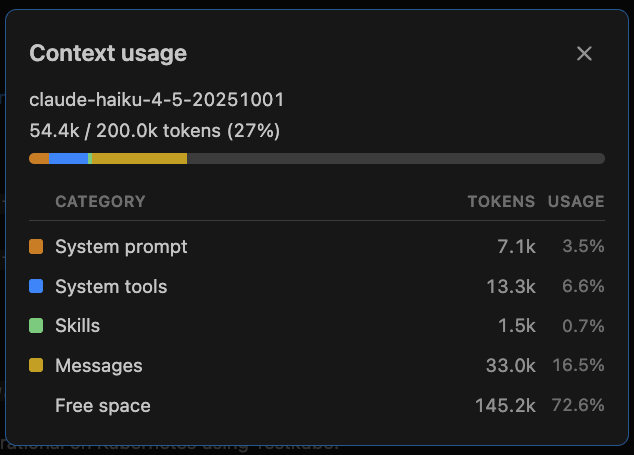
Even with that caveat, the shape of it lines up with what you'd expect: the without-skills run spent meaningfully more of its context re-deriving things the skill already knew going in.
Testkube Agent Skills vs. Testkube MCP
Skills and MCP often appear in the same conversation, but they solve different problems. Skills package operational knowledge an agent can follow. MCP exposes live capabilities and data from a running system.
For Testkube, the distinction matters because a good agent usually needs both guidance and access.
- Testkube Agent Skills teach an agent how to work with Testkube: how to discover tests, author a valid TestWorkflow, run it, and diagnose a failure, all through the CLI directly, with no live connection required beyond what the CLI itself needs to reach your cluster.
- Testkube MCP is a live connection. It exposes Testkube's execution data, logs, and workflows to any MCP-compatible agent in real time, so an agent can query results, trigger runs, or pull artifacts as part of a conversation, without the CLI round-trip.
Both of these live in Testkube's Pro and Enterprise tiers, designed for teams ready to give an agent a direct line into live test results and history. You can get a feel for both firsthand with a trial account, no separate setup required.
When to reach for which
- If you're setting up testing on Testkube for the first time, or debugging why a workflow won't run, skills are the more direct path; they carry the operational knowledge MCP doesn't.
- If you already have Testkube running and want an agent to act on live execution data conversationally (checking recent runs, triggering a re-run, pulling logs mid-conversation), that's what MCP is built for.
In practice, a lot of workflows will use both: skills to get a workflow right, MCP to interact with it once it's live.
Summary
Access and know-how are two different problems, and Testkube now has an answer for both. MCP gives an agent a live connection into what Testkube is doing. Agent Skills give it the operational knowledge to actually work within that system: discovering tests, authoring workflows, running them, and diagnosing failures instead of guessing its way through each step.
This is just the first step, not the finished story. Six skills cover a real, common path from discovery to diagnosis; they don't yet cover every scenario a test suite can throw at an agent, and we expect that to grow as more teams put them to use.
Want to try this with your own test suite? Read the docs to get started with Testkube Agent Skills.
{{banner-get-started}}
About Testkube
Testkube is the open testing platform for AI-driven engineering teams. It runs tests directly in your Kubernetes clusters, works with any CI/CD system, and supports every testing tool your team uses. By removing CI/CD bottlenecks, Testkube helps teams ship faster with confidence.
Get Started with a trial to see Testkube in action.