





Table of Contents
Executive Summary
Last month, I was speaking to a developer at KubeCon who used Cursor to build a new API endpoint. The AI agent generated everything from the boilerplate code, controller logic and even unit test cases - all under a couple of minutes. They commit, push, and the CI pipeline kicked off - only for the integration test to fail.
Now what? They had to switch to their CI dashboard to find the failed job, SSH into the Kubernetes cluster to check pod logs, open another tab for the test runner output, and tried to figure out what went wrong. Apparently, the AI agent, which generated all this code, can't help anymore because it only knew about the codebase and had no idea why test_payment_processing failed with a 500 error.
The problem is that AI tools can’t talk to your testing platform. Cursor can identify which tests to write but can't execute them in your testing environments. Copilot can suggest fixes but can't verify them against your actual test results. There's no bridge between your AI-powered development environment and your test orchestration platform.
That’s where Testkube and the Model Context Protocol (MCP) come into picture. In this post we’ll explore Testkube’s MCP server and learn how it exposes test orchestration capabilities directly to AI agents, enabling them to execute workflows, analyze results, and troubleshoot failures - all from within your IDE.
What is the Model Context Protocol?
Model Context Protocol (MCP) is an open standard developed by Anthropic that provides a standardized way for LLMs and AI applications to connect with external systems. A popular analogy is to think of this as a USB Type-C for AI tools - a standardized way to plug any AI agent into any data source or service.
Core Architecture
MCP uses a client-server model:
- MCP Clients integrate into AI tools (Claude, Cursor, VS Code Copilot)
- MCP Servers expose capabilities from external systems (databases, APIs, testing platforms)
- Transport Layer handles communication via stdio (local) or HTTP/SSE (remote)
Messages flow through JSON-RPC 2.0, supporting requests, responses, and notifications between clients and servers.
Why It Matters?
Before MCP, connecting AI tools to any external platform required custom integrations for each combination - an "N×M problem" that doesn't scale. MCP solved this by providing a single protocol that any AI tool can use to access any MCP-enabled system.
SDKs are available in Python, TypeScript, Go, C#, Java, and Kotlin, making it straightforward to build custom MCP servers or integrate existing ones.
Learn More: MCP GitHub Repository | Introduction to Model Context Protocol
Traditional Test Orchestration Problem
Most teams today run their tests across different platforms and use different tools which lead to visibility and efficiency challenges. And with the introduction of AI, this problem just amplifies. Let us look at some traditional test orchestration problems.
Scattered Testing Infrastructure
Tests execute across multiple fragmented systems:
- Unit tests in CI/CD pipelines
- Integration tests in Kubernetes clusters
- E2E tests in dedicated test environments
- Performance tests on separate infrastructure
To add to this, any or all of the above steps can be executed locally for pre-commit validation which requires a local testing stack leading to further fragmentation of your testing infrastructure.
Each system for running these tests has its own infrastructure, dashboard, logging mechanism, and API. There's no unified view of test results and application health across your entire application.
Manual Context Switching
When a test fails, developers jump between:
- CI/CD logs to identify which job failed
- Kubernetes dashboards to check pod logs
- Test runner outputs for stack traces
- Monitoring tools for resource metrics
- Git history to correlate with recent changes
This investigation process can easily takes 15-30 minutes per failure, multiplied across dozens of daily test runs.
Delayed Feedback Loop
Developers lose flow state switching contexts, and by the time they understand a failure, they’ve already moved on to the next feature. Issues discovered in staging that could have been caught earlier delay releases. Hence, the real problem isn’t the speed, but it’s the cognitive load.
AI-Development Mismatch
As discussed earlier, AI tools accelerate coding but can't bridge the testing gap. Your AI agent writes code in seconds but remains blind when tests fail in your pipelines and testing environments, unable to access execution logs, analyze failure patterns, or suggest fixes based on actual test results - basically, they lack the runtime context. Fast coding meets slow testing, and the bottleneck shifts from writing code to validating it.
How Testkube's MCP Server Enables Intelligent Test Orchestration
The challenges are clear: fragmented test infrastructure, manual context switching, and AI tools not having access to your test platform. Two things are needed a unified test orchestration platform and a standardized way for AI agents to interact with it. Testkube MCP Server does exactly that.
What is Testkube?
Testkube is a continuous testing platform built specifically for Kubernetes environments. Unlike traditional testing tools that bolt onto existing infrastructure, Testkube orchestrates tests as native Kubernetes resources:
- Kubernetes-native execution: Every test runs as its own pod or job, providing granular resource control, parallel execution, and isolated results
- Framework-agnostic: Supports any testing framework - Playwright, Cypress, k6, JMeter, Postman, custom scripts, etc. - without vendor lock-in
- Unified orchestration: Catalogs, executes, observes, and analyzes all tests from a single control plane
- Scalable by design: Leverages Kubernetes elasticity to scale from single tests to thousands of parallel executions
Testkube MCP Server
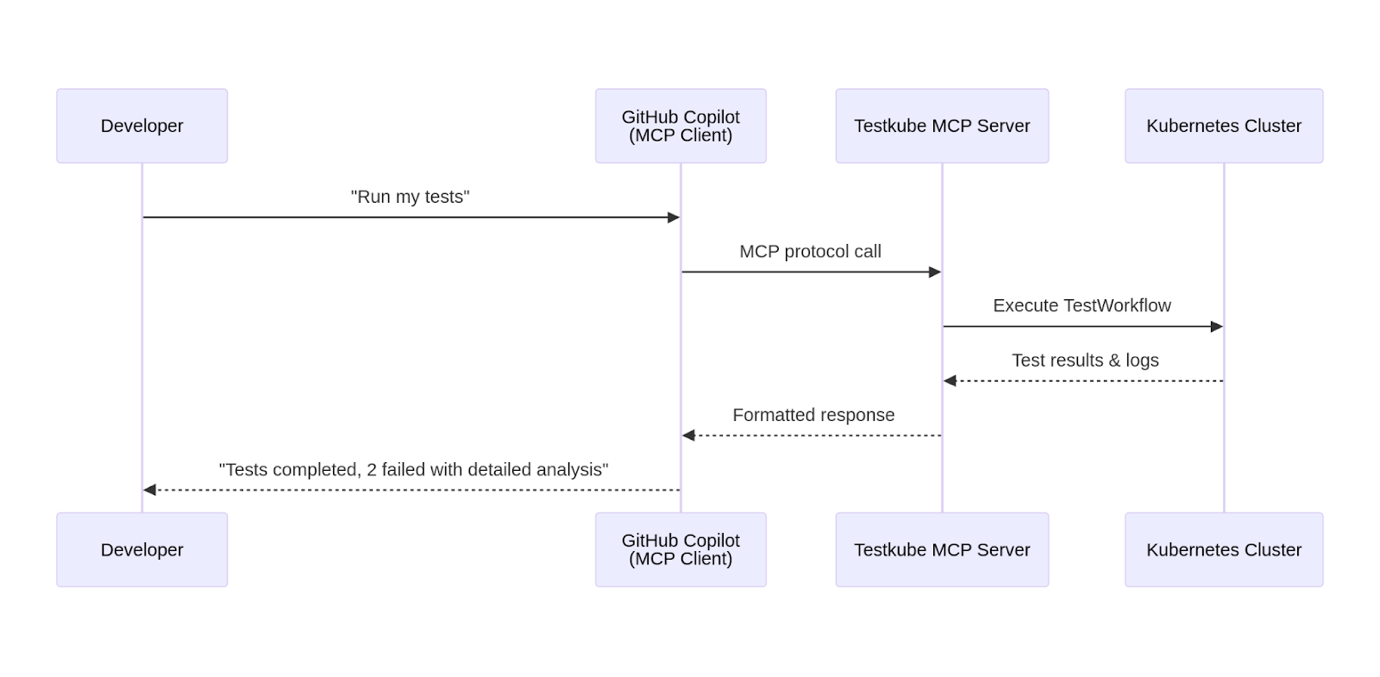
The Testkube MCP Server exposesTestkube's test orchestration capabilities directly to your IDE and AI-powered workflows, enabling AI agents to seamlessly interact with your Testkube workflows, executions, results and artifacts.
It doesn't just expose test execution APIs - it provides AI agents with comprehensive access to Testkube's stateful test memory and orchestration intelligence.
Execute and Monitor Workflows
With Testkube MCP, AI agents can orchestrate complex testing scenarios across distributed Kubernetes infrastructure. Execute workflows on specific agents based on labels or capabilities. Monitor real-time execution status, access resource consumption metrics (CPU, memory, network I/O), and implement adaptive execution strategies like aborting long-running tests or dynamically adjusting parallelization based on cluster capacity.
Analyze Test Results
During test failure scenarios, AI agents can now get complete diagnostic context, not just error messages. Access structured execution logs, retrieve test artifacts (Playwright traces, JMeter reports, custom outputs), and analyze resource consumption data correlated with test execution phases. The MCP Server also enables AI to cross-reference test failures with underlying Kubernetes events (pod evictions, network policies, node issues), performing root cause analysis that would normally require manually correlating information from multiple tools.
Navigate Test History
Testkube provides a unified pane of glass for all your tests, and it maintains comprehensive, queryable test result database spanning your entire testing infrastructure. By leveraging Testkube MCP, AI agents can analyze failure patterns across hundreds of historical executions to identify systematic issues versus transient failures, correlate test results with specific git commits and Kubernetes deployments, compare current performance against historical baselines, and surface helpful insights.
Create and Manage Test Workflows
AI agents can generate test workflows from natural language descriptions that you provide, optimize configurations based on historical performance data like adjusting timeouts, resource limits, retry strategies etc. and even create conditional workflows that adapt based on execution context. This transforms AI agents from merely code generators into testing infrastructure engineers that create standardized workflows for new services and suggest improvements based on actual execution patterns.
Use Cases Enabled by Testkube MCP
Intelligent Remediation: AI agents can diagnose test failures end-to-end. They can fetch execution logs, analyze error patterns, check corresponding Kubernetes events and logs, review recent code changes from GitHub MCP, and propose specific fixes in the form of a branch or Pull Request - all of this in a single conversation.
Dynamic Test Orchestration When code changes, AI agents can determine which tests to run based on the modified files, execute only relevant test workflows, and provide feedback without running the entire suite - reducing CI time significantly. They can also suggest changes to the tests based on the newly added code.
Performance Optimization AI agents can analyze historical execution data to identify bottlenecks, suggest optimal parallelization strategies, and dynamically adjust workflow configurations based on resource consumption patterns and cost constraints.
Technical Architecture
Testkube provides a hosted MCP endpoint directly accessible through your Testkube Dashboard - no local installation required. This is the recommended approach for most teams as it provides zero-setup access with built-in authentication and automatic updates.
Getting Your MCP Configuration
Navigate to your Environment Settings in the Testkube Dashboard and select the MCP Server option. The dashboard provides:
- Your unique hosted endpoint URL (format: https://api.testkube.io/organizations/{org_id}/environments/{env_id}/mcp)
- Pre-configured examples for popular AI tools (GitHub Copilot, Cursor, Claude Desktop)
- API token generation with appropriate permissions
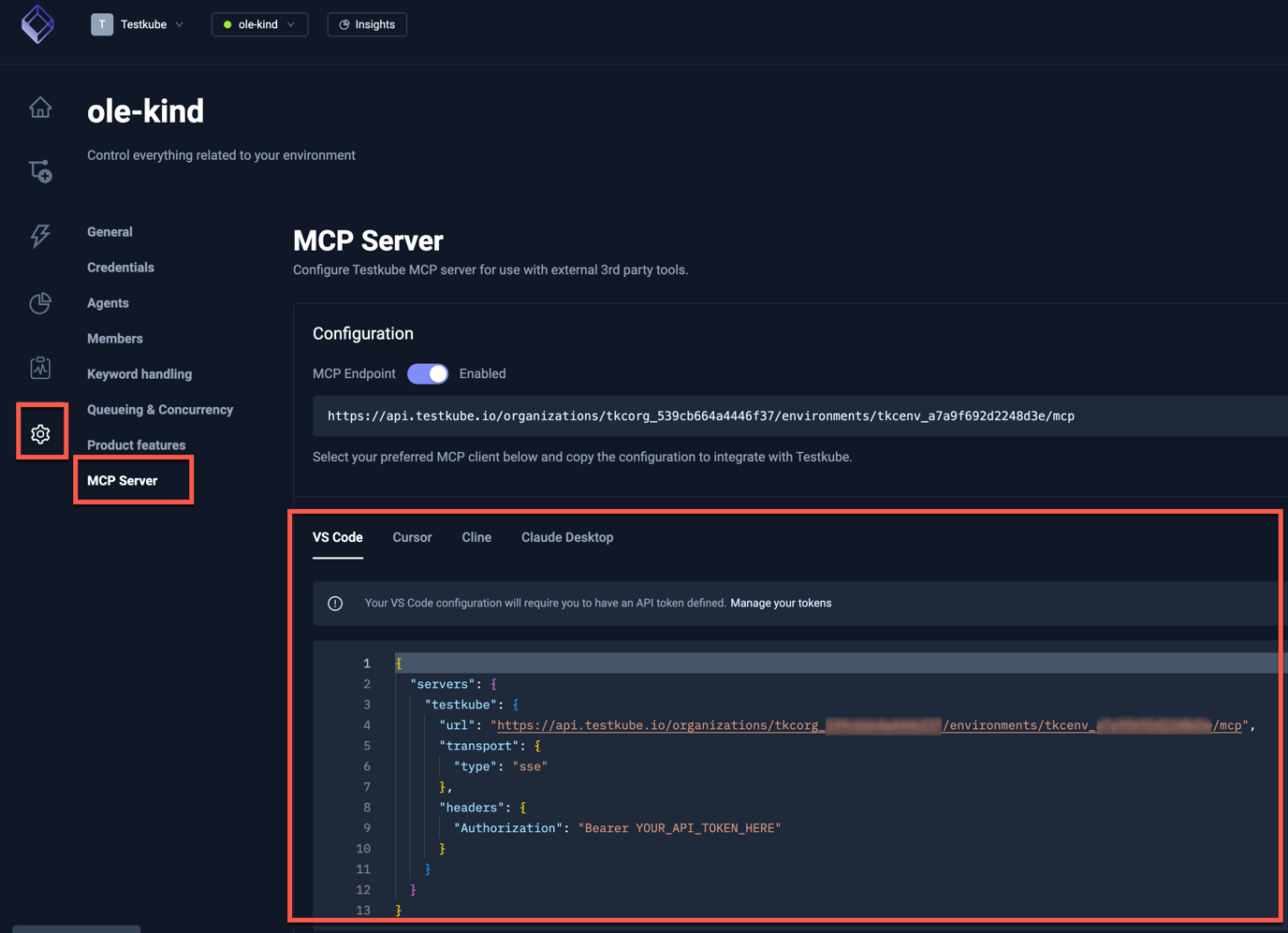
The hosted endpoint uses SSE (Server-Sent Events) transport, which allows AI tools to maintain real-time connections with your Testkube environment. Simply copy the configuration snippet for your AI tool, add your API token, and you're ready to start orchestrating tests through natural language.
AI Tool Compatibility
The hosted endpoint works seamlessly with:
- GitHub Copilot in VS Code
- Cursor IDE
- Claude Desktop
- Any custom MCP client supporting SSE transport
For teams needing local development or containerized deployments, Testkube also supports CLI-based and Docker-based MCP server options.
AI Test Orchestration in Action
We’ve built a complete demonstration using GitHub Copilot with the Testkube MCP Server. The scenario showcases an end-to-end AI-assisted debugging workflow - from test execution to root cause analysis to automated fix deployment.
Demo Scenario
We deployed a simple calculator microservice with an intentional bug: the /add endpoint multiplies numbers instead of adding them. Using only natural language prompts to GitHub Copilot, we demonstrate how AI agents can:
- Execute the test workflow to validate the /add endpoint
- Detect and analyze the failure by examining execution logs
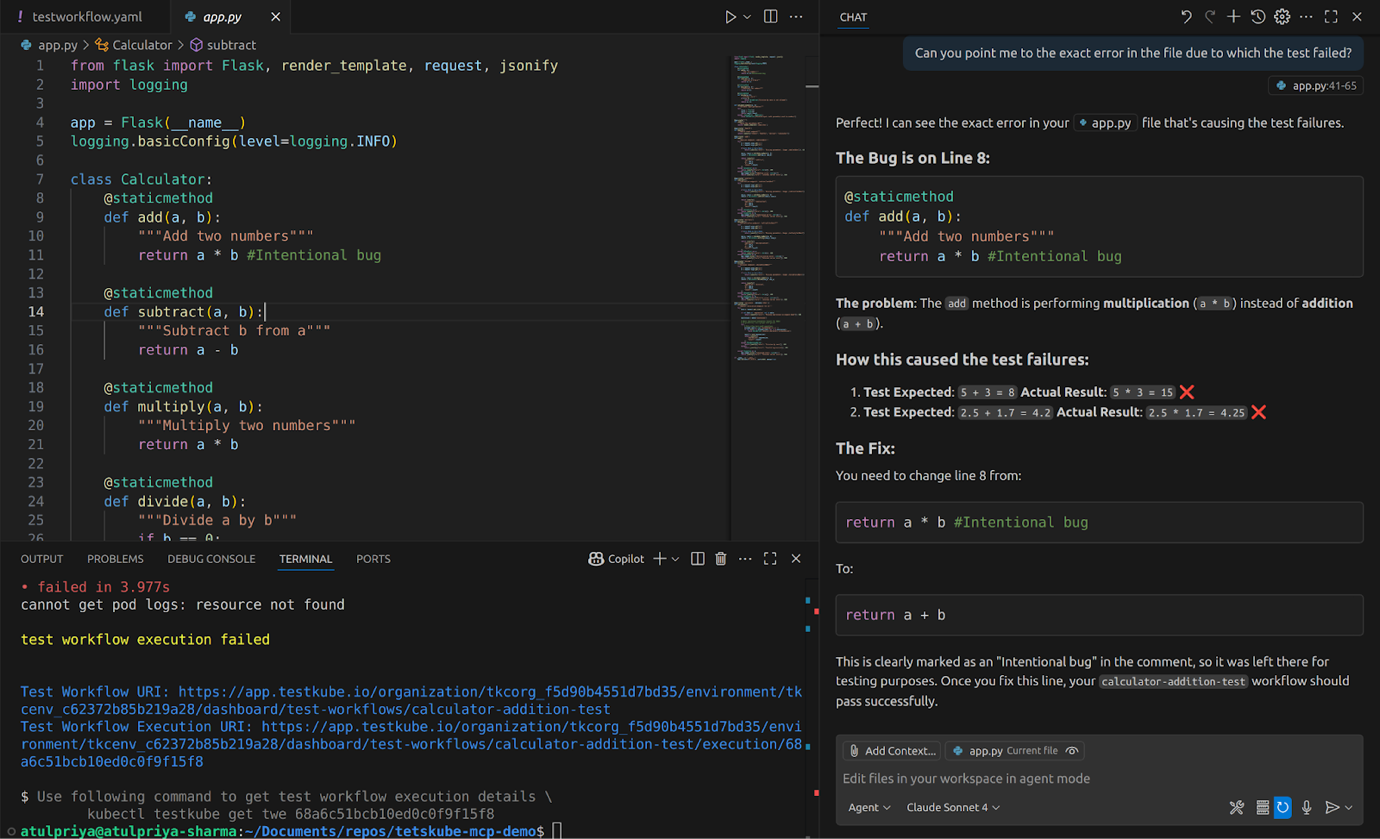
- Pinpoint the exact bug in the source code (line-level precision)
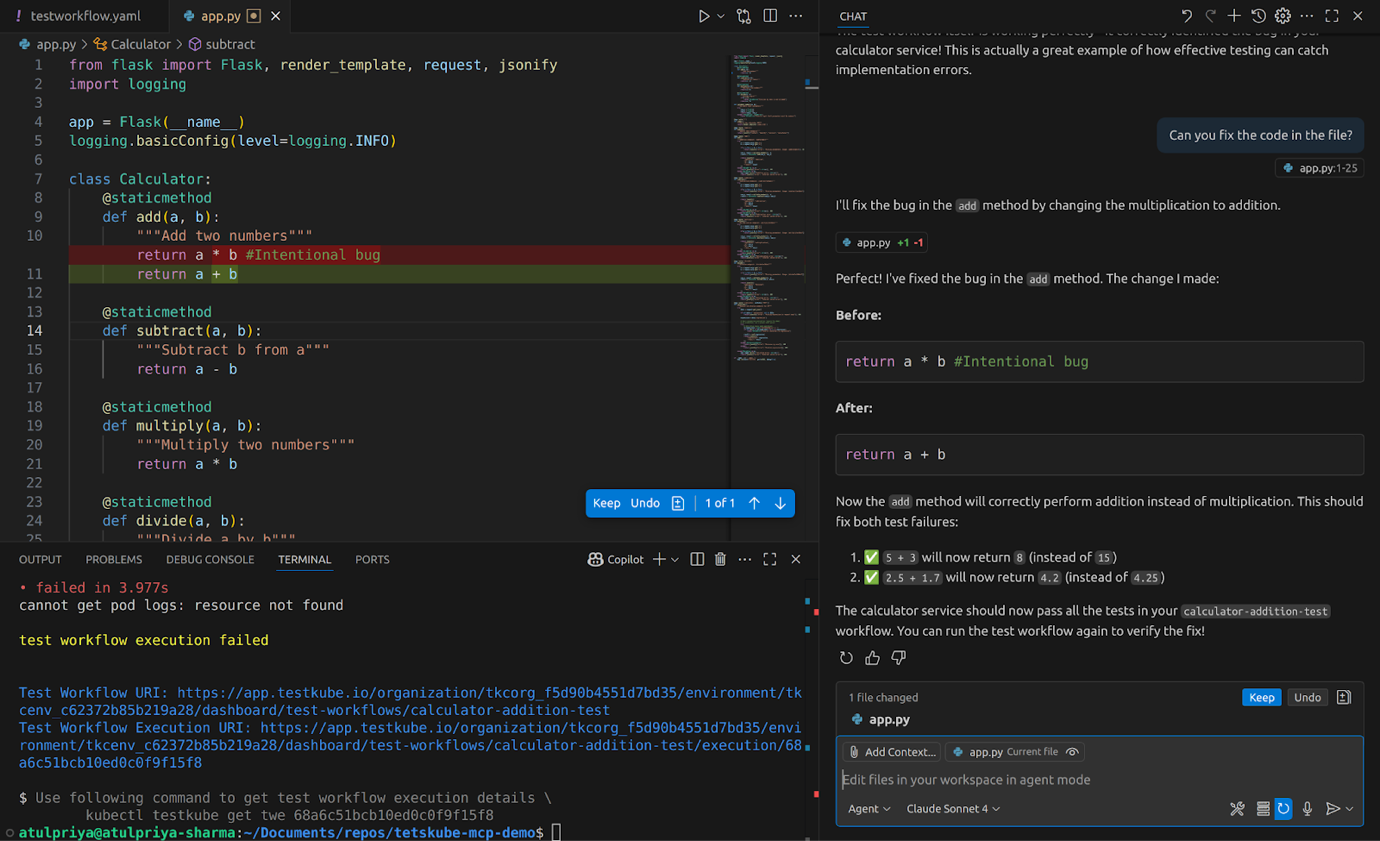
- Generate and apply the fix automatically
- Raise a pull request with detailed comments explaining the change
What Makes This Powerful
Natural Language Testing
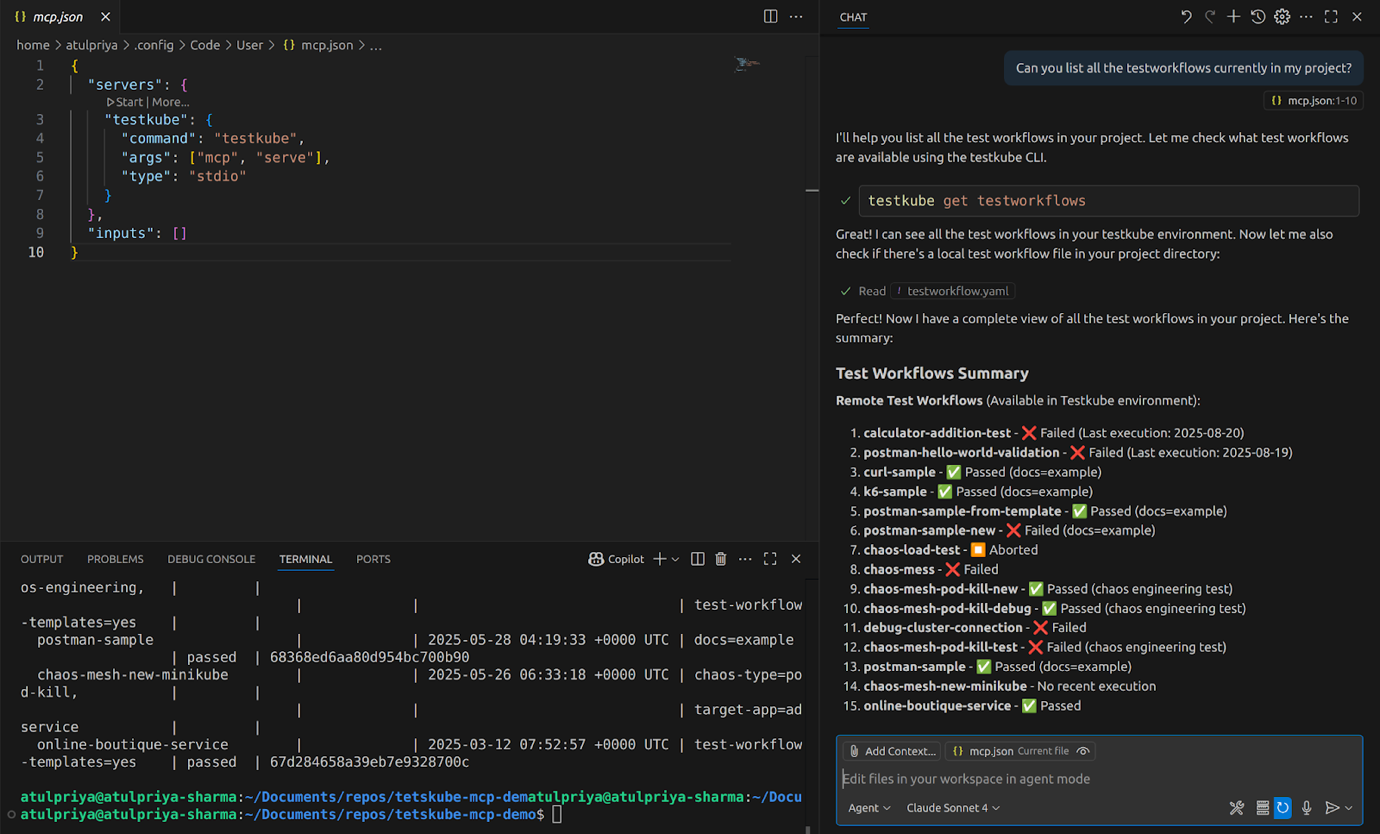
Instead of running kubectl exec commands or navigating dashboards, developers simply ask: "Can you list all the testworkflows currently in my project?" The AI handles execution, log retrieval, and analysis - all through the MCP Server.
Contextual Root Cause Analysis
When the test fails, the AI doesn't just report "assertion failed." It accesses the execution logs through Testkube MCP, correlates the failure with the source code (via GitHub MCP), and identifies the exact problem: return a * b should be return a + b on line 23.
Automated Remediation
The AI generates a fix, applies it to the code, and raises a properly formatted pull request with:
- Problem description
- Solution explanation
- Files changed
- Testing instructions
All without leaving the IDE or switching between tools.
For the full step-by-step demonstration including setup instructions, code walkthrough, read our Building AI-assisted Test Workflows using Testkube MCP and GitHub CoPilot blog post.
Benefits of Intelligent Test Orchestration
Bringing your testing platforms closer to AI agents not only improves your productivity but also affects the efficiency of your teams. Here’s why this matters in real-world Kubernetes setups for different users.
For AI Engineers
- Unified AI Agent Development: With MCP, AI engineers can create complex AI agents by connecting pre-built MCP servers. The Testkube MCP Server provides a complete test orchestration platform through a single, standardized interface that works with any MCP-compatible AI framework. By integrating multiple MCP servers with Testkube MCP server, AI engineers can build robust and efficient AI-powered pipelines and agents.
- Composable Multi-Tool Workflows: The real power of MCP comes when combining multiple MCP servers. An AI agent using Testkube MCP + GitHub MCP + Kubernetes MCP can implement end-to-end workflows: detect code changes in pull requests, determine which tests to run based on modified files, execute workflows on appropriate Kubernetes clusters, analyze failures with full infrastructure context, and commit fixes back to GitHub - all through natural language prompts.
- Context-Aware Debugging: AI agents gain access to Testkube's complete test result database. This enables sophisticated debugging and anomaly-detection strategies: identifying whether a failure is a new regression or a known flaky test, correlating failures with specific Kubernetes versions or cluster configurations, and predicting potential issues before they manifest in production based on historical patterns.
For Platform Engineers
- Centralized Test Observability for AI Consumption: Platform teams struggle with scattered test data across CI/CD systems, test runners, and monitoring tools. Testkube aggregates all test execution data - results, logs, artifacts, resource metrics - in a single platform. The MCP Server exposes this unified dataset to AI agents, eliminating the need to build custom data pipelines or integration layers.
- Reduced Integration Overhead: Every new AI tool or testing framework traditionally required custom integration work. MCP standardizes this: implement once, and any MCP-compatible AI tool (Cursor, VS Code Copilot, Claude Desktop, custom agents) can immediately access your testing infrastructure. For platform teams this reduces the maintenance overhead of keeping integrations current.
- Enhanced Developer Experience at Scale: Platform engineers enable self-service testing by making test orchestration accessible through conversational interfaces. Developers who don't understand Kubernetes YAML or complex CI/CD syntax can execute, debug, and optimize tests using natural language. This democratizes testing capabilities across the organization while platform teams maintain centralized control, governance, and observability through Testkube's unified platform.
Business Impact
- Faster Mean Time to Resolution (MTTR): Manually debugging an issue requires you to navigate through multiple systems, logs, traces and connect the dots to find the root cause, a process that can easily take hours. AI-assisted debugging through Testkube MCP reduces this to minutes by automatically aggregating logs, execution history, and infrastructure context. This significantly improves deployment frequency and incident response times.
- Improved Test Coverage: AI agents can identify testing gaps by analyzing code changes against existing test workflows and historical coverage data. They can suggest new test scenarios, generate workflow definitions, and even implement tests autonomously. This enables teams to maintain comprehensive test coverage as codebases grow.
- Accelerated Team Velocity: Context switching between development, testing, and debugging tools creates cognitive overhead that slows teams down. Conversational testing interfaces eliminate these transitions as developers stay in their IDE, ask questions in natural language, and receive actionable insights without navigating dashboards or learning specialized tools. This reduces and allows teams to maintain higher sustained velocity.
Best Practices for Intelligent Test Orchestration
- Start small: Connect MCP to existing workflows first - list, execute, analyze. Validate integration before building complex automation. This provides a sustainable path to maturity as well as avoid overwhelming the team.
- Compose multiple MCP servers: Combine Testkube + GitHub + Kubernetes MCP for end-to-end workflows. Single servers solve tactical problems; integrating multiple MCP servers enable strategic automation.
- Implement progressive permissions: Begin with read-only access, then enable execution, then workflow creation. Prevents accidental changes while teams learn AI behavior.
- Enrich AI context with documentation: Provide workflow docs, testing standards, and runbooks as MCP resources. Better context = better AI decisions.
- Optimize for token efficiency: Request specific data, not broad queries. Use "show failures in api-gateway from last 24 hours" instead of "show everything."
- Version control as truth/Human-in-the-loop: Keep workflow definitions in Git. Let AI execute but require PR approval for modifications. Maintains audit trail and enables rollback.
- Leverage historical patterns: Prompt AI to compare current failures against history: "Has this test failed before? What was the root cause?" Prompts like these transforms reactive debugging into proactive pattern recognition.
Conclusion
Model Context Protocols bridges the gap between enterprise platforms and AI workflows that have until now been frustratingly disconnected. The Testkube MCP Server transforms test orchestration from a manual, fragmented process into an intelligent, conversational experience.
Instead of context-switching between IDEs, CI/CD dashboards, and Kubernetes logs, developers simply create their AI agents to execute tests, diagnose failures, and suggest fixes - all within their natural development flow.
The integration of testing platforms like Testkube with AI agents using MCP will redefine test orchestration in Kubernetes environments. As AI agents learn from your test patterns and infrastructure behavior, they become increasingly effective at predicting issues, optimizing workflows, and maintaining quality at scale.
Ready to enable intelligent test orchestration in your environment?
- Try Testkube: Get started with the sandbox
- Set up MCP Server: Follow the configuration guide
- Join the community: Connect with us on Slack
About Testkube
Testkube is the open testing platform for AI-driven engineering teams. It runs tests directly in your Kubernetes clusters, works with any CI/CD system, and supports every testing tool your team uses. By removing CI/CD bottlenecks, Testkube helps teams ship faster with confidence.
Get Started with a trial to see Testkube in action.


