


Table of Contents
Start your free trial.
Start your free trial.

Start your free trial.



Table of Contents
Executive Summary
The Evolution of Test Maintenance
In modern environments, a failed test does not always mean a product bug. Many failures occur due to flaky tests, environment drift, infrastructure instability, or inconsistent test data. As a result, engineers spend a large amount of time investigating issues that are not actually related to application code. This is where failure categorization becomes important.
Understanding whether a failure comes from an application bug, infrastructure problem, or test instability is the first step toward reducing maintenance effort. Today, QA and DevOps teams spend significant time reviewing logs, rerunning tests, and applying temporary fixes. Over time, the effort required to maintain the test suite grows faster than the test coverage itself. The result is slower delivery cycles and decreased confidence in test pipelines.
Why Traditional Debugging Doesn’t Scale
As systems grow and testing pipelines expand, traditional debugging approaches begin to break down for several reasons:
- Manual Investigation is Time-Intensive: Engineers jump between logs and dashboards to trace failures. This fragmented workflow slows down investigation. It also makes debugging dependent on individual experience rather than consistent system insight. Another challenge is reproducibility where engineers often attempt to recreate failures locally or in staging environments. But environmental differences make failures difficult to reproduce, which increases investigation time.
- Limited Visibility: Modern applications run across microservices, containers, and distributed infrastructure. Failures rarely occur in isolation. Signals are spread across logs, metrics, test outputs, and Kubernetes events. Because these signals exist in separate tools, teams lack a unified view of the failure. Sometimes an issue in one service cascades into several others. Without proper correlation, these failures appear unrelated, increasing noise and making root cause identification harder.
- Reactive Bottlenecks: Most debugging workflows are reactive. Teams only investigate once tests fail, and pipelines are blocked. Frequent flaky tests create alert fatigue. Engineers begin ignoring failures because many of them turn out to be noise rather than real issues. Over time, this reduces trust in automated testing. Instead of learning from failures, teams repeatedly investigate the same types of issues.
What AI-Assisted Debugging Really Means
AI shifts the approach from reactive troubleshooting to proactive failure understanding by analyzing patterns across the entire execution history rather than looking at failures in isolation.
- Pattern Detection & Contextual Analysis: AI correlates logs, metrics, and cross-service dependencies into a single context to identify the true root cause. This allows the system to automatically distinguish between systemic product defects and isolated "flaky" tests, categorizing them into clear buckets like Application Regressions or Infrastructure Failures.
- Automated Flagging via Specialized Agents: Instead of engineers manually sifting through raw logs, AI triggers capture failed executions instantly. These specialized agents inspect execution data and system signals to provide contextual, actionable insights alongside test results, routing the failure to the right team immediately.
- Continuous Learning from Test Data: These systems improve over time by learning from historical test executions. As more data is collected, the AI becomes more accurate at recognizing recurring patterns and refining its categorization, creating a feedback loop where every failure helps harden the overall testing pipeline.
How Testkube Reduces Test Maintenance Overhead
Testkube is a cloud-native test orchestration platform designed to run and analyze automated tests directly inside Kubernetes environments. Testkube applies AI to detect and group issues by decoupling the "when" of the investigation from the "what" of the analysis.
The AI Agent Trigger: Automated TestWorkflow Execution Capture
TestWorkflows are the core specifications used by Testkube to define how tests run inside the Kubernetes cluster, including steps, resources, and parameters. An AI Trigger in Testkube acts as the bridge between a failed test and automated analysis. It is configured to run only when specific execution conditions occur. For example, the trigger can run when a Testkube TestWorkflow execution ends in a failed or error state.
- When a failure occurs, the trigger captures the full execution context. This includes logs, artifacts, and Kubernetes events related to the test run. The system then passes this context directly to an AI agent for analysis.
- Because the trigger operates automatically, teams no longer need to manually inspect failed executions. The system continuously monitors the pipeline and activates analysis only when needed.
The Testkube AI Agent: Intelligent Triage
Testkube provides a Failure Categorization Agent that performs the analysis. It inspects execution logs, test results, and system signals to determine the likely cause of the failure. By combining test execution data with Kubernetes-level diagnostics, the agent can quickly classify failures based on known patterns.
- While the AI trigger handles the automation by activating the AI Agent based on predefined conditions, such as a failed test execution, the AI agent focuses on reasoning and analysis.
- Instead of engineers manually reviewing logs, the agent identifies the failure category and applies the appropriate tags. This allows teams to quickly distinguish real product defects from environmental noise, helping them prioritize investigation and reduce time spent on routine triage.
Demo: Implementing Automated Failure Categorization
A common use case for QA is to know what the basic reason for test failure is. We configure AI Agent Triggers to automatically categorize failed test executions using the Failure Categorizer agent included with Testkube (see https://docs.testkube.io/articles/ai-agents#agent-templates for a list of all agents included with Testkube).
The example TestWorkflow intentionally fails a K6 load test due to an infrastructure issue, so the AI agent can analyze the execution logs and assign failure tags.
The implementation flow is as follows:
Step 1: Create a TestWorkflow and Testkube AI Agent
- Create a TestWorkflow to run test inside the Kubernetes cluster. If you already have one, you can continue using the existing workflow.

- In Testkube Dasboard, select Settings and click on AI Agents. You can view here the Testkube built-in AI Agents and the ones you can create using a template.

- Select Failure Categorizer AI Agent by clicking on Create Agent. This agent includes instructions to analyze execution logs and assign failure tags based on patterns (for example: infrastructure issue, code regression, flaky test). The agent reads the logs and execution context, analyzes the failure, and adds the appropriate tag. To create a custom Testkube AI Agent read our post on Building your first Testkube AI Agent.
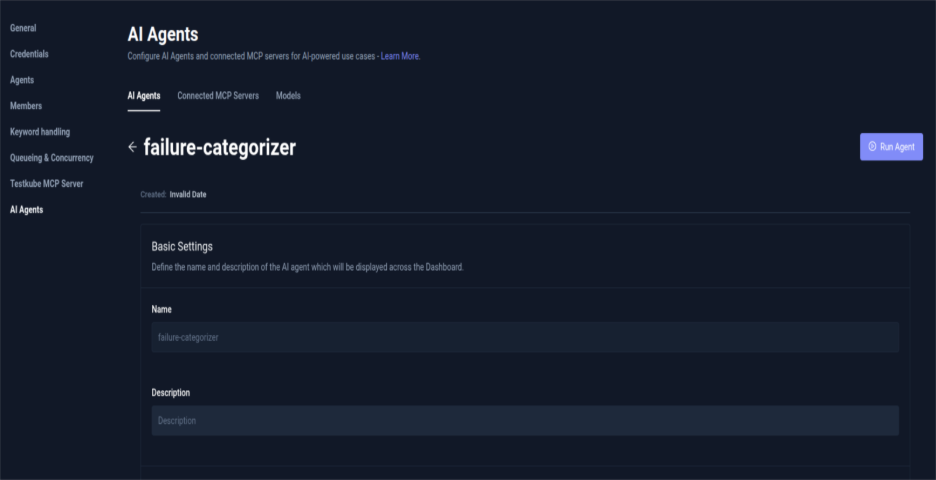
By default, the Testkube MCP server is automatically configured and attached to every Testkube AI Agent. For this setup, enable the MCP tools required by the agent and set them to Auto Approval. This allows the trigger to execute the tools automatically without requiring manual approval during the workflow.
Your Failure Categorizer Testkube AI Agent is ready to use. This agent can be run manually to understand the behavior or can be integrated with a trigger that will automate the execution so that all your test execution with failure results is categorized based on the reason.
Step 2: Configure the AI Agent Trigger
- Navigate to Integrations from the sidebar in Testkube Dashboard and select AI Agent Triggers tab.

- Click Create your first AI Trigger and complete the Condition and Action step.
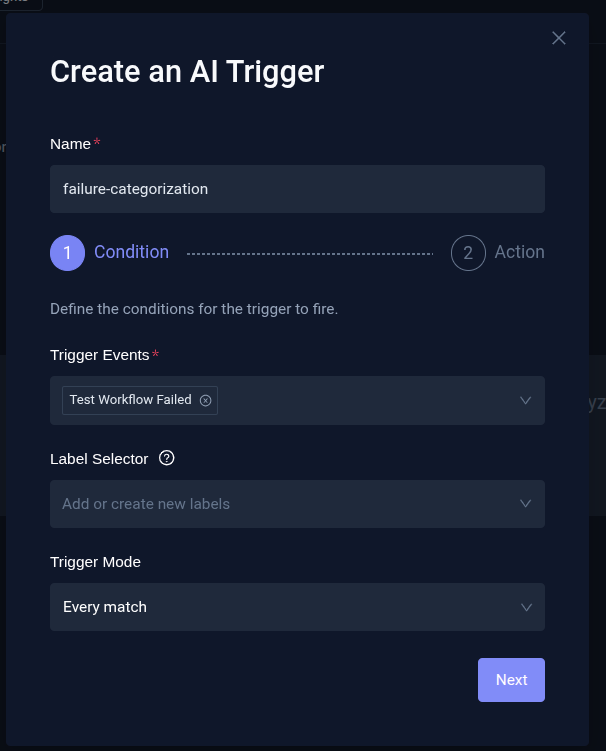
- In the Condition step:
- Provide a name for the trigger and define trigger events. These determine when the trigger runs (for example, when a TestWorkflow execution fails or is aborted).
- Select Label selector and Trigger mode depending on how you want the trigger to be applied.
- In the Action step:
- Set the action of AI Trigger by selecting the AI Agent (failure-categorization agent) that should run when the trigger fires. For API Token select an API Token already created or Autogenerate a new API token
- Set token permission to write so the agent can get access to execution metadata and add tags.
- Configure the Prompt Template which shall contain extra instructions appended to the agent’s system prompt when the trigger runs.
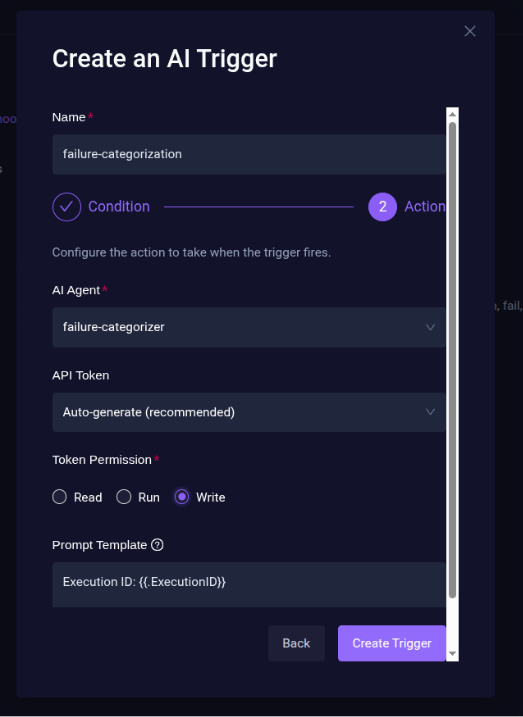
- Click Create Trigger to create a trigger for the failure categorizer agent.

The AI Trigger for failure categorization is ready and enabled in Testkube Dashboard.
Step 3: Failure Analysis
- For failure analysis, execute the Testworkflow using Testkube. When the test fails, the AI trigger activates automatically.

- The trigger sends execution logs and context to the Failure Categorizer AI Agent. The agent analyzes the failure and automatically adds the relevant failure tags.

- From the sidebar navigation in Testkube Dashboard, select Chats and you will see the recent AI Agent Execution summary.

Step 4: Executions Filtering
Once the tags are added, navigate to the Executions from sidebar in Testkube Dashboard to create a new filter.
- Under Execution Tags, select the failure tags generated by the AI agent. These filters executions based on the categorized failure type.

- Save the view and set visibility to Shared Across Environment to share it with your team.

- The view will appear under Executions → Shared Views.

Now your team can easily view and group failed test executions based on failure categories.
With AI Triggers and failure categorization agents in place, test failures are automatically analyzed and labeled without manual investigation. This helps with the first level of diagnosis and reduces the effort that goes in identifying the cause for test failure. Teams can quickly identify real issues, reduce debugging time, and maintain a more reliable test pipeline.
What QA and DevOps Teams Should Focus on Now
- Adopting AI-assisted debugging also requires changes in how teams approach test maintenance. One priority should be improving test stability instead of simply increasing test volume. A smaller, stable test suite provides clearer signals and enables better automation.
- Another important step is integrating observability with testing workflows. Tests should be connected to logs, metrics, and infrastructure signals. This context is essential for accurate AI analysis.
- Finally, teams should build continuous feedback loops using historical test data. By analyzing recurring failure patterns, tests and infrastructure configurations can be improved over time. These changes gradually reduce maintenance overhead while improving overall system reliability.
Conclusion
Test maintenance is no longer just a QA problem. In modern cloud-native systems, it has become a platform-level challenge. AI-assisted debugging offers a scalable way to reduce repetitive investigation and improve the reliability of automated testing. By combining intelligent analysis with platforms like Testkube, teams can move away from manual log inspection and toward automated failure understanding.
The result is less time spent debugging pipelines and more time focused on building reliable software. If you're looking to simplify test orchestration and bring AI-driven insights into your products, explore Testkube and see how it can help reduce test maintenance overhead in your Kubernetes environments.
About Testkube
Testkube is the open testing platform for AI-driven engineering teams. It runs tests directly in your Kubernetes clusters, works with any CI/CD system, and supports every testing tool your team uses. By removing CI/CD bottlenecks, Testkube helps teams ship faster with confidence.
Get Started with a trial to see Testkube in action.


