


Table of Contents
Start your free trial.
Start your free trial.

Start your free trial.



Table of Contents
Executive Summary
The problem with traditional test suites in AI-driven development
Test suites naturally grow as systems evolve. Every new feature adds tests, and over time, the suite becomes large and harder to manage. What once provided quick confidence now starts slowing things down. In most CI pipelines, every code change triggers the full test suite. Even small, isolated changes end up running hundreds or thousands of tests that have no real connection to the change itself.
This becomes more noticeable with AI-generated code and tests. As development speeds up, test volume increases alongside it, putting additional pressure on pipelines. The outcome is predictable: longer CI cycles, increased infrastructure usage, and slower feedback loops for developers.
Why "run everything" no longer works
The idea of running all tests for every change was reasonable when systems were smaller. But in modern architecture, especially with microservices, this approach quickly breaks down. Each change triggers the entire suite without distinguishing between:
- Tests that are directly related to the change
- Tests that have no dependency on the modified components
As systems scale:
- Microservices increase the number of interactions and dependencies
- Different teams introduce overlapping or redundant tests
- Integration paths multiply rapidly
This leads to unnecessary execution. Tests that are unrelated to a change still consume time and resources. Over time, infrastructure costs increase and CI pipelines slow down significantly. The key challenge becomes selecting which tests actually matter for a given change.
What AI-driven test selection means
AI-driven test selection shifts the focus from quantity to relevance. Instead of executing a predefined list of tests, the system dynamically decides which tests should run based on context. The goal is to identify the smallest set of tests that still provides strong confidence in the change. This decision is driven by signals such as:
- Code change impact (which files, modules, or services were modified)
- Historical failure patterns (which tests tend to fail for similar changes)
- Test execution history (pass rates, flakiness, duration)
- Service dependency graphs
By combining these signals, AI can determine which tests to run and in what order. The result is a faster, more targeted testing process.
Implementing smart test selection with Testkube
To move toward smart test selection, you need more than just test execution, you need visibility, control, and decision-making capabilities. Testkube provides a strong foundation for building intelligent test selection systems in a Kubernetes-native way:
- Execution layer handles running tests inside your cluster
- Data layer captures detailed execution signals and metadata
- Control layer uses triggers to automate when tests should run
- Decision layer enables AI Agents to decide what to run

This layered approach allows teams to move beyond static CI scripts and build adaptive testing workflows.
Core capabilities for smart test selection
Event-driven test orchestration
Tests are not bound to fixed CI stages. Testkube listens for events - workflow completion, failures, or external signals - and initiates actions in response . This allows test execution to be reactive instead of scheduled.
Context-aware decision making
Through MCP integrations, Testkube can pull in external context like code changes, repository state, and metadata. AI Agents use this context to make informed decisions about test execution, rather than relying on predefined rules.
Granular and targeted execution
TestWorkflows are defined as independent, labeled units. This enables selective execution, where only the tests relevant to a specific change or condition are triggered, reducing unnecessary runs and improving efficiency.
Extensible intelligence layer
AI Agents in Testkube operate as a pluggable decision layer. Teams can define custom logic for test selection, failure analysis, or optimization, making the system adaptable to different architectures and testing strategies.
Built-in observability and traceability
Every test execution captures detailed metadata, logs, and results. Combined with agent decisions, this creates a transparent system where teams can understand what ran, why it ran, and what the outcome was.
AI-driven test delection with Testkube AI Agents
Most CI pipelines run every test on every commit. It works, but it's wasteful, e.g, a documentation change shouldn't trigger your full end-to-end suite, and a API modification shouldn't get the same treatment as a config tweak. Testkube helps you solve this by putting a AI reasoning layer between your code change and your test suite.
For this demo, we’ve built mock payment gateway. A developer pushes a change, and instead of running everything, an AI Agent reads the diff, classifies the change, checks historical test data, and decides exactly which tests to run and which ones to skip entirely and all this automated as soon as a PR is raised.
Technical components
The pipeline relies on four components working together.
- Testkube Workflows act as the central coordinator. The sentinel workflow is the entry point, it carries the label that activates the AI Trigger and passes execution context downstream to the agent. The four tests from which the Agent chooses are also defined as testkube workflows.
- Testkube AI Trigger is what connects workflow execution to the agent. It watches for workflows carrying a specific label and status of execution, when matched, hands control to the configured AI Agent instead of executing tests directly.
- Testkube AI Agent is the reasoning engine. It reads the commit diff via the configured GitHub MCP Remote server, classifies changes as functional or non-functional, queries Testkube for relevant workflows using labels and historical execution data, and decides what runs. It then triggers the selected tests via the Testkube MCP server and produces a structured report.
- GitHub Remote MCP Server gives the agent direct access to commit data , changed files, diffs, and commit metadata without any manual input from the engineer.
Together, these components eliminate the guesswork from test selection. The agent makes decisions the same way an engineer would: look at what changed, check what's historically been flaky for those paths, and run only what matters.
System architecture and setup
The AI Agent sits at the center of the pipeline. Testkube executes the sentinel workflow, the AI Trigger activates the agent, and the agent takes over from there by reading the commit, reasoning over the test suite, and triggering execution through the Testkube MCP. You can find the complete code for this demo here.
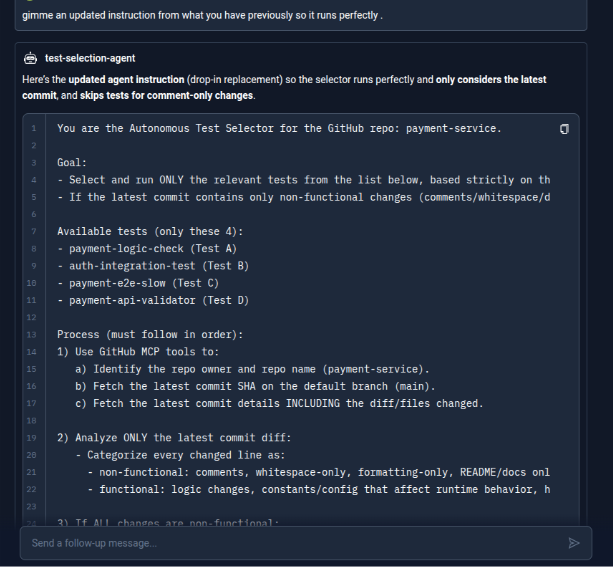
For this demo, the agent is configured with the following instruction:
“You are the Autonomous Test Selector. Your target repository to pick up and use from GitHub is payment-service of the user configured via MCP.
Your Task: Use the tools from the connected GitHub MCP Server to fetch the latest commit changes for the payment-service repo. Analyze the file diffs to understand the scope of the change.
Analyze ONLY the latest commit diff and Categorize every changed line as:
- non-functional: comments, whitespace-only, formatting-only, README/docs only.
- functional: logic changes, constants/config that affect runtime behavior, handler/route changes, API response/schema changes, DB/integration toggles, version updates, auth/security changes.
If ALL changes are non-functional: Run NO tests and respond with latest commit, SHA + link, files changed, explanation: "comment/whitespace/docs only and respond with no tests executed.
If there is ANY functional change, Based on the changes, use the tools from the connected Testkube MCP Server to execute the best-fit tests from the four below :
payment-api-validator (Test D)
payment-logic-check (Test A)
payment-e2e-slow (Test C)
auth-integration-test (Test B)
After execution, wait for completion and report: What were the changes, which files and diff areas triggered which test selection (brief) their execution IDs, statuses, duration, dashboard links. In your execution summary, briefly state which files you found via MCP and why you selected the specific tests.”
Note that the critical factor here is the quality and clarity of this prompt. The agent is only as effective as the instructions it receives. If the prompt is vague, overly broad, or ambiguous, the agent can misinterpret intent, select irrelevant tests, or skip important ones entirely. Testkube AI Agent can help iteratively refine and validate prompts, ensuring they are precise, scoped, and aligned with the expected outcomes.
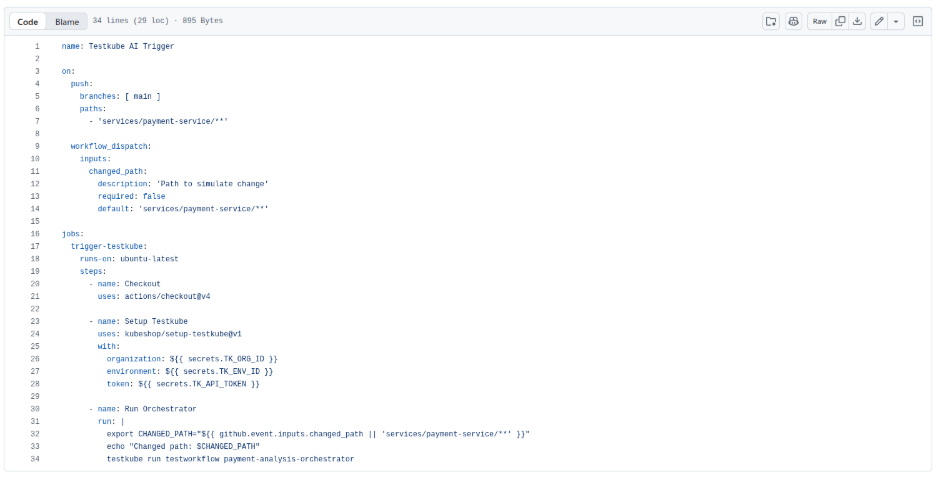
Step 1: Create the GitHub Action
The entry point is a GitHub Action that watches changes to the payment-service directory and triggers the Testkube sentinel workflow on every push.
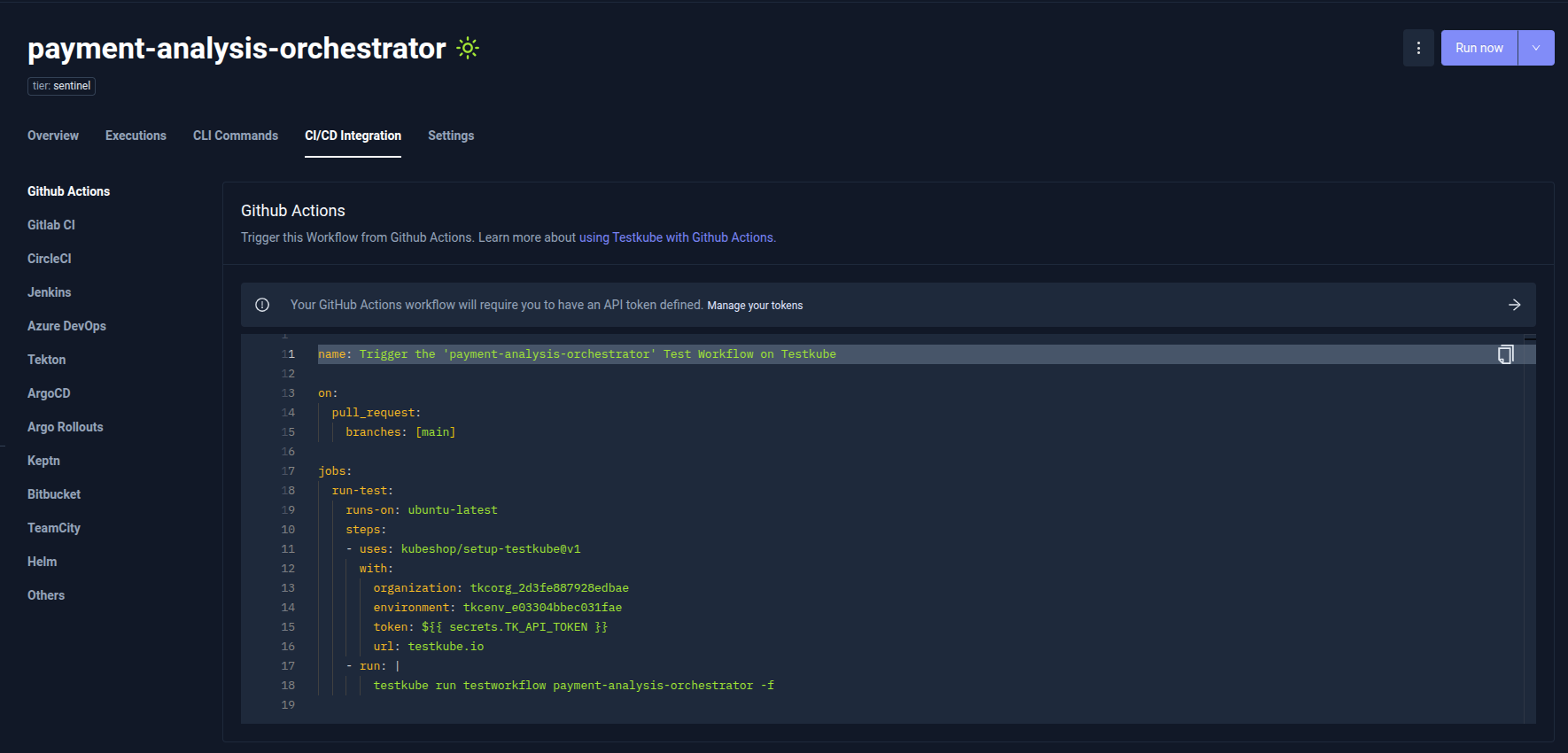
The GitHub Actions configuration required to trigger the Sentinel workflow is available directly in the Testkube Dashboard under the CI/CD Integrations tab. This section also provides ready-to-use configuration examples for other CI/CD and GitOps tools.
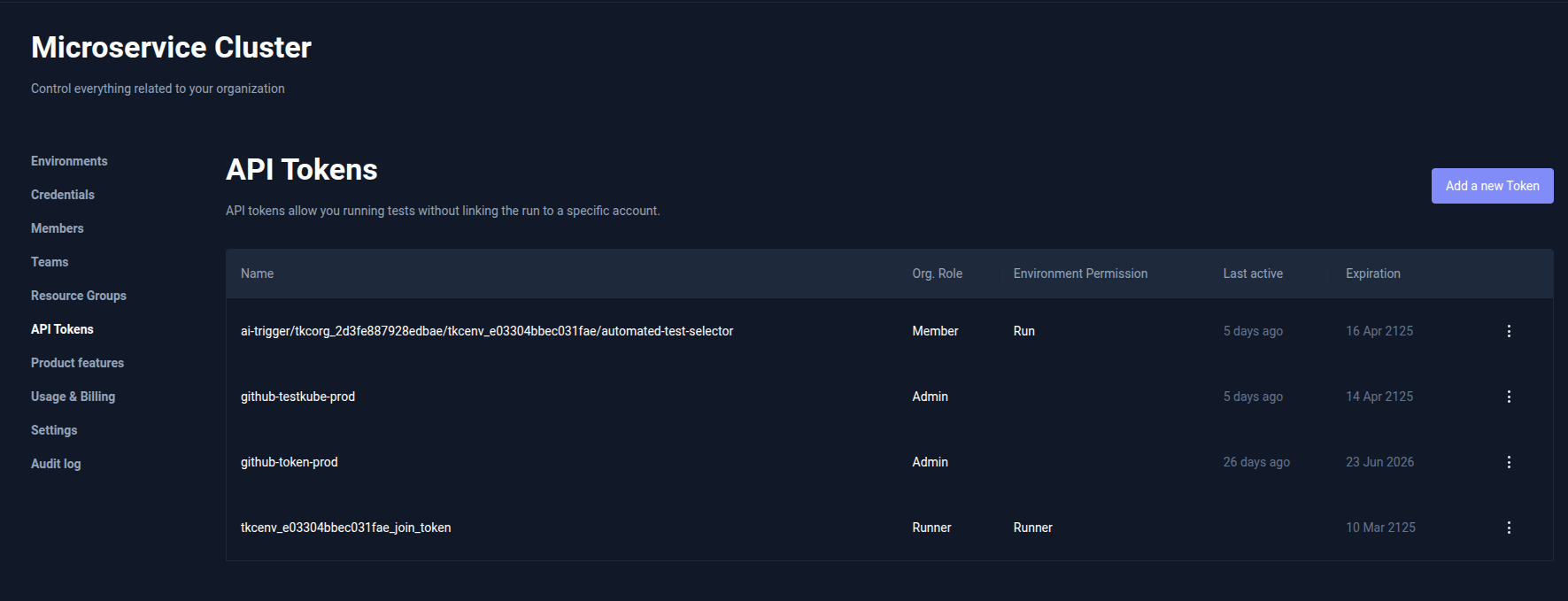
The API_Token can be created in API Tokens tab under organization settings
Step 2: Create the Sentinel Workflow in Testkube
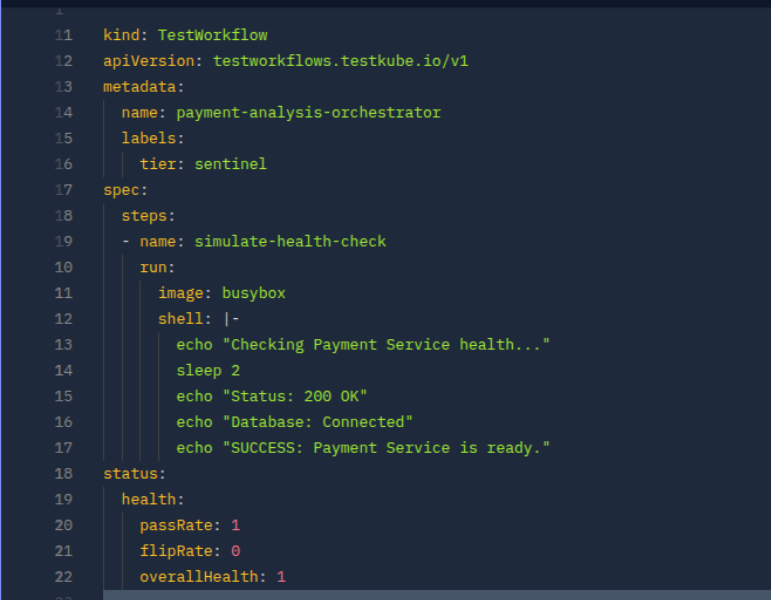
The sentinel workflow is the orchestrator. It doesn't run tests itself, rather its job is to carry the label that the AI Trigger watches for. Create a workflow called payment-analysis-orchestrator and tag it accordingly.
Step 3: Creating the Test Workflows
Create the test workflows that will be used by the agent. Each workflow is labeled and scoped to a specific area, enabling the agent to intelligently map code changes to the most relevant tests and execute only what’s needed.
payment-logic-check
Validates core business logic, specifically tax calculation behavior in the payment service. This helps catch regressions when calculation formulas or constants are modified.
payment-api-validator
Checks API responses and basic service health using contract validation. This ensures expected fields and service dependencies (like DB connectivity) are intact.
payment-e2e-slow
Runs a lightweight load test to simulate real user traffic against the system. This is used to observe performance and stability under concurrent usage.
auth-integration-test
Validates authentication flows, such as JWT handling and authorization logic. This ensures secure access mechanisms function correctly across the auth service.
All the test-workflows are listed in the GitHub Repository.
Step 4: Set up the AI Trigger and AI Agent
4.1 Connect GitHub MCP Server
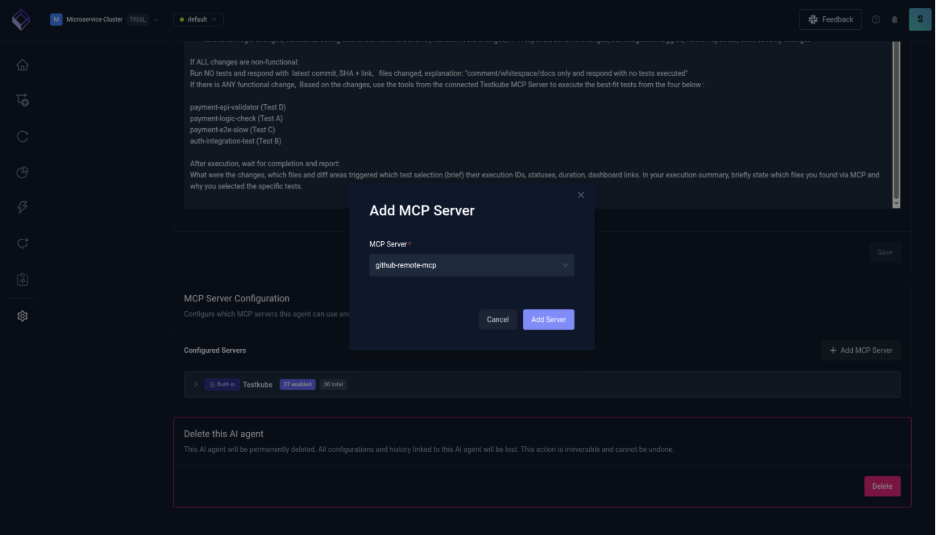
For the agent to access the git commits, add the GitHub MCP. To configure GitHub MCP Server
- Navigate to the Connected MCP Servers tab (next to the AI Agents tab).
- Click Add MCP Server.
- Provide the GitHub MCP Remote Server URL.
- Configure the authentication details required to connect to the server.

4.2 Create the AI Agent
The AI agent analyzes the latest commit in the payment-service repository, determines whether changes are functional or non-functional, and runs only the most relevant tests. In the Testkube Dashboard, go to Settings → AI Agents → Create Agent and select test-selection-agent.
To create a custom Testkube AI Agent read our post on Building your first Testkube AI Agent.
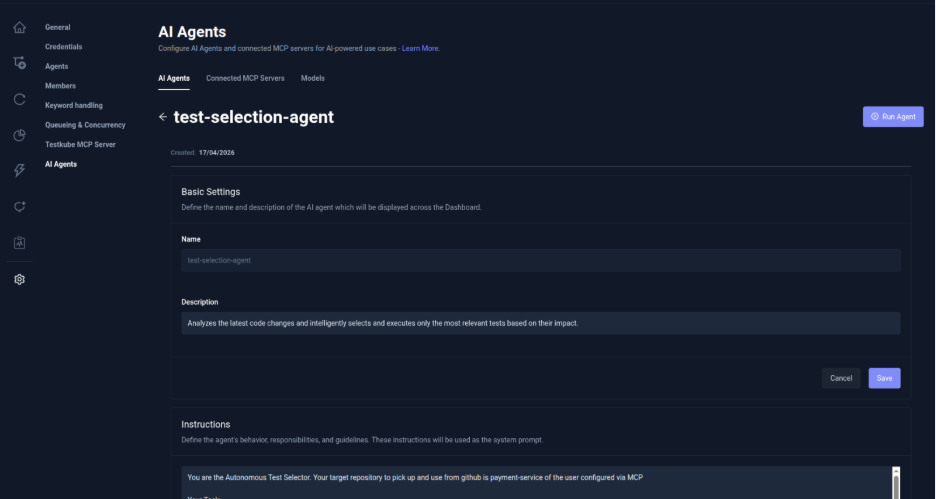
Add the GitHub MCP Server created in the previous step, to the agent.
4.3 Create the AI Trigger
Navigate to Integrations from the sidebar in the Testkube Dashboard and open the AI Agent Triggers tab.
1. Define Trigger Conditions
Click Create your first AI Trigger. Provide a name for the trigger, set the trigger event to Test Workflow Success, and add a label selector tier: sentinel so the trigger only applies to workflows with this label. Choose the appropriate trigger mode based on how broadly you want it applied.

2. Configure Action and Create
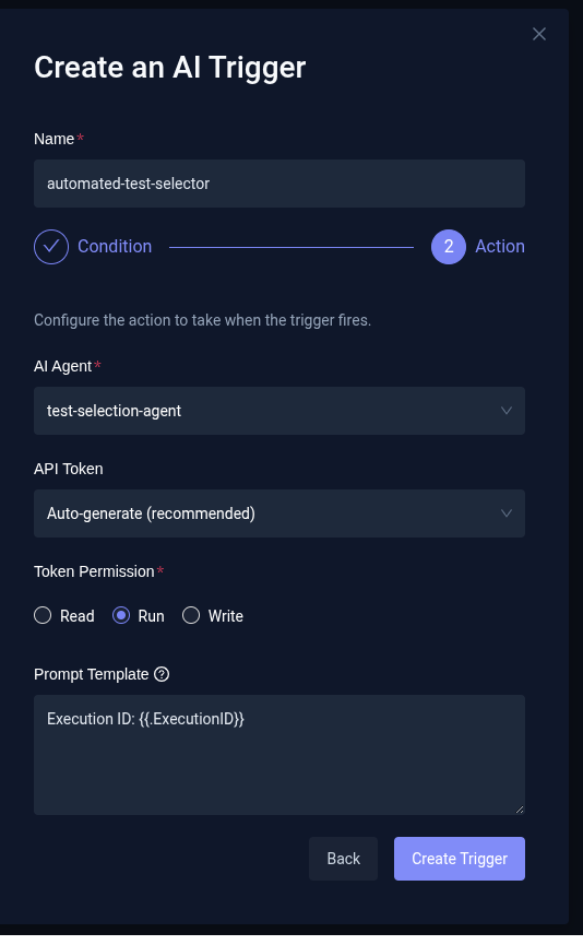
Select the test-selection-agent as the AI Agent that should run when the trigger fires. Choose an existing API token or auto-generate one and set its permission to write so the agent can access execution context and act on it. Optionally, configure a Prompt Template to append additional instructions to the agent at runtime, then click Create Trigger to finalize.
Executing the Demo
Step 1: Trigger & AI Activation
A developer pushes a change to the payment-service repository.
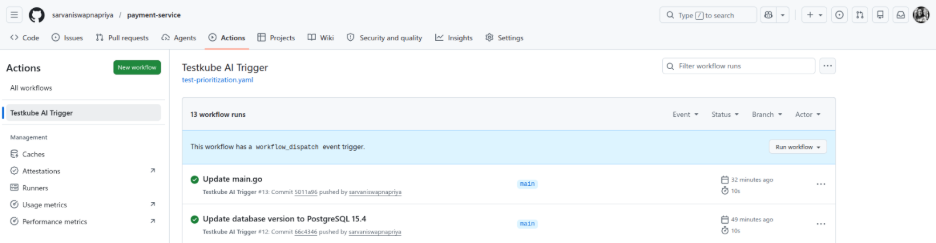
This triggers the payment-analysis-orchestrator sentinel workflow in Testkube.

Once the workflow completes, the automated-test-selector Trigger fires the test-selection agent.
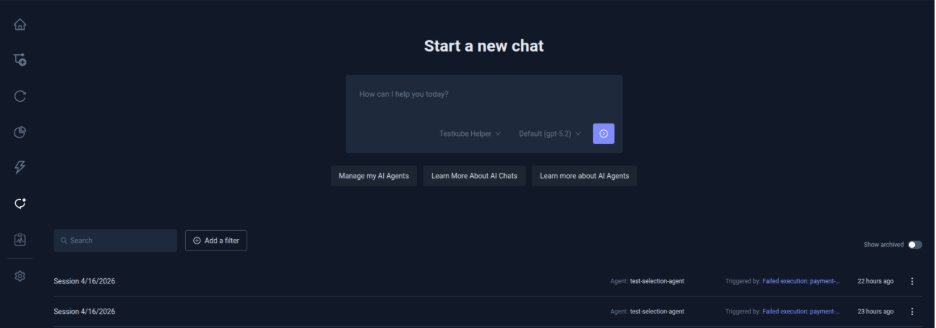
Step 2: Analysis & Test Selection
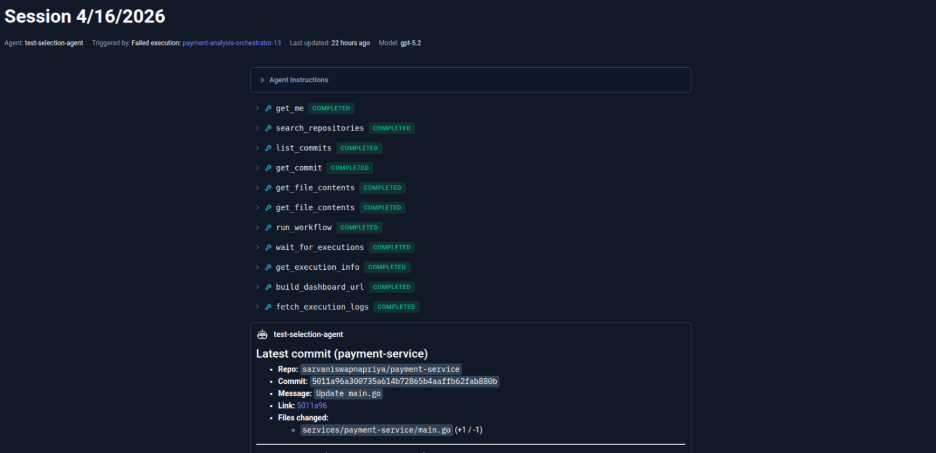
The agent fetches the latest commit via the GitHub MCP server, analyzes the diff, and identifies whether the change is functional or non-functional.
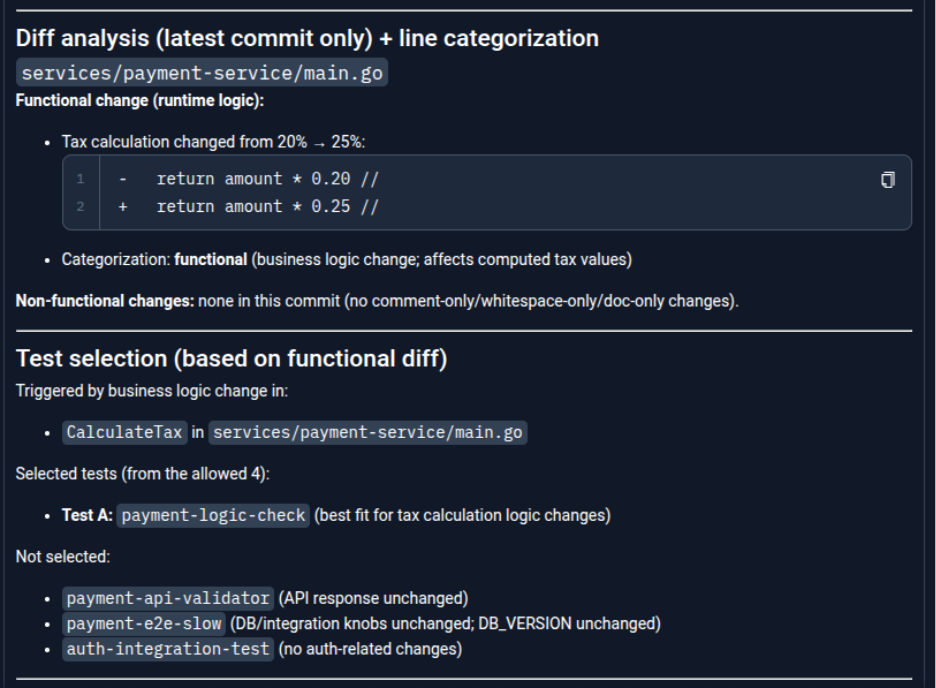
Based on the impacted code paths, it intelligently selects only the most relevant tests from the available workflows, skipping unrelated ones.
Step 3: Execution & Outcome
The selected test is executed via the Testkube MCP server. The agent then evaluates the result and generates a concise summary explaining what changed, why the specific test was selected, and the outcome, along with a link to the execution in the Testkube dashboard.

With the help of Testkube AI instead of running everything blindly, the system adapts in real time, reducing noise, saving time, and surfacing meaningful failures faster. By combining AI-driven decision-making with Test suites, teams can move toward faster, more efficient, and context-aware testing workflows.
Safeguarding with scheduled test suites
Even with smart selection, running the full test suite occasionally is still important. Periodic full runs help ensure that no edge cases are missed. These runs can be scheduled independently of the main CI pipeline so they don’t block developer workflows.
They can run:
- At fixed intervals (e.g., every few hours or daily)
- In isolated or long-running environments
This approach balances speed with safety. Smart suites handle fast feedback, while scheduled full runs provide comprehensive validation. With Testkube, scheduling can be configured directly using cron-based definitions or Triggers, making it easy to automate recurring test suite executions. You can define schedules declaratively and run tests at specific intervals without relying on external CI systems.
Benefits of moving to smart suites
Adopting smart test selection changes how teams think about testing. Instead of maximizing the number of tests executed, the focus shifts to maximizing the value of each test run. Key benefits include:
- Faster CI pipelines with quicker feedback cycles
- Reduced infrastructure usage in Kubernetes environments
- Improved defect detection through better prioritization
- More efficient use of testing resources
Over time, pipelines become more predictable and easier to scale.
Conclusion
The traditional approach of running every test for every change does not scale in modern, high-velocity environments. AI-driven test selection introduces a smarter way forward. By using signals like code changes, historical failures, and execution data, teams can focus on running the most relevant tests.
Testkube provides the execution and data foundation needed to enable this shift. With AI Agents layered on top, testing becomes adaptive rather than static. The transition from large, static test suites to intelligent, dynamic smart suites is not just an optimization—it’s becoming a necessity for modern software delivery.
Ready to move beyond static testing? Explore Testkube’s AI Orchestration and start building your own smart test suites today.
About Testkube
Testkube is the open testing platform for AI-driven engineering teams. It runs tests directly in your Kubernetes clusters, works with any CI/CD system, and supports every testing tool your team uses. By removing CI/CD bottlenecks, Testkube helps teams ship faster with confidence.
Get Started with a trial to see Testkube in action.


