Table of Contents
Start your free trial.
Start your free trial.

Start your free trial.



Table of Contents
Executive Summary
To test ephemeral vCluster environments, install a Testkube runner inside each feature vCluster, define tests once as a Test Workflow, and gate promotion in staging. Tests reach services at their in-cluster address, and only versions that pass move to production.
Giving each feature its own environment has become a common way to work. When a developer starts a feature, a vCluster is created for it. The feature runs there with its own copy of the services, and often the developers who build it now own its testing too.
Both changes help teams ship faster. Both also make testing harder to organize: there are now many environments, many people starting tests, and still one production to protect.
Three questions every team runs into
Once each feature has its own environment, the same three questions come up:
- Where do the tests run, so they can reach the feature’s services?
- What starts them: the pipeline, a deploy, or a person?
- How do you make sure only tested versions move on to production?
To answer them, we built a working setup in our lab. It has four feature vClusters on one cluster, a CI pipeline in Argo Workflows, Kargo for promotion, and Testkube for the tests. The rest of this post is what that setup taught us.

Where should tests run in a feature vCluster?
Tests that run inside the environment reach the app at its normal in-cluster address. There is no ingress, port-forward or public URL to set up for each feature, and nothing about the feature has to be exposed outside its vCluster.
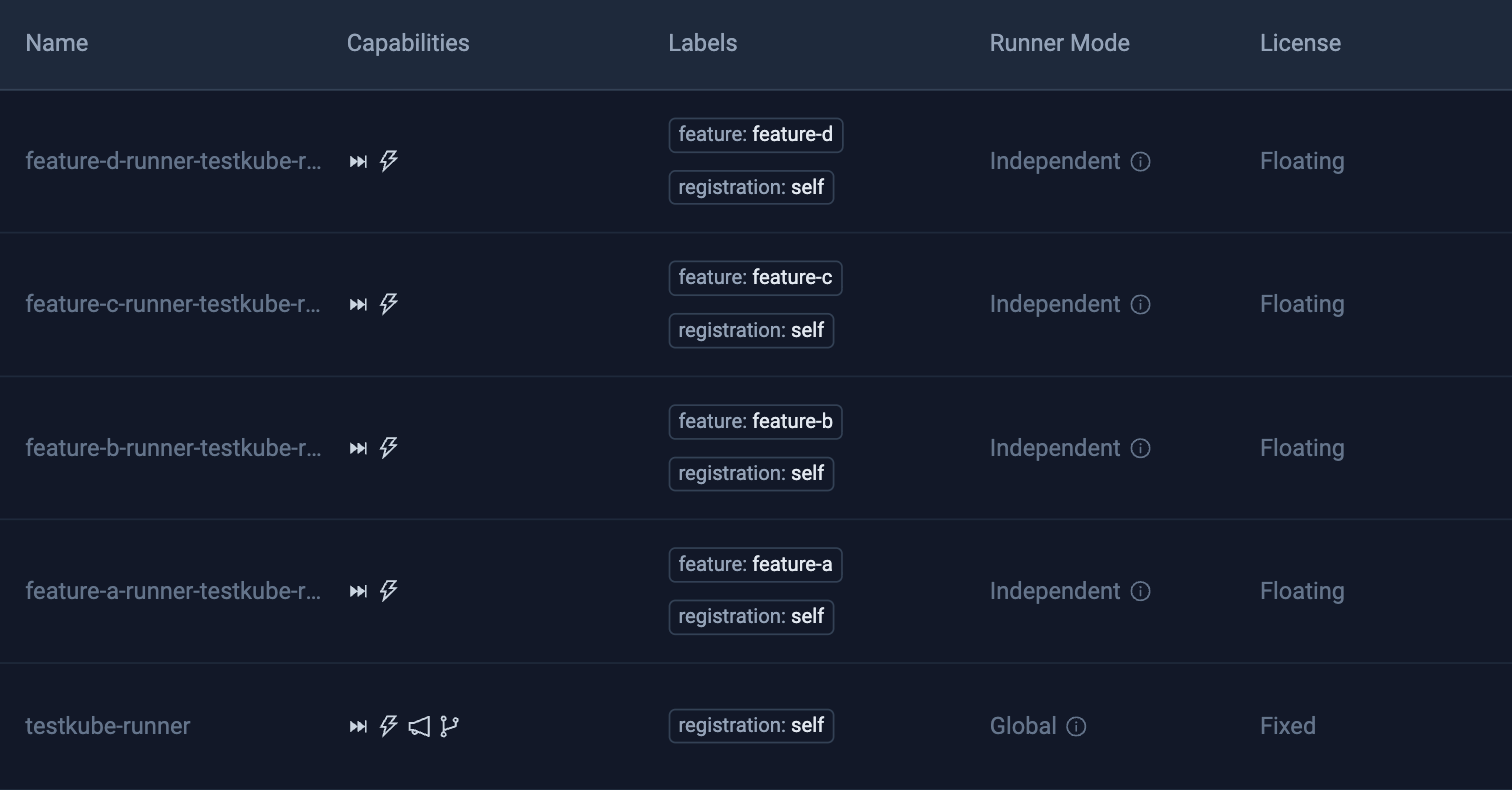
In Testkube, the piece that runs tests is a runner. Whatever creates the vCluster also installs a runner inside it, as one Helm release. The runner connects out to the Testkube control plane on port 443, so no inbound ports are opened.
Two choices made this work smoothly:
- Name the runner after the feature. A feature called feature-a gets a runner with feature-a in its name. Any tool that knows the feature name can then send its tests to the right place, with nothing to look up.
- Size licenses by how many features test at once. Feature environments come and go, so their runners use floating licenses. A runner holds one only while it runs tests, and when all are busy, the next run waits in line and starts on its own. The number that matters is how many features test at the same moment, not how many vClusters exist.
How do you trigger tests from CI, deploys and promotion tools?
When tests live inside the pipeline, every way of running them needs its own copy. Re-running one failed test means re-running the whole pipeline, and a deploy that skips the pipeline is never tested.
The fix is one test definition that says what to run, kept apart from what starts it. In Testkube that is a Test Workflow. Ours pulls the tests from the app’s Git repository, waits until every service answers its health check, runs 17 Playwright tests, and keeps the reports. The feature name is passed in when the run starts, so the same workflow serves every feature.
With one definition, anything can start the tests:
- The CI pipeline, as one step that runs the tests on the feature’s runner and waits for the result. A failed test fails the pipeline. We used Argo Workflows; any CI that can run a command works the same way.
- A deploy, through a trigger inside the vCluster. When a new version of the app rolls out, the runner starts the tests by itself, whatever tool did the deploy.
- A promotion tool, before a version moves on. The next section covers this.
- A person, from the dashboard or the command line, or a schedule.
In the lab, every one of these ran the same Test Workflow. Only two values changed per run: the feature name and the runner. From the command line, a run looks like this:
testkube run testworkflow vcluster-e2e-inside --config feature=feature-a --target name=feature-a-runner-testkube-runner --watchHow do you keep untested versions out of production?
Feature environments find problems early, but they come and go. The check that protects production belongs in an environment that stays up and looks like production: staging.
The pattern is simple. A promotion tool moves a new version to staging, runs the tests there, and lets production take only versions that passed. In our lab, Kargo did the promotion, and its verification step after each promotion to staging was a Testkube run. A version that failed stayed in staging, and the production stages never saw it.
Kargo calls Testkube through an AnalysisTemplate. This example from the Testkube Kargo docs runs a Test Workflow on the staging runner and fails the verification if any test fails:
apiVersion: argoproj.io/v1alpha1
kind: AnalysisTemplate
metadata:
  name: testkube-verification
  namespace: my-project
spec:
  args:
    - name: workflow-name
      value: e2e-tests
    - name: runner-name
      value: staging-runner
  metrics:
    - name: run-testkube-workflow
      provider:
        job:
          spec:
            backoffLimit: 0
            template:
              spec:
                restartPolicy: Never
                containers:
                  - name: testkube
                    image: kubeshop/testkube-cli:latest
                    env:
                      - name: TK_API_KEY
                        valueFrom:
                          secretKeyRef:
                            name: testkube-api
                            key: api-key
                    command: ["sh", "-c"]
                    args:
                      - |
                        testkube set context -c cloud \
                          --org-id tkcorg_YY \
                          --env-id tkcenv_ZZ \
                          -k "$TK_API_KEY"

                        testkube run testworkflow {{args.workflow-name}} \
                          --target name={{args.runner-name}} \
                          -f || exit 1
      successCondition: result.exitCode == 0
      failureCondition: result.exitCode == 1
      count: 1
Staging lives as long as production does, so its runner uses a fixed license. Tests there start the moment they are triggered, with no waiting in line. The same check can also run after a production deploy, as a smoke test.

How do you track test results across many vClusters?
With many environments and many ways to start tests, results scatter quickly: a log in one pipeline run, a job output somewhere else. It gets hard to say how a feature’s tests have gone this week.
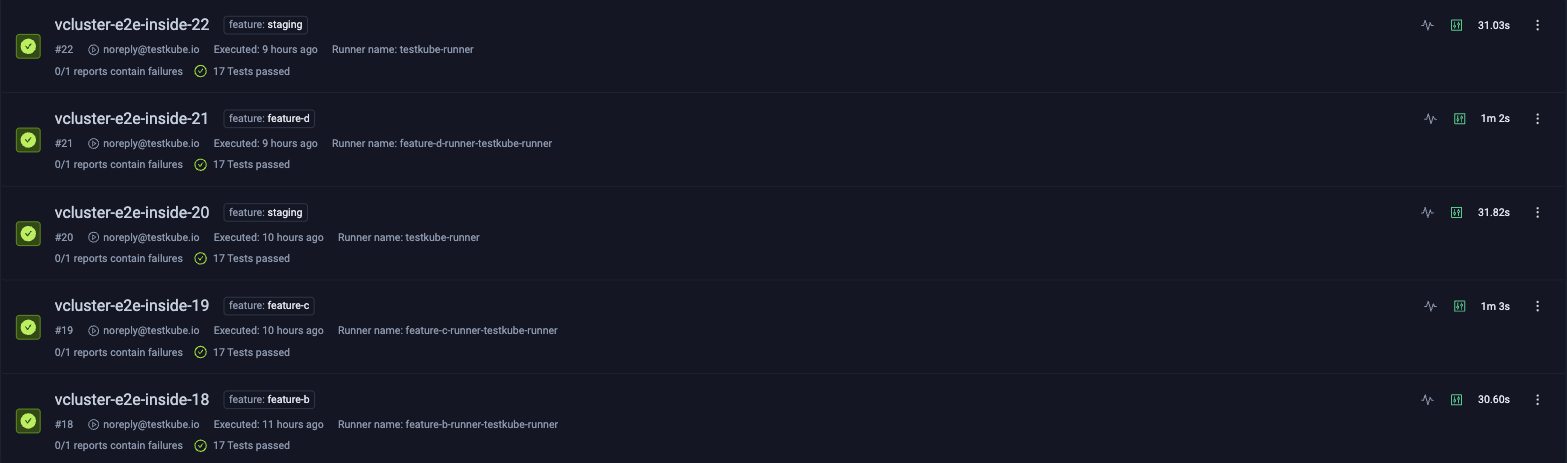
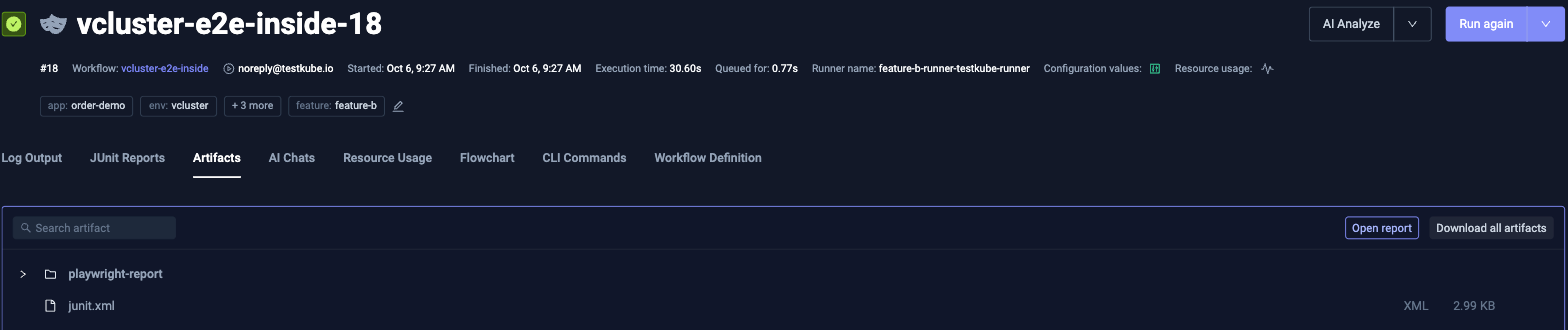
Keep every result in one place, tagged with the environment each run tested. In Testkube, every run lands in the same list, whether the pipeline, a trigger or the promotion check started it. A filter on the feature tag shows one environment’s history. Each run keeps its logs and reports, such as the Playwright report and the JUnit results.
Lessons from testing in ephemeral vClusters
- Use one name everywhere. The vCluster, its runner and the tag on each run all carry the feature name, so every tool can find the others without a lookup.
- Make cleanup part of teardown. Deleting a vCluster removed the runner’s pods, but not the runner’s entry in Testkube. Our teardown step removes both.
- Check that the app is ready before testing. A short readiness step that waits for every service keeps a slow start from showing up as a failed test.
- Tell the runner which namespaces to watch. A deploy trigger only sees changes in namespaces the runner watches, so include the app’s namespace when you install it.
- Expect the first run in a new environment to be slower. It pulls the test image and took about a minute in our lab. Later runs took about 30 seconds.
- Keep feature names short. One name becomes a vCluster, a namespace, a Helm release and a runner, and Kubernetes limits most names to 63 characters.
Learn more
Each piece of this setup has a page in the Testkube docs:
- Ephemeral Environments: runners for environments that come and go.
- Testkube Runners: fixed and floating licenses.
- Using Testkube with Argo Workflows: the test step in a CI pipeline.
- Kubernetes Event Triggers: tests that start on a deploy.
- Using Testkube with Kargo: the check before promotion.
- Execution Tags: tagging runs by environment.
Frequently Asked Questions
{{banner-get-started}}
About Testkube
Testkube is the open testing platform for AI-driven engineering teams. It runs tests directly in your Kubernetes clusters, works with any CI/CD system, and supports every testing tool your team uses. By removing CI/CD bottlenecks, Testkube helps teams ship faster with confidence.
Get Started with a trial to see Testkube in action.