


Table of Contents
Start your free trial.
Start your free trial.

Start your free trial.



Table of Contents
Executive Summary
How Testkube uses its own AI assistant
- The challenge: Testkube engineer Catalin H needed to create workflows that would fail randomly to test a new workflow health feature, rather than relying on their existing 100% successful workflows.
- AI-powered solution: Using Testkube's AI Assistant, Catalin generated a complete YAML workflow with inline Node.js code that simulates random failures, all within a single configuration file without needing separate repositories.
- Iterative improvement: Through conversational refinement with the AI Assistant, the solution evolved to include environment variables for controlled testing and runtime parameterization through the UI, making it both random and controllable.
- Broader applications: Beyond workflow creation, the AI Assistant helps with log analysis, dashboard navigation, workflow search/filtering, YAML configuration assistance, and real-time troubleshooting across the Testkube ecosystem.
The best proof that a tool works is when your own engineers reach for it without being asked. That is exactly what happened when Catalin H, Senior Full Stack & AI Systems Engineer at Testkube, faced a development challenge and instinctively turned to our AI Assistant.
Want the broader context? Why AI accelerates code generation faster than testing infrastructure can keep up, and how teams close the gap. Read: How to scale testing for AI-accelerated development →
The challenge: building workflows that fail on purpose
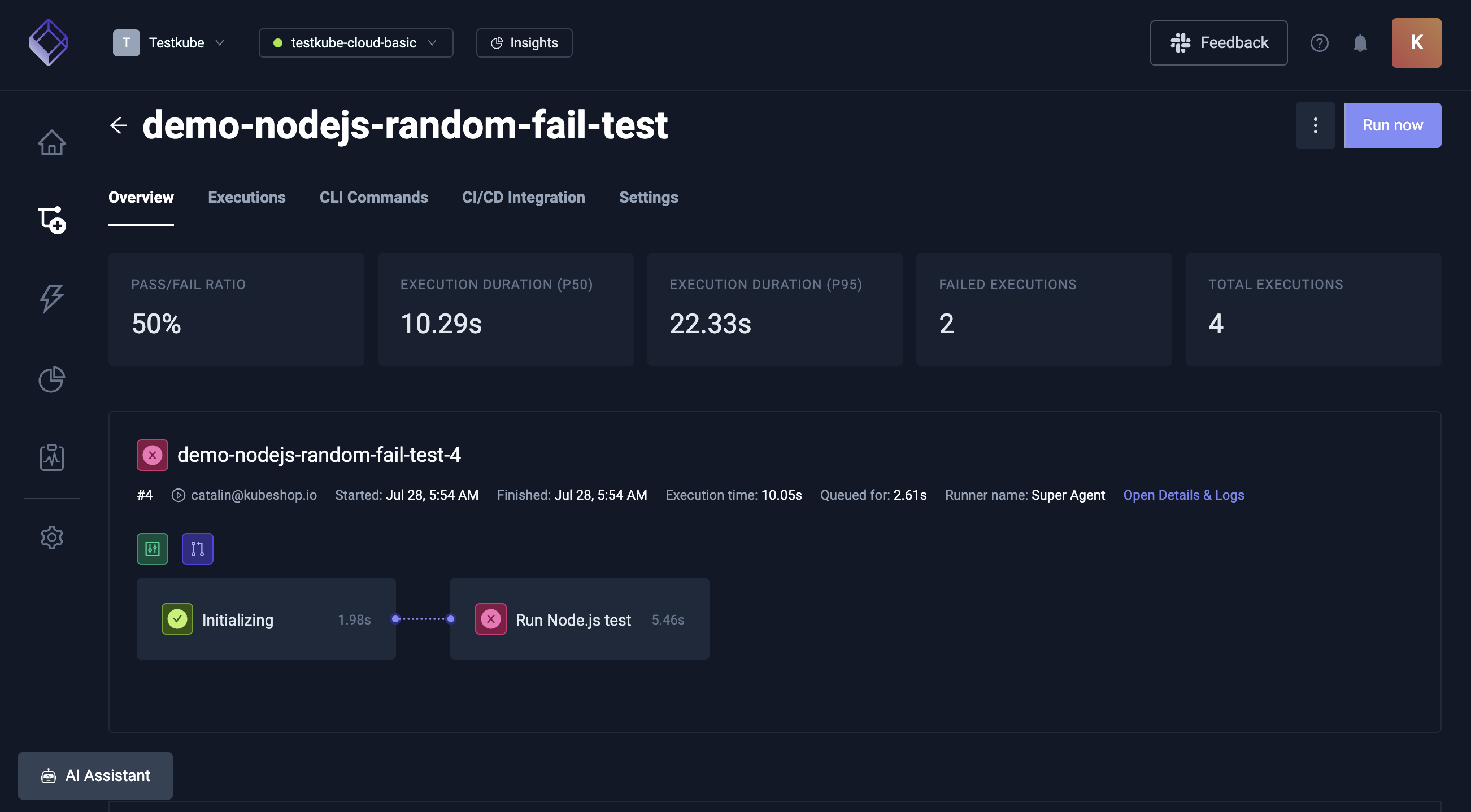
Why would a testing platform need workflows designed to fail? To validate features that respond to test failures, you need real failures to test against. Testkube was building a workflow health feature that displays weather icons next to workflow names based on status. The team's existing workflows ran at 100% success, which meant the only way to see failure-state UI was to build workflows that fail by design.
The Testkube team was implementing a workflow health feature that displays weather icons next to workflow names, indicating their status. While they had plenty of healthy, green workflows running at 100% success, they needed something different for testing: workflows that would fail randomly to simulate real-world flaky behavior.
"For my testing, I needed some workflows that were flaky, that failed randomly, so I can see different versions of that health," Catalin explains in his demonstration. Rather than spending time manually crafting these specialized workflows, he decided to explore how our AI Assistant could accelerate the process.
The AI-powered development process
How does the Testkube AI Assistant generate test workflows? Through conversational prompts that build context incrementally. Start with a constraint or goal, ask the Assistant to produce a working solution, then refine through follow-up prompts. The Assistant has context about Testkube features and can suggest capabilities you may not know about, like inline file content or runtime parameterization.
Starting with the right questions
The key to success with AI assistance lies in asking the right questions and building context incrementally. Catalin began with a specific constraint: "I wanted to run this with a single YAML, I don't want to write another test in another language on a GitHub repository and have to check out and take more time for this workflow."
His first query to the AI Assistant was straightforward: Could the content of a Node.js test file be written directly into the YAML workflow file? Within seconds, the AI Assistant confirmed this was possible using the content field in YAML and provided the technical foundation needed to proceed.
From concept to working code
With the basic approach validated, the next step was implementation. Catalin asked the AI Assistant to "write the YAML for a workflow that fails randomly, use Node.js and write the code of the test as an inline content file."
The AI Assistant delivered a complete solution that included:
- A properly structured YAML configuration with a "demo" prefix for easy identification.
- Inline Node.js code using
Math.random()to generate random pass/fail behavior. - Correct syntax for embedding code directly in the workflow specification.
"The name we can see has the demo prefix correctly and we can see it uses the spec content files, the syntax looks correctly," Catalin noted while reviewing the generated code.
Here is the generated YAML:
kind: TestWorkflow
apiVersion: testworkflows.testkube.io/v1
metadata:
  name: demo-nodejs-random-fail-test
spec:
  config:
    forcedResult:
      type: string
      default: ""
  content:
    files:
      - path: /test.js
        content: |
          const forcedResult = process.env.FORCED_RESULT || "{{ config.forcedResult }}";
          if (forcedResult) {
            console.log(`Forced result: ${forcedResult}`);
            process.exit(forcedResult === 'pass' ? 0 : 1);
          } else {
            const randomFail = Math.random() > 0.5;
            console.log(`Random result: ${randomFail ? 'fail' : 'pass'}`);
            process.exit(randomFail ? 1 : 0);
          }
  steps:
    - name: Run Node.js test
      container:
        image: node:14
        env:
          - name: FORCED_RESULT
            value: '{{ config.forcedResult }}'
      shell: node /test.js
Iterative improvements through conversation
The real power of the AI Assistant became apparent in the iterative refinement process. Recognizing that purely random behavior would be difficult to test reliably, Catalin requested an enhancement: adding an environment variable to force specific results.
The AI Assistant integrated this requirement, updating both the Node.js code to read from process.env and the YAML configuration to include the environment variable with a default value. This allowed for both random behavior and controlled workflow scenarios.
Discovering advanced features
"Testkube allows you to pass the runtime and you can parameterize," Catalin explained after the AI Assistant suggested the feature, then asked it to implement the solution using spec.config parameters. This allowed the workflow to accept runtime values through the UI, eliminating the need for manual YAML edits.
The results: from idea to implementation in minutes
What was the total time from prompt to working parameterized workflow? A few minutes of conversation. The final solution included a complete YAML workflow, inline Node.js for random failure simulation, environment variable support for controlled behavior, runtime parameterization for UI-based control, and proper error handling. No separate repository. No manual YAML drafting from scratch.
The entire process from initial concept to fully functional, parameterized workflow took just a few minutes of conversation with the AI Assistant. The final solution included:
- A complete YAML workflow configuration.
- Inline Node.js code for random failure simulation.
- Environment variable support for controlled workflow behavior.
- Runtime parameterization for UI-based control.
- Proper error handling and execution flow.
"This is one way I've been using the copilot. It really works best when you ask some questions, build a bit of context, and try to learn about the Testkube features as the copilot also guides you with that and gives you context," Catalin observed.
Beyond workflow creation: other AI Assistant use cases
What else can the Testkube AI Assistant do besides generate workflows? Five primary use cases. Log analysis (ask "why did this fail?" and get a diagnostic summary). Dashboard navigation (ask for a feature and get a direct link). Workflow search (natural language filters). YAML configuration help. Real-time troubleshooting with access to Control Plane data.
Catalin's workflow creation example represents just one facet of how Testkube's AI Assistant can enhance your testing operations. Here are additional ways teams use Testkube's AI Assistant:
- Log analysis and debugging. When workflow executions fail, the AI Assistant can analyze log outputs and provide insights. Simply ask questions like "why did this execution fail?" or "write a short summary of what failed" to get detailed diagnostic information without manually parsing through lengthy log files.
- Dashboard navigation and discovery. The AI Assistant serves as an intelligent guide through the Testkube Dashboard, helping users quickly locate specific features and pages. Whether you need to "create an API token" or "check the audit log," the AI Assistant provides direct links to relevant pages, eliminating navigation guesswork.
- Workflow search and filtering. Complex queries become simple with natural language processing. Ask the AI Assistant to "find all workflows that failed" or "find all successful cypress workflows and failed postman workflows," and it will navigate you to the appropriate pages with filters pre-applied.
- YAML configuration assistance. Beyond creating workflows from scratch, the AI Assistant excels at helping with specific configuration challenges. Whether you need examples of service configurations, worker settings, or parallelism setups, the AI Assistant can provide tailored examples and explanations.
- Real-time troubleshooting. The AI Assistant's deep integration with the Testkube ecosystem means it can access real-time data from your Control Plane, providing current insights rather than generic advice. This contextual awareness makes troubleshooting more effective and recommendations more relevant.
The collaborative advantage
What makes the Testkube AI Assistant different from a generic chatbot? Context and continuity. Generic chatbots answer isolated questions without state. The Testkube AI Assistant maintains context across the full conversation, references your actual environment through the Control Plane integration, anticipates follow-up needs, and proactively suggests Testkube features relevant to your task.
What sets Testkube's AI Assistant apart from generic chatbots is its collaborative approach to problem-solving. Rather than simply answering isolated questions, it maintains context throughout conversations, anticipates follow-up needs, and proactively suggests improvements. For deeper integration patterns, see the Testkube MCP Server post, which extends these capabilities to external AI agents and IDEs.
"You can collaborate with it to get to the desired results," Catalin noted, highlighting how the AI Assistant becomes a true development partner rather than a question-answering tool.
Watch Catalin's full demonstration
Want to see this entire process in action? Watch Catalin's detailed walkthrough where he collaborates with the AI Assistant in real-time to build these flaky workflows from scratch.
Getting started with AI-powered workflow development
How do I start using the Testkube AI Assistant? Enable it in your organization settings. Once on, the Assistant becomes available throughout the dashboard for workflow generation, log analysis, navigation help, and YAML configuration assistance. It works across all environments and clusters connected to your Control Plane.
The success of Catalin's workflow creation example demonstrates the potential for AI to transform how we approach testing challenges. By combining domain-specific knowledge with conversational AI, complex tasks become accessible to developers regardless of their familiarity with specific testing frameworks or configurations.
Whether you are building flaky workflows for feature validation, debugging failed executions, or learning your way around Testkube's test workflow configuration, the AI Assistant provides intelligent guidance that adapts to your specific needs and context.
Enable the Testkube AI Assistant in your organization settings and discover how conversational AI can streamline your development today.
Key takeaways
- The proof of internal use matters. When Testkube engineers reach for the AI Assistant for their own work without being prompted, that is a stronger validation than any marketing claim about AI capabilities.
- Iterative prompts beat single big prompts. The most effective use of the AI Assistant is building context across multiple turns: start with a constraint, get a working baseline, then refine. The Assistant suggests features you may not know about along the way.
- Inline file content eliminates a layer of overhead. Testkube workflows let you embed Node.js, Python, or shell scripts directly in the YAML through
content.files. No separate repo, no checkout step, no extra moving parts. - Runtime parameterization makes one workflow reusable. With
spec.config, the same workflow accepts different inputs through the dashboard UI at execution time. No YAML edits required to change behavior. - The Assistant covers more than workflow generation. Log analysis, dashboard navigation, search and filtering, and YAML configuration help are all in scope. The real value compounds across daily use, not just one-off generation tasks.
Frequently asked questions
What is the Testkube AI Assistant?
The Testkube AI Assistant is a conversational AI built into the Testkube dashboard. It generates test workflows from natural language, analyzes failed execution logs, helps navigate the dashboard, assists with YAML configuration, and provides real-time troubleshooting. It has deep context about your Testkube environment, so its answers reference your actual workflows, executions, and configurations rather than generic advice.
Can the Testkube AI Assistant generate a complete test workflow from a prompt?
Yes. A Testkube engineer used it to generate a complete YAML test workflow with inline Node.js code that simulates random failures, all from natural-language prompts. The Assistant produced a working workflow, then iteratively refined it to add environment variable controls and runtime parameterization through the UI, all without leaving the chat.
How does the Testkube AI Assistant differ from generic AI chatbots?
Generic chatbots have no access to your testing environment. The Testkube AI Assistant is integrated with your Control Plane and has real-time context about your workflows, executions, logs, and configurations. It maintains conversation context across multiple prompts, proactively suggests Testkube features relevant to your task, and produces answers grounded in your actual setup.
What can I use the Testkube AI Assistant for?
Five primary use cases. Generating test workflows from prompts. Analyzing failed execution logs and producing summaries. Navigating the dashboard (ask "create an API token" and get a direct link). Searching and filtering workflows using natural language. Getting YAML configuration help for specific scenarios like services, workers, or parallelism setups.
How does inline content work in Testkube YAML workflows?
Testkube test workflows support a content.files field that lets you embed script content directly inside the YAML, eliminating the need for a separate repository. The Node.js, Python, or shell script lives in the workflow definition itself. The container step references the file path and runs it as part of the workflow.
Can I parameterize Testkube workflows for runtime UI control?
Yes. Use the spec.config block in your test workflow to declare configurable parameters. Reference them inside the workflow using template syntax. The Testkube dashboard then prompts for those values at runtime, so you can pass different inputs without editing the YAML each time. The AI Assistant can write this configuration for you.
How do I enable the Testkube AI Assistant?
Enable the AI Assistant in your Testkube organization settings. Once on, it becomes available throughout the dashboard for workflow generation, log analysis, navigation help, and YAML configuration assistance. It works across all environments and clusters connected to your Control Plane.
About Testkube
Testkube is the open testing platform for AI-driven engineering teams. It runs tests directly in your Kubernetes clusters, works with any CI/CD system, and supports every testing tool your team uses. By removing CI/CD bottlenecks, Testkube helps teams ship faster with confidence.
Get Started with a trial to see Testkube in action.


