Table of Contents
Start your free trial.
Start your free trial.

Start your free trial.



Table of Contents
Executive Summary
Why AI debugging needs a cost strategy
Testkube AI Agents can automatically categorize failures and surface root causes without someone manually digging through logs. Refer to How Testkube Reduces Test Maintenance Overhead to enable the failure categorization AI Agent and see it in action using AI Trigger. Once you have set up AI-assisted debugging with Testkube, you will have already felt the difference.
But as teams scale this approach, a new challenge emerges:
How do you make AI debugging sustainable?
Every failed test run ships logs, stack traces, and artifacts to an external LLM API. At scale, that means:
- Token costs spiraling out of control
- Sensitive data leaving your infrastructure
- Online / internet connectivity required
- Latency from network round trips slowing autonomous debugging
That is the hidden tax of AI-assisted debugging, and it is not sustainable.
The goal is more than just smarter debugging; it is efficient, predictable, and secure debugging. A local large-language model (LLM) can deliver that. By running an intelligent model inside your environment, you slash token usage, eliminate network lag, and keep every log and event behind your firewall.
In this post, we will configure Testkube with a local model for AI-assisted development and debugging, balancing cost, speed, and security without compromising insight.
Why local models change the game
The cost and security friction of external LLM APIs is not inevitable. Running models locally shifts AI debugging from an unpredictable third-party dependency to a reliable internal capability. Analysis happens inside your infrastructure and not in a black box across the internet.
Here is what that unlocks:
- Cost Control: No per-token billing. No surprise spikes from a single flaky test suite producing megabytes of logs. Just predictable infrastructure costs.
- Data Privacy: Logs, stack traces, and execution artifacts never leave your VPC. Meeting compliance requirements (HIPAA, SOC2, GDPR) becomes straightforward instead of a legal headache.
- Offline & Air-Gapped Support: Works in restricted environments where external APIs are simply not allowed. Government, finance, and defense can finally adopt AI-assisted debugging.
- Low Latency: Eliminate external API round trips. In CI/CD, each second matters. Local inference means faster root-cause analysis and tighter feedback loops.
The goal is to use the right tool for the right job. Route basic, high-volume debugging to a local model. Reserve external APIs for complex, low-frequency analysis. Hybrid, not all-or-nothing.
Local model vs external LLM API at a glance
Setting up a local model with Testkube
Testkube already captures rich execution context:
- Test logs
- Kubernetes events
- Pod lifecycle data
- Artifacts
Instead of exporting this data externally, you can plug in a local LLM to analyze it directly.
This keeps the same AI-assisted debugging workflow and runs it entirely within your infrastructure. Follow the setup below to configure Testkube to use a local LLM runtime.
Prerequisites
Before setting up Testkube with a local model, ensure the following are in place:
- Kubernetes cluster with Testkube installed and configured
- Ollama and ngrok installed
1. Deploy a local model runtime using Ollama
- Download any suitable model. We have used qwen3.5:latest for this setup.
- Expose the Ollama API by creating a Traffic Policy using:
Save the above manifest in ollama.yaml.
- Start your Ollama endpoint:
This will give you an endpoint where Ollama is running.
- Verify that your Testkube cluster can access Ollama.
Ollama runs as a background service, so the endpoint stays available across sessions without restarting it manually.
2. Configure the Testkube AI Agent to use the local endpoint
- In the Testkube Dashboard, go to Settings and select AI Agents. Here you can configure AI Agents, Connected MCP Servers, and Models.
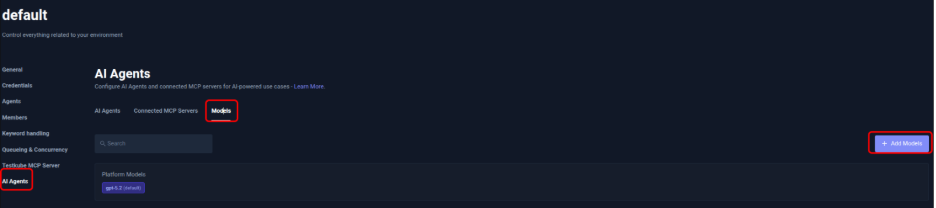
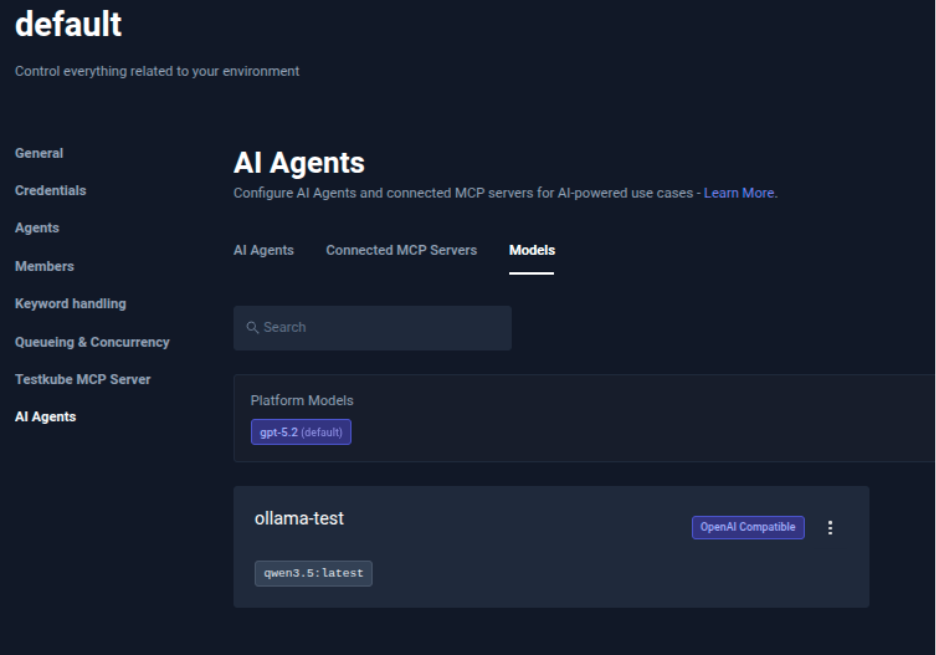
- Select Models and click Add Models. Set a unique Name for the model, provide the endpoint as Base URL, append /v1 to the endpoint, create an API Key, and click Add Models.
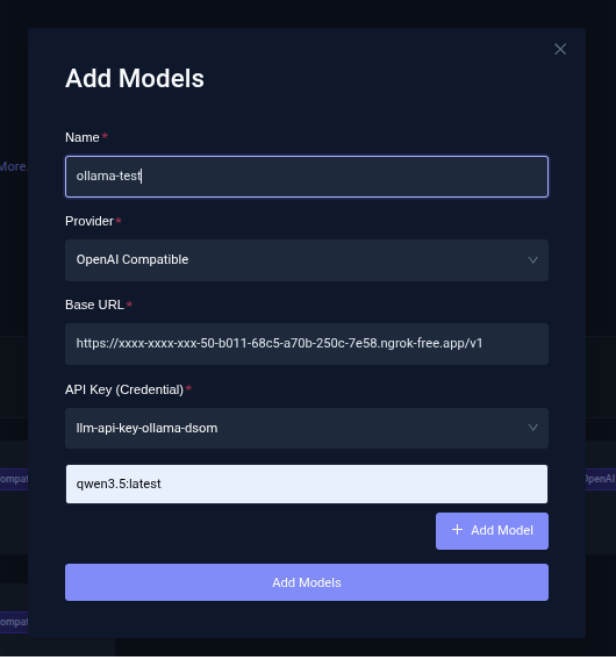
- Verify in Testkube that the model is configured.
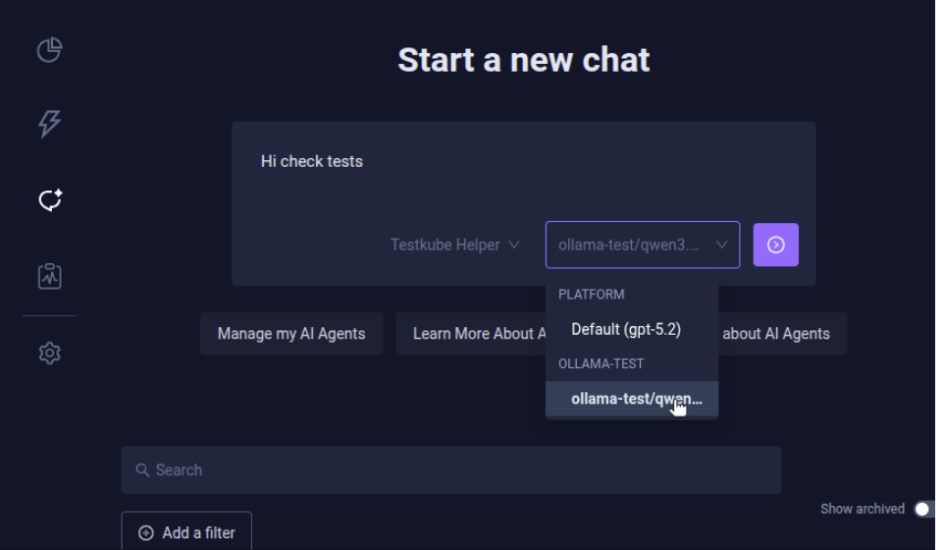
- Start a new chat using the local model configured in Testkube. Select Chats from the Testkube Dashboard and, in Start a new chat, provide a prompt to view tests and select the model you configured.
- Testkube uses the local model to find the tests executed in your environment.
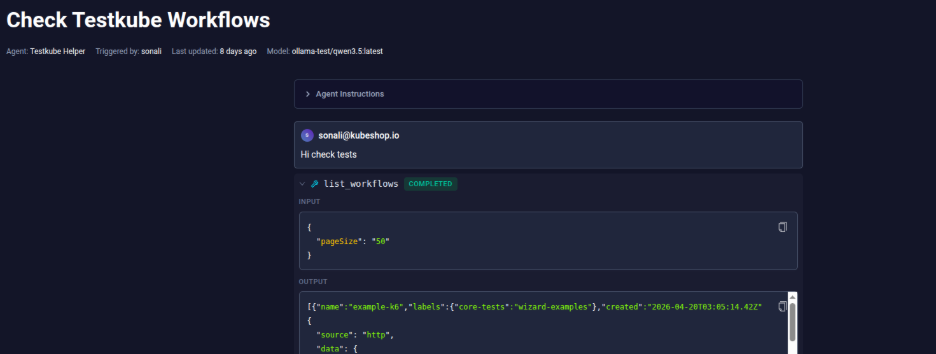
qwen3.5:latest supports text and image input with a 256K context window, which is more than enough headroom for even verbose pod logs and stack traces. Testkube here has listed the Test Workflows in the environment.
3. Connect the failure categorization agent
Testkube AI Agents can be run to internally use local models rather than using an external API.
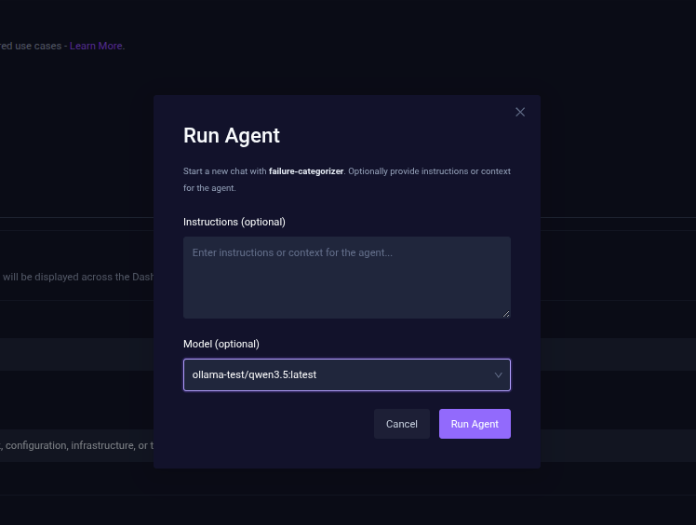
- Enable the failure categorization agent in AI Agents and select Run Agent.
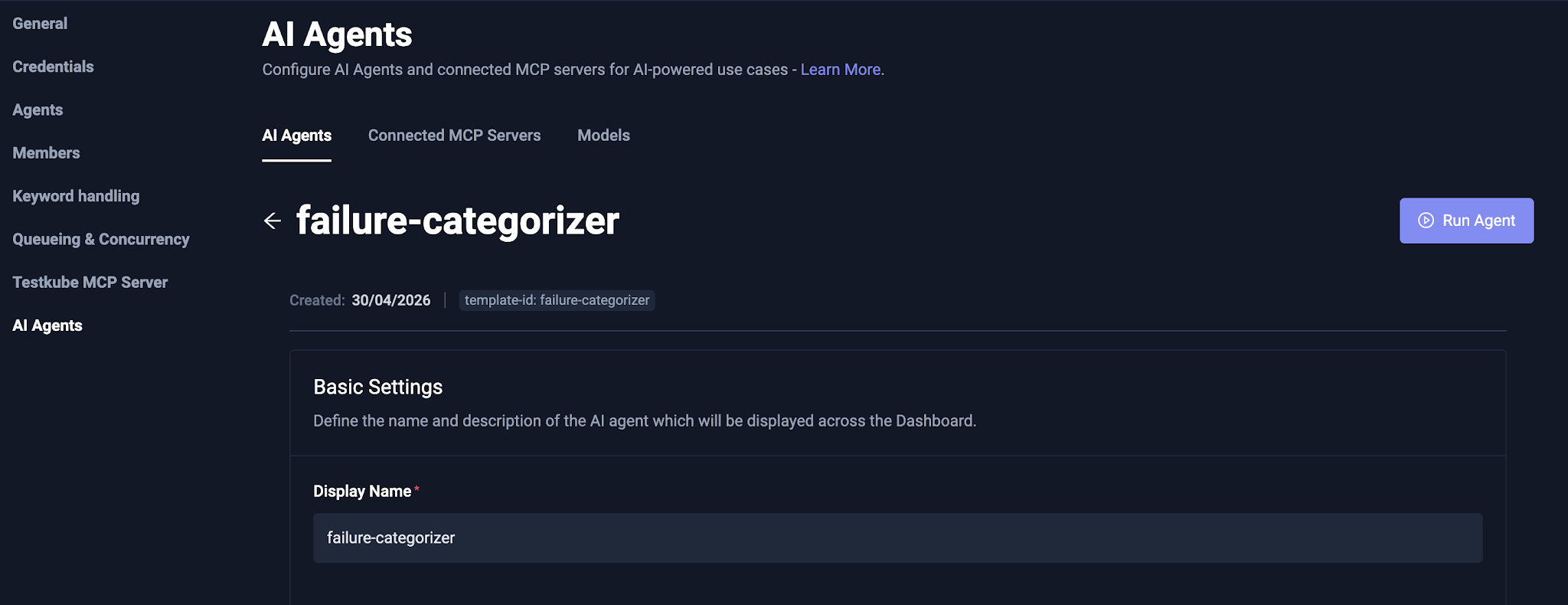
- In the prompt, select the Model as the local LLM and click Run Agent.
- Once the failure categorization agent has been executed, it provides complete details of failed test executions. You can chat with it for more details regarding your test failure.
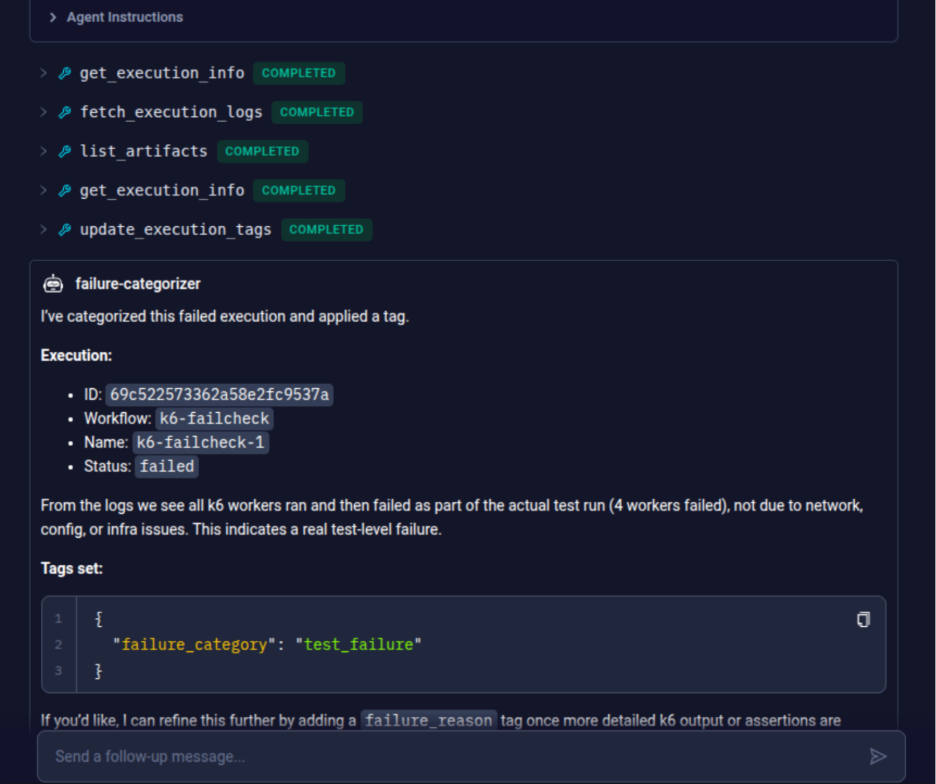
The workflow itself does not change. Testkube runs tests, collects failures, and analyzes them exactly as before. The only difference is where inference occurs. Instead of an external API, the request goes to Ollama running on your machine.
Use local models with the following tips to get reliable results:
- Keep prompts structured and concise
- Limit log size (chunk or summarize)
- Focus on classification tasks, not long-form reasoning
This will help optimize prompts for the local model. You can try classification tasks like “is this a timeout, a missing resource, or an assertion failure?”, rather than asking for long-form reasoning. Local models handle pattern recognition well. They are less suited for the kind of exploratory diagnosis you would ask a frontier model to do.
Features worth exploring
Once a local LLM is integrated with Testkube, you can unlock capabilities that external-only setups make too expensive or slow to run at scale. They start making sense once you have watched your token bill climb for the third month in a row.
1. Failure pattern clustering
If you are running hundreds of test executions, you have probably noticed the same five failures showing up in different costumes. Clustering groups them semantically, locally, so you are not paying per-token to rediscover that yes, this is still the same timeout issue from two weeks ago. We caught a whole family of flaky tests this way that had been filed as separate bugs.
2. Smart log summarization
Pod logs are brutal to read at scale. This compresses thousands of lines into something closer to an actual hypothesis, which is “here is probably why.” Because it runs locally, there is no latency waiting on an API and no cost per run.
3. Incremental learning (lightweight)
The first time you see a failure, you analyze it. The tenth time, you should not have to. Past classifications get stored locally and reused, so over time the repetitive stuff gets skipped entirely. No retraining, no pipelines, just a lookup that gets more useful the longer you run it.
4. Hybrid mode
The local model handles the routine stuff: timeouts, missing resources, assertion failures that follow a known pattern. Genuinely unknown failures, the ones where you actually need a frontier model, get escalated. You set the rules: confidence threshold, failure type, whatever makes sense for your setup. In practice, we have seen the local model cover around three quarters of cases without any escalation needed.
Costs stay predictable; latency stays low, data privacy, and the full power of frontier models when you genuinely need them. Local-first means smart, sustainable debugging at scale.
When should you use local models?
Local models are not a silver bullet and have their own limitations:
- Lower reasoning capability vs top-tier cloud models
- Requires resource management (CPU / GPU)
- Needs prompt tuning for consistent results
But for high-volume, repetitive debugging tasks, they are often more than sufficient.
Local-first AI debugging works best when:
- You run large test suites daily – Token costs from external APIs would dwarf your infrastructure spend.
- Cost predictability is non-negotiable – No spikes from a single flaky suite generating megabytes of logs.
- You are in a regulated environment – Healthcare, finance, or government. Data leaving your cluster is simply not an option.
- You need subsecond feedback in CI/CD – Every millisecond of external latency adds up across thousands of runs.
If your test volume is low and your data is not sensitive, a cloud model is probably simpler. The decision comes down to where your pain actually is.
Key takeaways
- External LLM APIs make AI debugging expensive at scale. Per-token billing, data exposure, and network latency compound as test volume grows.
- A local LLM keeps inference inside your infrastructure. Logs, stack traces, and artifacts never leave your VPC, which simplifies HIPAA, SOC2, and GDPR compliance.
- Testkube plugs into a local runtime without changing the workflow. Point an AI Agent at an Ollama endpoint and the same failure categorization runs locally.
- Local models excel at classification, not exploratory reasoning. Keep prompts concise and focused on tasks like timeout vs missing resource vs assertion failure.
- Hybrid mode gives you both cost control and depth. Local handles roughly three quarters of cases; rare, complex failures escalate to a frontier model.
Conclusion
AI-assisted debugging removes the manual overhead that makes test maintenance unsustainable at scale. But routing every failure through an external API is not a long-term strategy. The costs compound, the latency accumulates, and the data exposure adds up quietly until it becomes someone else’s urgent problem.
A local model changes that calculus. Paired with Testkube, it keeps inference fast, cost predictable, and logs inside your infrastructure. The teams that get the most out of this are not running anything exotic. They just stopped treating AI debugging as something to use selectively and started running it on everything, because once the per-run cost drops to zero, there is no reason not to.
That is what sustainability looks like in practice.
Frequently asked questions
About Testkube
Testkube is the open testing platform for AI-driven engineering teams. It runs tests directly in your Kubernetes clusters, works with any CI/CD system, and supports every testing tool your team uses. By removing CI/CD bottlenecks, Testkube helps teams ship faster with confidence.
Get Started with a trial to see Testkube in action.