Table of Contents
Start your free trial.
Start your free trial.

Start your free trial.


Table of Contents
Executive Summary
AI-assisted development is most effective when it gives developers and testing teams tools that reduce repetitive work. AI helps engineers move faster and makes debugging, testing, and failure analysis more efficient.
In the previous article, we used a Failure Categorization Agent for test analysis in Testkube with a local model. The same agent can be run with a frontier model as well.
Both models can classify failures automatically inside Testkube. The behavior is not identical. The difference becomes visible when the failure does not have a single obvious signal.
This article compares local and frontier models using the Failure Categorization Testkube AI Agent and helps you identify where each model fits best, and where a hybrid approach works better depending on the different agents offered by Testkube. With the right tooling, teams can spend more time building reliable software instead of manually chasing issues.
How the Failure Categorization Agent works
The Failure Categorization Agent runs when a test fails and answers one question: what type of failure is this?
It classifies failures into four categories:
- Network: DNS failures, connection refused, TLS errors, unreachable endpoints
- Configuration: invalid workflow config, missing env vars, wrong image tags
- Infrastructure: OOM kills, timeouts, pod evictions, node conditions
- Test failure: assertion errors, test logic bugs, expected vs. actual mismatches
.png)
The agent examines logs and metrics, matches patterns, and tags the execution. This is a classification task. It is high volume and repetitive, which makes it a good fit for local models.
Example: a Kubernetes test fails with "Connection refused." The categorization agent examines logs, sees the pattern, and tags it as failure-type=network.
Using the Failure Categorization Agent with a local model vs. a frontier model
For failure categorization and private views corresponding to failure type, Testkube can be integrated with local LLMs for analysis as well as frontier models. You can run the same Failure Categorization Agent and select which model backend to use. Both will classify the failure, but their behavior differs.
Local model: fast classification
When you run the Failure Categorization Agent with a local model (Ollama with Qwen 3.5), the agent:
- Retrieves execution logs and metadata
- Examines the failure patterns
- Matches against known signatures (timeouts, connection errors, config issues)
- Returns a categorization quickly
- Tags the execution with the result
Local models excel at straightforward pattern recognition. They work best on failures with clear signals. Here is an example of a distributed K6 load test that fails.
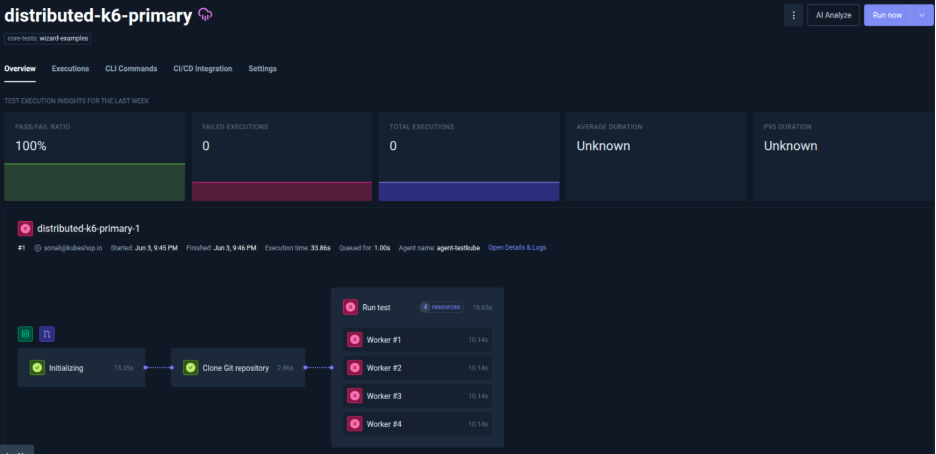
Logs show:
time="2026-06-03T16:16:21Z" level=error msg="open /data/artifacts/k6-results-0.json: no such file or directory"
Run the Failure Categorization Agent with the local model:

Local model analysis:
- Scans logs for error patterns
- Recognizes this is a test execution error (artifact write failure)
- Identifies that the test run itself failed
- Tags: failure_category=test_failure
- Cost: $0 (infrastructure only)

The local model quickly identified this as a test failure. The K6 test execution failed and couldn't write its results. The signal is clear. Local models excel at this pattern recognition, even though the underlying root cause (missing artifacts directory) would require deeper investigation.
Frontier model: deeper reasoning
When you run the same Failure Categorization Agent with a frontier model (GPT-5.2), the agent:
- Retrieves execution logs and metadata
- Examines the failure context more deeply
- Correlates with execution history and resource state
- Returns a categorization with confidence levels and reasoning
- Tags the execution with the result and explanation
Frontier models provide reasoning depth. They handle ambiguous or multi-layered signals better by synthesizing context. Here, a Playwright browser automation test fails.
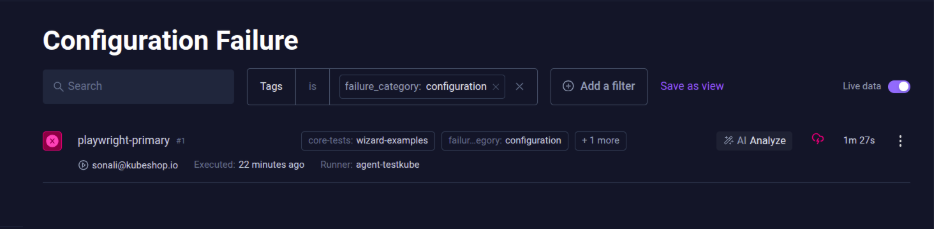
Logs show:
Error: browserType.launch: Executable doesn't exist at /ms-playwright/chromium_headless_shell-1179/chrome-linux/headless_shell
Local model analysis (if we ran it):
- Sees "Executable doesn't exist"
- Tags: failure_category=configuration
- Reasonable categorization, but incomplete context
Frontier model analysis:
- Examines logs, pod environment, and image layers
- Checks: is this a missing Playwright install? Wrong image? Cache issue?
- Correlates with recent image changes, pod restart patterns, and node conditions
- Considers: is this truly configuration (image missing dependency) or infrastructure (pod pulled wrong image version)?
- Tags: failure_category=configuration, failure_reason: playwright-browser-binaries-mismatch (missing firefox executable); update playwright docker image or align Playwright version
- Cost: ~$0.005

The frontier model reveals the deeper issue, that this isn't just "executable missing." The question that arises here is whether we need this much information with the Test Workflow execution at this point.
When a local model is the better fit
- Clear error patterns: missing files, missing mounts, file not found, path errors (like the K6 example)
- High-volume categorization: you need to categorize thousands of failures quickly
- Cost matters: you can't afford per-token billing
- Data privacy is critical: logs cannot leave your infrastructure (regulated environment)
Testkube Failure Categorization helps with categorizing tests using a local model. This allows users to perform analysis on a particular type of failure rather than running the model on all failures, which avoids unnecessary agent execution cost.

When a frontier model is the better fit
- Ambiguous infrastructure issues: when the root cause could be multiple layers (image layer vs. pod scheduling vs. node condition)
- Multi-layered signals: the failure mentions one thing (executable missing) but the real issue might be deeper (image version, container build, deployment config)
Using the Troubleshoot Agent with a frontier model
The Failure Categorization Agent answers "what type of failure?" Once categorized, if you need to understand why the failure occurred, the root cause rather than the category, you use a different agent: the Troubleshoot Agent with a frontier model. The Troubleshoot Agent:
- Performs deeper analysis than categorization
- Correlates failure data with code changes, infrastructure events, and more
- Suggests remediation steps
- Requires frontier model reasoning

The Troubleshoot Agent with a frontier model is run only for failures where you want a deeper analysis. This saves cost and helps you optimize the test analysis process.
Test analysis in hybrid mode in Testkube
Rather than picking one model globally and either not getting useful analysis or paying a huge cost for complete analysis in scenarios where complete analysis is not required, a better approach is hybrid mode. Use multiple agents with multiple models.
Hybrid architecture:
- Agent 1: Failure Categorization Agent backed by a local model (Ollama with Qwen)
- Agent 2: Troubleshoot Agent backed by a frontier model (GPT-5.2)
Benchmarking local vs. frontier
With local models, a straightforward failure with obvious signals, like the K6 example (test execution error, artifact write failure), takes less time than an ambiguous failure where multiple causes are plausible, like the Playwright example (configuration or infrastructure).
Running only a local model for all types of agents and complexities would require huge investment in infrastructure. With a frontier model, you will burn through tokens faster than you realize. With a hybrid approach, you can make a reasonable investment in infrastructure for running models that support execution of simple agents, and use frontier models separately based on requirements.
Prompt engineering differences between the two
The gap between local and frontier model prompts reflects a fundamental difference in capability. Local models are pattern matchers. They need structured input, clear options, and focused scope to perform well. Frontier models are reasoners. They can handle ambiguity, synthesize context, and explore trade-offs.
If you're building a hybrid system with both models, you need two separate prompts, one optimized for each model's strengths. The same failure analysis request cannot use the same prompt for both. Design your categorization prompt for local model constraints, and your troubleshooting prompt for frontier model reasoning. Then route failures to the appropriate agent and prompts accordingly.
Model choice is an infrastructure decision
Choosing between local and frontier models is about matching your tool to your constraints: cost, latency, data privacy, and reasoning needs.
Local models are infrastructure you control. They are fast and cheap, and your logs never leave your cluster. They excel at high-volume categorization where the signal is clear. You use them for the problems they solve well.
Frontier models are external APIs. They cost per token, add network latency, and send data outside your cluster. You use them for the fraction of failures where reasoning depth saves engineering time.
Your team doesn't need to choose local or frontier. Choose both and use each where it works best.
{{banner-get-started}}
About Testkube
Testkube is the open testing platform for AI-driven engineering teams. It runs tests directly in your Kubernetes clusters, works with any CI/CD system, and supports every testing tool your team uses. By removing CI/CD bottlenecks, Testkube helps teams ship faster with confidence.
Get Started with a trial to see Testkube in action.