Table of Contents
Start your free trial.
Start your free trial.

Start your free trial.



Table of Contents
Executive Summary
Most teams do not avoid test automation because they think it is a bad idea. They avoid it because they have tried it before and it did not stick, or because they do not know where to start. Maybe your tests flaked at the worst possible moment. Maybe your pipeline said everything was fine while production was on fire. Maybe "just rerun it" became the go-to answer for every failure. However it played out, automation probably started to feel like more trouble than it was worth.
Meanwhile, manual testing cannot keep up. With AI coding assistants helping developers ship faster than ever, QA is quickly becoming the bottleneck. After dealing with unreliable test suites and noisy pipelines, it is no wonder someone might be hesitant to give automation another shot.
Automation itself is not the problem. The problem is brittle test suites, inconsistent environments, and scattered results that make automation painful. Fix those and automation becomes something your team can actually rely on.
This guide walks through how to get automated testing right. You will see how to avoid the pitfalls that tripped up past efforts and build a foundation that scales with your team.
1. Start where it saves you the most time
One of the biggest mistakes teams make is trying to automate everything at once. That leads to analysis paralysis, wasted time on low-value tests, and automation projects that stall before they start.
Focus on the high-impact areas instead.
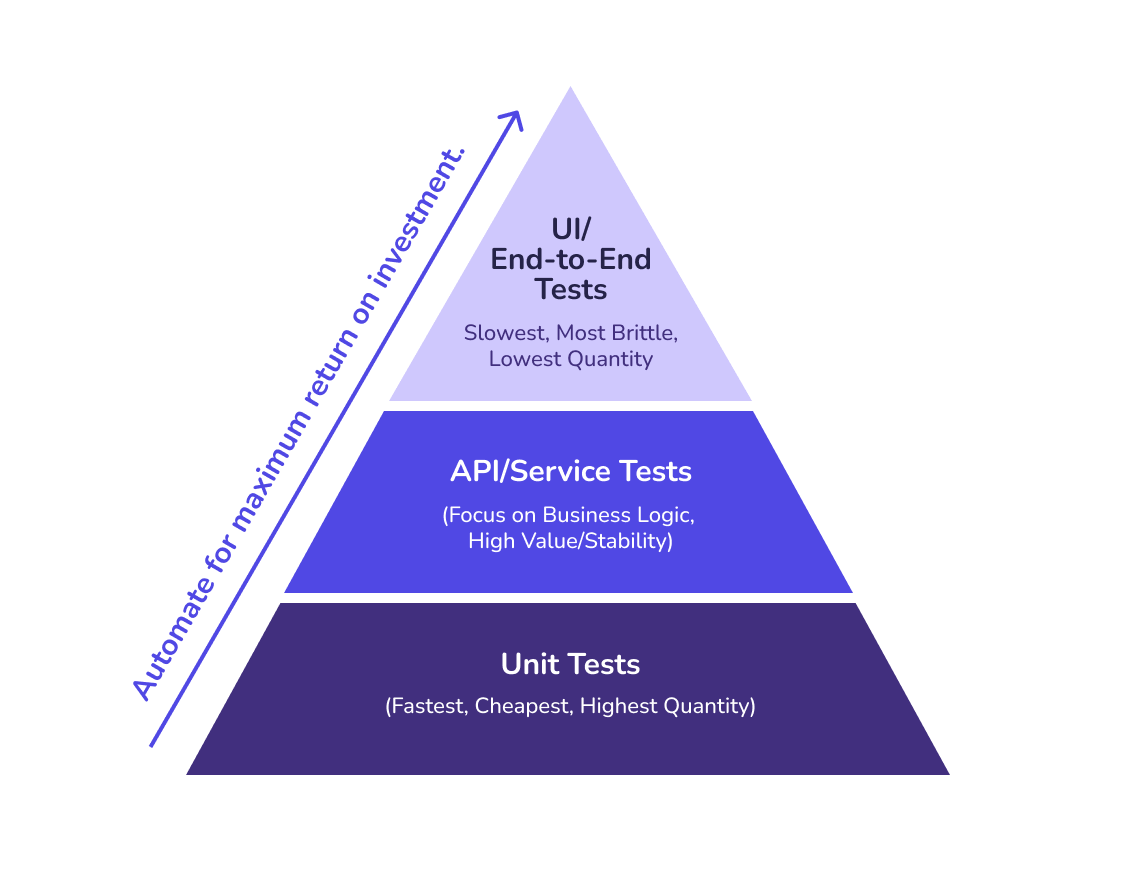
UI and E2E tests for core user flows. If your application has a frontend, start with basic UI/E2E tests that validate critical paths like signing in, searching, and checking out. Skip the edge cases initially. Get a safety net in place that catches when new (AI-generated) code breaks anything critical.
API tests for business logic. API tests are often the next area to tackle, or the first if you are building services for other teams to consume. They are faster to write (scaffolding can often be generated from API contracts), more stable than UI tests, and they cover critical business logic. A solid API test suite catches breaking changes before they reach the interface layer.
Smoke tests for post-deployment confidence. Smoke tests verify that core functionality works after each deployment. These are your "is the system alive" checks. They run quickly and catch catastrophic failures immediately.
Regression suites for past bugs. If you fixed a bug, automate a test for it. Regression suites protect features that have broken before, which prevents the same issues from resurfacing as your codebase evolves.
The starting point is mapping your most critical user journeys. Ask: what would cause the most headaches if it broke, what do customers always flag when it fails, and what eats up the most manual QA time. That is where automation should start.
Keep the focus tight. You will see value fast, build momentum with your team, and figure out what works for your setup before you try to automate everything.
2. Do not tie your tests to CI
If you have ever watched tests pass locally and then fail in CI, you are not alone. One of the most common pitfalls in long-term test automation strategy is tightly coupling tests to your CI/CD solution. It might work initially, but it does not scale as you add more tests and more testing tools to the mix. CI/CD tools were not built for test automation at scale.
Teams lose trust in CI/CD pipelines for testing as their needs grow because:
- Generic CI/CD runners do not match your actual application infrastructure
- Tests fight over shared resources or hit noisy neighbors
- Logs vanish after jobs complete, turning debugging into guesswork
- Parallelization is fragile and hard to maintain
- There is no centralized view of all the tests running across all your pipelines (each result is buried in build-specific logs and artifacts)
- Managing granular access to individual test results becomes a nightmare in regulated environments
The answer is not to give up on CI. It is to let CI do what it does best: build application artifacts and run the quick, reliable checks like unit tests, linting, and smoke tests. The heavier stuff (integration, end-to-end, load, and infrastructure tests) deserves its own stable, production-like platform where results actually mean something and failures are worth investigating.
Decoupling test execution from your build pipeline buys you faster feedback for developers, healthier pipelines, and a renewed sense of trust in test results. Catching bugs earlier means faster debugging, less wasted effort, and faster time to market.
3. Choose the right frameworks
There is no single "best" testing framework. The right choice depends on what you are testing and your team's existing skills.
Web and UI testing
- Playwright: Excellent cross-browser support, built for modern web applications, strong auto-waiting capabilities
- Cypress: Exceptional developer experience with real-time reloading and time-travel debugging
API testing
- Postman (Newman for CLI): Easy for less technical team members to contribute
- REST Assured: Integrates naturally into Java-based projects
- PACT: Contract validation for both clients and servers as APIs evolve
Backend unit testing
- Jest: Dominates the JavaScript/TypeScript ecosystem
- PyTest: Powerful fixtures and excellent Python integration
- JUnit: Standard for Java applications
Load and performance testing
- k6: Scripting flexibility with JavaScript, integrates with Grafana for reporting
- Gatling: Detailed reports for complex scenarios
Infrastructure testing
- Chainsaw: Validates Kubernetes resources and cluster state
- cURL: Validates network connectivity between namespaces and clusters
- Custom operator tests: Ensure infrastructure behaves correctly
What matters most is that you can mix and match. Your web team might use Playwright while your API team prefers Postman, and that is fine. You do not need to force everyone onto a single framework.
What you do need is a way to run all these different tests consistently and to gather all the results in one place. Most teams start with a mix and only later realize unified execution and reporting are critical. Plan for that as your test suites grow.
4. Provide consistent feedback loops for local development
Make sure local test results match what you see in CI. There is nothing more frustrating than tests that pass locally but fail in CI, or the other way around. Use containers or consistent configs to avoid the classic "works on my machine" headaches.
Give developers control. They should be able to run a single test, a single file, or a full suite, depending on what they are working on.
The easier and faster local testing becomes, the more your team will actually use it and trust it. Fast feedback loops mean you catch bugs right away, not hours later when a pipeline fails.
5. Make test results easy to access and understand
A test that fails without clear information is almost as useless as no test at all. Developers need to quickly understand what broke and why. They need context: application, microservice, test environment. The stuff a typical CI/CD system does not capture.
Preserve artifacts
- Logs from failed test runs and every component in the system under test
- Resource usage metrics to detect execution trends and anomalies that might not result in immediate failures
- Screenshots of UI tests at the point of failure
- Network traffic captured for API tests
- Video recordings for complex user flows
Use standardized output formats
JUnit XML makes it easier to parse results across different tools and frameworks.
Make results accessible to the whole team
Not just developers. Product managers, QA engineers, and support teams benefit from seeing test results. Centralized reporting helps everyone understand system health.
Do not let your team run into black-box failures. There is nothing worse than a CI message that just says "Tests failed" with zero context. Every failure should link to detailed logs, stack traces, and the exact point of failure.
As testing grows, scattered results become a real headache. When results are buried in CI logs, local terminals, Slack, and email, teams spend more time hunting for information than fixing issues. If that sounds familiar, it is a sign you are ready for more advanced test orchestration.
6. Build a maintenance habit
Test automation is not a set-and-forget solution. Like production code, tests need ongoing maintenance.
Track pass/fail ratios as a trend. Assess quality contextually per component, team, functional area, and environment.
Address flaky tests immediately. A flaky test (one that passes sometimes and fails other times) erodes trust in your entire suite. When teams start ignoring failures because "it is probably just flaky," you have lost the value of automation.
Version your test dependencies. Pin framework versions, browser versions, and third-party libraries. Uncontrolled updates break tests unpredictably.
Review automation debt every sprint. Set aside time to check in on test health. Which tests are slowing down CI? Which are not pulling their weight? Which need updates for new features?
Retire tests that are not earning their keep. Not every test needs to live forever. If a test is painful to maintain and covers something that rarely breaks, it is probably time to let it go.
Teams that succeed with test automation treat it as a living system that grows with their product. The ones that struggle let maintenance slip to the bottom of the backlog, and that is when things fall apart.
7. Recognize when you need a testing platform
If you have implemented the practices above, you have built a solid foundation. Your team is automating tests, running them in CI, and seeing real value.
As automation matures, new challenges emerge.
Tests are scattered across multiple frameworks. Your web team uses Playwright, your ops team uses k6, your backend team uses PyTest, your infrastructure team has Helm tests. Each framework has its own execution pattern, output format, and requirements.
CI slows down when it becomes your test runner instead of your build system. As soon as integration, end-to-end, and load tests get shoved into PR pipelines, execution time balloons and teams scramble to reorganize tests just to keep development moving.
Environment inconsistencies cause problems. Tests behave differently in local, dev, staging, and prod environments. You are spending time debugging environment issues instead of actual bugs.
You need infrastructure-based test execution. Your application runs in Kubernetes, but your tests run in generic CI runners that do not match your production environment or require access to your K8s infrastructure that compromises security constraints.
Parallelization becomes complex. You want to split tests across multiple machines to speed up execution, but coordinating parallel runs and aggregating results is manual work.
Reporting and observability are fragmented. Results live in different places, and getting a holistic view of test health requires stitching together multiple sources.
When these problems start stacking up, your automation has outgrown basic scripts. The next step is orchestration: moving from scattered scripts to coordinated execution. That is the natural evolution of testing maturity.
How Testkube helps teams get started
Testkube was built for teams like yours, just getting started with test automation. From day one it makes running, coordinating, and tracking your tests simple, flexible, and ready to scale.
Instead of writing custom scripts you will eventually outgrow, Testkube gives you a foundation that grows with you.
Infrastructure-based test execution. Run tests directly in your Kubernetes clusters from the start. Tests execute in the same environment as your application, so you never have to debug "works in CI but not in staging" problems later.
Framework-agnostic orchestration. Whether you are using Playwright, Postman, PyTest, or something else, Testkube brings everything together under one roof. As your stack changes, add new frameworks without migrations, glue code, or rewrites.
Centralized results from the beginning. Every test run lands in a single dashboard with logs, artifacts, and metrics in one place. No more piecing together reports from different tools after the fact.
Scheduling and coordination are built in. Trigger tests on commits, on a schedule, or when something happens in your cluster. Run suites in parallel and let Testkube handle the heavy lifting, so you do not have to write or maintain that logic yourself.
Room to grow. As your test suites get more complex, Testkube grows with you. When you are ready for AI-powered debugging, advanced parallelization, or deeper observability, it is all there. No platform switch, no starting over.
Most teams that hit roadblocks with test automation are not the ones who did too little. They are the ones who built too much custom infrastructure early and spent months cleaning it up. Testkube skips that mess. Start with a foundation that makes the rest of your test automation journey easier.
8. Start simple and scale smart
Effective test automation is not about being perfect on day one. It is about building step by step.
- Start with high-impact areas (APIs, smoke tests, critical paths)
- Keep CI lean and move heavier tests to stable environments
- Choose frameworks that match your team's skills and use cases
- Keep local feedback loops fast so developers actually use them
- Make results accessible and understandable across the team
- Establish clear conventions for naming, structure, and ownership
- Maintain tests as you would production code with regular reviews
- Recognize when you have outgrown basic automation and need orchestration
Most successful testing teams follow this path. They start simple, show value fast, and add sophistication as their needs grow. The trick is knowing when you have moved from one stage to the next. Still running tests by hand? Focus on automation basics. Already automated but things feel scattered? That is your cue to look at orchestration.
Key takeaways
- Most automation efforts fail for the same reasons: trying to automate everything at once, tying tests too tightly to CI, ignoring flaky tests, and letting results scatter across too many tools.
- Start with high-impact areas first. Critical user flows, APIs, smoke tests, and regression suites for known bugs. Skip the edge cases until the foundation is in place.
- Keep CI lean. Use it for builds, linting, and quick unit tests. Move integration, E2E, load, and infrastructure tests to a dedicated execution platform that matches your production environment.
- Mix frameworks across teams. There is no single best framework. What matters is unified execution and centralized reporting at the orchestration layer above the tools.
- Treat tests like production code. Track pass/fail trends, address flakiness immediately, version dependencies, review automation debt every sprint, and retire tests that are not earning their keep.
- Recognize when you have outgrown basic automation. Scattered frameworks, slow CI, environment inconsistencies, and fragmented reporting are the signals that you need test orchestration, not more scripts.
Frequently asked questions
What are the best practices for test automation?
The core best practices for test automation are: start with high-impact areas (critical user flows, APIs, smoke tests), do not tie tests to CI, choose frameworks that match your team's skills, keep local feedback loops fast, make test results centralized and accessible, treat tests like production code with regular maintenance, and adopt test orchestration when basic scripting stops scaling.
Where should I start with test automation?
Start with the highest-impact areas first. Map your most critical user journeys and ask: what would cause the most headaches if it broke, what do customers always flag, and what eats up the most manual QA time. Begin with smoke tests, API tests, and basic UI/E2E tests on those critical paths. Avoid trying to automate everything at once, which usually leads to stalled projects.
Why should tests not be tied to CI/CD?
CI/CD tools were built for building and deploying code, not for orchestrating tests at scale. Tying tests to CI creates problems as you grow: generic runners do not match your production infrastructure, tests fight over shared resources, logs disappear after jobs complete, parallelization gets fragile, and results scatter across pipeline logs. Keep CI lean (unit tests, linting, smoke checks) and move heavier tests to a dedicated execution platform.
What are flaky tests and how do I deal with them?
A flaky test passes sometimes and fails other times without any code change. Flaky tests erode trust in your entire test suite because teams start ignoring failures as "probably just flaky." Address them immediately: investigate the root cause (timing issues, environment mismatch, shared state, race conditions), fix or quarantine the test, and never let "just rerun it" become your default response.
What is test orchestration and when do I need it?
Test orchestration is a dedicated layer that manages how tests run, when they run, where they run, and how their results are collected. You need it when basic automation starts breaking down: tests scattered across multiple frameworks, CI slowing down under test load, environment inconsistencies causing debug time, fragmented reporting across tools, and parallelization becoming manual work. That is the signal to move from scripts to orchestration.
What testing frameworks should I use?
There is no single best framework. For web and UI testing, Playwright and Cypress are strong choices. For API testing, Postman (with Newman for CLI), REST Assured for Java, and PACT for contract validation. For backend unit testing, Jest for JavaScript, PyTest for Python, JUnit for Java. For load testing, k6 and Gatling. For Kubernetes infrastructure testing, Chainsaw and cURL. Mix frameworks across teams as needed and unify execution at the orchestration layer.
How do I keep test results from getting scattered?
Centralize results from the start. Preserve logs, screenshots, network captures, and resource metrics for every run. Use standardized output formats like JUnit XML so results parse cleanly across tools. Avoid storing results in pipeline logs, local terminals, Slack, or email. When teams have to hunt for information across multiple sources, debugging time balloons. A unified dashboard for all test runs (regardless of framework or trigger source) solves this.
About Testkube
Testkube is the open testing platform for AI-driven engineering teams. It runs tests directly in your Kubernetes clusters, works with any CI/CD system, and supports every testing tool your team uses. By removing CI/CD bottlenecks, Testkube helps teams ship faster with confidence.
Get Started with a trial to see Testkube in action.