Table of Contents
Start your free trial.
Start your free trial.

Start your free trial.



Table of Contents
Executive Summary
Traditional CI/CD pipelines were designed for deterministic software, where the same input consistently produces the same output. AI-native applications work differently and need an additional layer of validation.
Large language models (LLMs), Retrieval-Augmented Generation (RAG) systems, and AI agents generate probabilistic responses that can vary based on prompts, model versions, retrieved context, inference parameters, or even underlying data changes. As a result, passing unit tests and integration tests is no longer enough to confidently ship an AI-powered application.
To deliver reliable AI systems, software delivery pipelines need an additional validation layer that continuously evaluates AI quality. Instead of only verifying whether an application functions correctly, teams must also validate whether responses are accurate, grounded, safe, and consistent enough for production use.
In this blog, we'll look at why traditional CI/CD pipelines fall short for AI workloads, the additional quality signals that need to be validated, how AI evaluation can be integrated throughout the software delivery lifecycle, and the tools that help automate this process. We'll also see how Testkube can orchestrate AI evaluation suites as Kubernetes-native quality gates before looking at a practical demo.
Challenges of testing AI systems in delivery pipelines
Traditional CI pipelines assume every test has a predictable outcome. If the same test is executed multiple times, the expected result remains identical. AI systems don't always behave this way.
Non-deterministic outputs
Large language models can generate different responses to the same prompt while still producing equally valid answers. Small differences in wording, reasoning, or sentence structure shouldn't necessarily cause a deployment to fail. Because of this, exact output comparisons become unreliable, and evaluation shifts toward measuring response quality instead of matching expected strings.
Prompt, model, and inference variability
AI applications are influenced by far more than application code. Updating a prompt template, changing the foundation model, adjusting inference parameters such as temperature, or modifying retrieved context in a RAG pipeline can all affect the generated response. These changes may improve or degrade quality without introducing any code changes, making them difficult to detect through conventional CI pipelines.
Dynamic acceptance criteria
Unlike traditional software, AI systems rarely have a single correct answer. Instead, deployments rely on evaluation metrics and thresholds that define acceptable quality. For example, a response may need to achieve minimum faithfulness or answer relevance scores while remaining below a defined latency or toxicity threshold. These evaluation scores become the quality gates that determine whether a deployment can proceed.
AI quality checks beyond functional testing
Traditional application testing verifies that an API responds successfully or that a workflow completes without errors. AI applications require additional validation to determine whether the generated response is actually useful.
Hallucinations and factual accuracy
One of the biggest challenges with LLMs is hallucination, the generation of incorrect information presented with confidence. AI evaluation frameworks such as DeepEval, Ragas, OpenAI Evals, and LangSmith compare model outputs against reference answers or supporting context to determine whether responses remain factually accurate. This helps identify quality regressions that functional tests would never detect.
RAG retrieval quality and grounding
For Retrieval-Augmented Generation applications, validating the generated response alone is not sufficient. The retrieval pipeline must also return relevant context for the language model to use. Poor retrieval quality often results in incorrect answers even when the underlying model performs well. Metrics such as context precision, context recall, groundedness, and faithfulness help evaluate whether responses are supported by retrieved documents rather than fabricated by the model.
Response quality, safety, and latency
Beyond correctness, production AI systems should consistently generate relevant responses, follow user instructions, avoid unsafe or sensitive outputs, and respond within acceptable latency limits. These characteristics become part of the deployment criteria alongside traditional application tests, helping ensure both quality and operational reliability.
Runtime validation challenges in AI-native systems
AI systems continue to evolve after deployment. Models are upgraded, embedding models change, vector databases grow, and new enterprise knowledge is added over time. Even if the application code remains unchanged, these changes can significantly impact response quality.
Because of this, AI evaluation cannot be treated as a one-time activity during CI. Production traffic frequently exposes scenarios that benchmark datasets cannot fully capture. Continuous evaluation allows teams to monitor AI quality over time and detect regressions caused by changing models, embeddings, or production data.
Instead of relying on a single pass or fail result, AI deployments typically evaluate multiple metrics together. A deployment may only progress if the generated responses remain sufficiently faithful, relevant, safe, and performant. These measurable thresholds provide objective quality gates for AI-native applications.
Integrating AI testing into modern delivery pipelines
Building AI validation into CI/CD
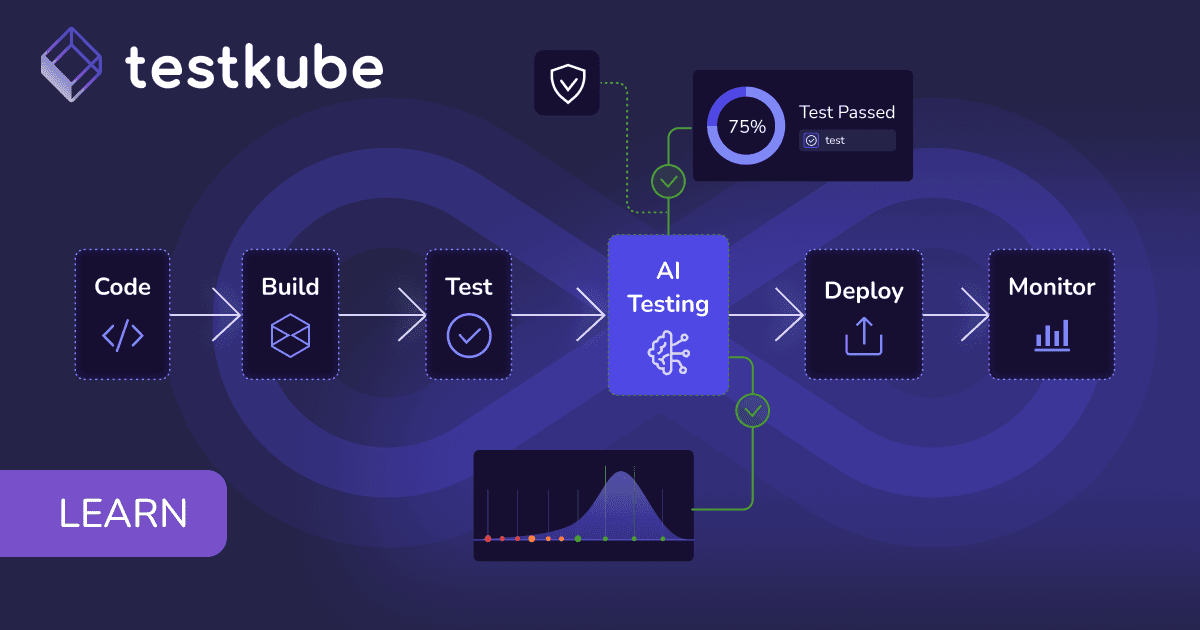
AI validation needs to become a part of the delivery pipeline, just like unit tests, integration tests, and security scans. By automating AI evaluations during different stages of CI/CD, teams can detect prompt regressions, model behavior changes, and RAG quality issues before they reach production.
Pre-merge evaluations
Whenever prompts, RAG pipelines, retrieval logic, or model configurations change, benchmark evaluation suites can execute automatically as part of pull request validation. Instead of only verifying that an endpoint responds successfully, these evaluations check whether the AI application continues to produce high-quality responses.
Examples of pre-merge AI evaluations include:
- Prompt regression testing: Validate that changes to prompts do not reduce response quality or cause unexpected behavior.
- RAG evaluation: Verify that retrieved documents are relevant and that generated answers are grounded in the provided context.
- Response quality checks: Measure metrics such as answer relevance, faithfulness, context precision, and correctness against benchmark datasets.
- Safety evaluations: Check whether model responses contain harmful, biased, or restricted content.
- Model comparison testing: Compare responses between different model versions to ensure an upgrade does not negatively impact application quality.
Running these evaluations during pull requests helps teams detect AI quality regressions before changes are merged into the main branch.
Deployment quality gates
After an application is built successfully, AI evaluation suites can execute before deployment. Instead of promoting releases solely because unit and integration tests pass, deployments can require predefined AI quality thresholds to be satisfied before progressing to staging or production. This extends conventional deployment quality gates with AI-specific validation.
Regression testing for prompts, models, and RAG
Regression testing is no longer limited to application code. Changes to prompt templates, foundation models, embedding models, retrieval logic, or vector databases can all introduce quality regressions. Running benchmark datasets automatically after these changes helps teams identify issues before they affect production users.
Continuous evaluation after deployment
Even after deployment, AI quality should continue to be monitored. One common approach is shadow testing, where production requests are evaluated against newer prompts or model versions without affecting end users. This enables teams to compare quality before rolling changes into production.
Scheduled benchmark execution also helps detect quality degradation that occurs independently of application releases, such as model updates or changes to enterprise knowledge bases. Combined with production telemetry, including latency, retrieval quality, and user feedback, continuous evaluation creates a feedback loop that helps improve both benchmark datasets and future deployment decisions.
AI testing tools and frameworks
Several open-source and commercial tools support different stages of AI testing, from offline evaluation during development to continuous monitoring in production. Each tool focuses on a specific part of the AI delivery lifecycle.
LLM evaluation frameworks
AI observability platforms
CI/CD and workflow orchestration
AI testing automation with Testkube
Traditional testing frameworks struggle with AI systems because:
- LLM outputs are non-deterministic (same input ≠ same output)
- Quality metrics are subjective and require multiple evaluations
- Tests need to track trends over time, not just pass/fail
- Results must integrate with production observability tools
Testkube helps teams operationalize AI testing by providing a cloud-native platform to execute and manage evaluation workflows. It acts as an orchestration and observability layer for AI tests by running evaluation suites such as DeepEval and Ragas within TestWorkflows, collecting evaluation results, exposing metrics for analysis, integrating with dashboards through Testkube Insights, and enabling teams to use AI evaluation results as part of their delivery quality gates.
Key Testkube features for AI testing:
Building RAG quality gates: the demo
To demonstrate how Testkube can help orchestrate AI testing, we've set up a customer service RAG bot that answers questions using a knowledge base of 6 FAQ documents. Every time an engineer changes the prompt or retrieval logic, automated quality tests run 20 real customer questions through the bot, measure how well it performs using 3 objective metrics (Faithfulness, Recall, Relevancy), and track whether quality improves or degrades over time. If metrics drop below thresholds, the workflow blocks the change and an AI Agent diagnoses the root cause.
The flow
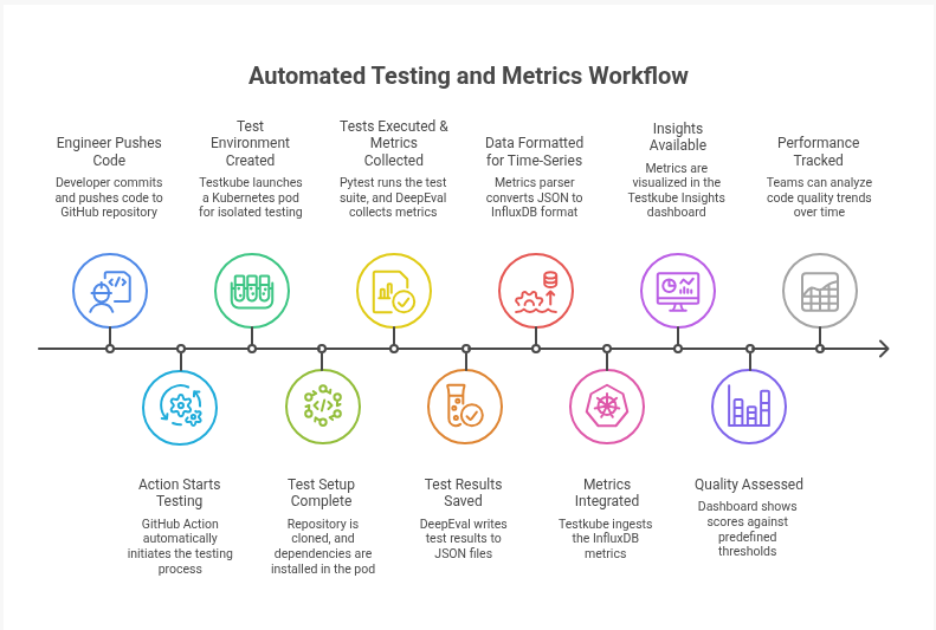
git push (prompt change)
↓
GitHub Action calls: testkube run testworkflow rag-quality-gate
↓
TestWorkflow clones repo (content.git) → runs DeepEval pytest suite
↓
Execution finishes: status = failed (Answer Relevancy < 0.80)
↓
AI Agent Trigger evaluates: label match ✓, event=Failed ✓, state changed ✓
↓
Testkube auto-starts "rag-quality-remediation" agent session
↓
Agent reads test-results.json (Testkube MCP) + recent commits (GitHub MCP)
↓
Agent opens PR: "Fix: Answer Relevancy regression from casual tone prompt"
↓
You see it in: AI Agents → Chats, and as a real GitHub PR
Step-by-step implementation
Prerequisites
Setting up DeepEval
DeepEval provides LLM-based evaluation metrics to measure the quality of AI responses. For RAG applications, commonly used metrics include:
- Faithfulness: Checks whether the generated response is supported by the retrieved context and detects potential hallucinations.
- Contextual Recall: Evaluates whether the retrieved context contains the information required to answer the query.
- Answer Relevancy: Measures whether the generated response is relevant to the user's question.
Install DeepEval using pip:
pip install deepeval
Create a DeepEval test suite by defining the required metrics and evaluation criteria for your AI application. Configure the test suite with your LLM provider credentials and the metrics you want to track.
For this demo, the DeepEval evaluation suite generates structured JSON results after execution. These results are consumed by Testkube to visualize AI quality metrics and track evaluation trends through Testkube Insights.
Step 1: Set up DeepEval test suite
Create pytest tests that measure RAG quality using DeepEval metrics. DeepEval provides LLM-powered evaluation of RAG outputs, measuring three critical dimensions:
Your test file loads 20 customer questions from YAML. For each question, it runs through the RAG pipeline (Gemini generates the answer), creates a DeepEval test case with the expected answer and retrieved context, measures all 3 metrics using Gemini as the evaluator, and asserts each metric passes its threshold. All three return scores from 0.0 to 1.0. Over time, Testkube ingests these as individual data points so the dashboard can show whether quality is improving or degrading.
You can find the demo code here.
Step 2: Enable DeepEval results export
Configure DeepEval to generate JSON evaluation results after execution. These results can be ingested by Testkube and visualized through Testkube Insights, allowing teams to track AI quality metrics and monitor evaluation trends across test runs.
Set this environment variable in your TestWorkflow:
env:
  - name: DEEPEVAL_RESULTS_FOLDER
    value: /data/repo/results
DeepEval automatically writes to this folder when pytest runs. What gets created is a results/test_run_*.json file with raw test results and all metric scores. This is why the export step matters: Testkube Insights only understands InfluxDB format, so we need to bridge from DeepEval's JSON output to that standard format using the Testkube ai-metrics-parser component, which ingests AI testing metrics from common AI testing frameworks and parses these into the Influx format that Testkube uses to ingest custom metrics.
Step 2.5: Testing baseline vs candidate prompts
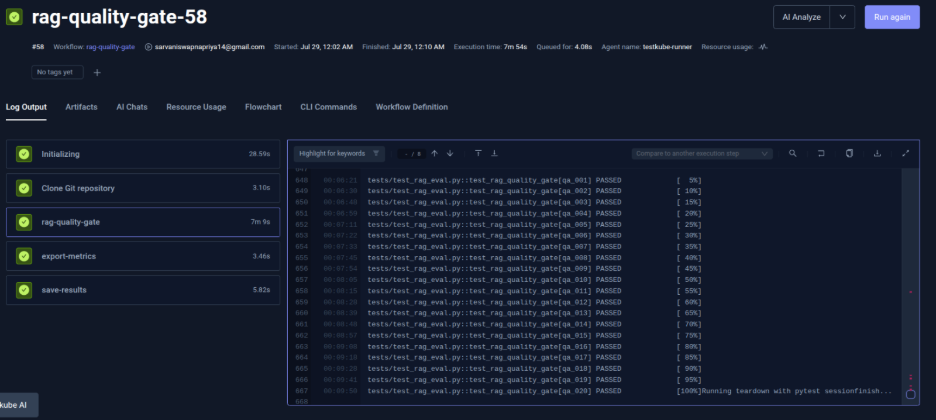
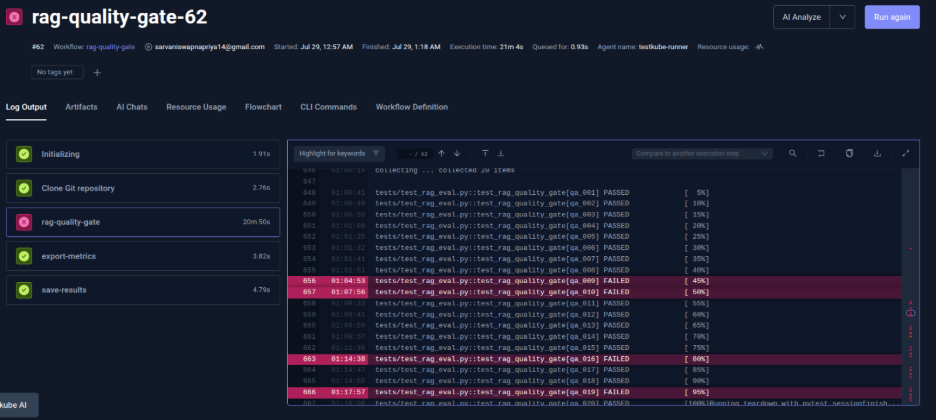
This demonstrates how quality gates catch bad prompt changes by testing two prompts side-by-side. We have a Baseline Prompt (original, proven to work) and a Candidate Prompt (new version). The Candidate adds "Draw from your general knowledge in addition to the provided context" to help the bot be more helpful, but this actually causes problems. We run both prompts against the same 20 questions and analyze the results.
The Candidate prompt fails because it allows the bot to hallucinate (drawing from general knowledge instead of just the context), which tanks Faithfulness. It also becomes verbose and goes off-topic, tanking Relevancy. With the help of Testkube, you can catch this before production.
Here is an execution with Baseline Prompt:
Here is an execution with Candidate Prompt:
Step 3: Deploy metrics parser step
Add a Testkube step that converts DeepEval JSON to InfluxDB line protocol.
Add this step to your TestWorkflow:
- name: export-metrics
  condition: always
  container:
    image: docker.io/kubeshop/testkube-ai-metrics-parser:latest
    imagePullPolicy: Always
  shell: |
    testkube-ai-metrics-parser deepeval \
      -i 'results/test_run_*.json' \
      -o results/metrics.lp \
      --tag suite=rag-quality-gate \
      --stdout
This step uses the Testkube ai-metrics-parser to read the DeepEval JSON, extracts metric scores, converts them to InfluxDB line protocol format, and outputs to results/metrics.lp. The example output looks like:
deepeval,metric=faithfulness,suite=rag-quality-gate mean_score=0.95,tests=1i,passed=1i,failed=0i
deepeval,metric=contextual_recall,suite=rag-quality-gate mean_score=0.88,tests=1i,passed=1i,failed=0i
deepeval,metric=answer_relevancy,suite=rag-quality-gate mean_score=0.92,tests=1i,passed=1i,failed=0i
Each line represents one data point per metric. This format allows Testkube to understand not just the score, but also how many tests passed, failed, and cost.
Step 4: Save artifacts for Testkube ingestion
Configure your TestWorkflow to persist metrics files so Testkube can ingest them. Without saving artifacts, metrics are lost when the pod terminates.
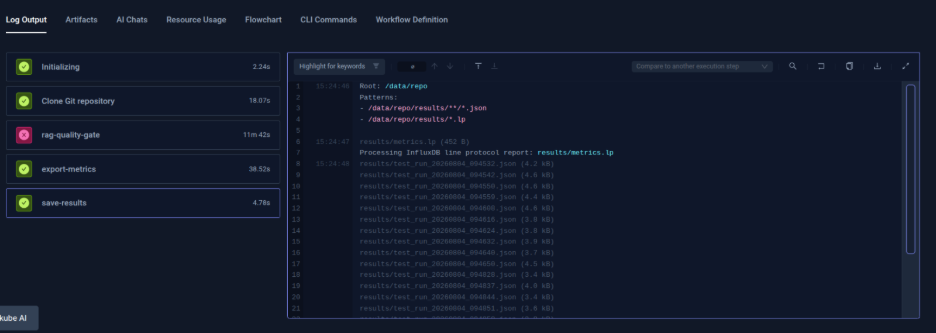
The save-results step in the TestWorkflow does this:
- name: save-results
  condition: always
  artifacts:
    paths:
      - results/**/*.json
      - results/*.lp
The condition: always ensures this runs even if tests fail, so you capture metrics for debugging. Both JSON (raw scores) and LP (formatted) files are stored. Testkube automatically reads .lp files and ingests the metrics into Insights, no manual configuration needed. This is the persistence layer that enables trend tracking.
Step 5: Testkube auto-ingestion of InfluxDB metrics
Testkube Platform automatically injects metrics into Insights when it detects .lp files in artifacts. This happens with zero configuration because Testkube already knows your organization, environment, TestWorkflow name, and execution timestamp.
After workflow execution, Testkube finds results/metrics.lp in artifacts, reads each line and sends it to the Insights database, and makes metrics available in the dashboard immediately. This zero-config happens because the parser output format plus artifact path plus Testkube context automatically align.
Step 6: View metrics in Testkube Insights dashboard
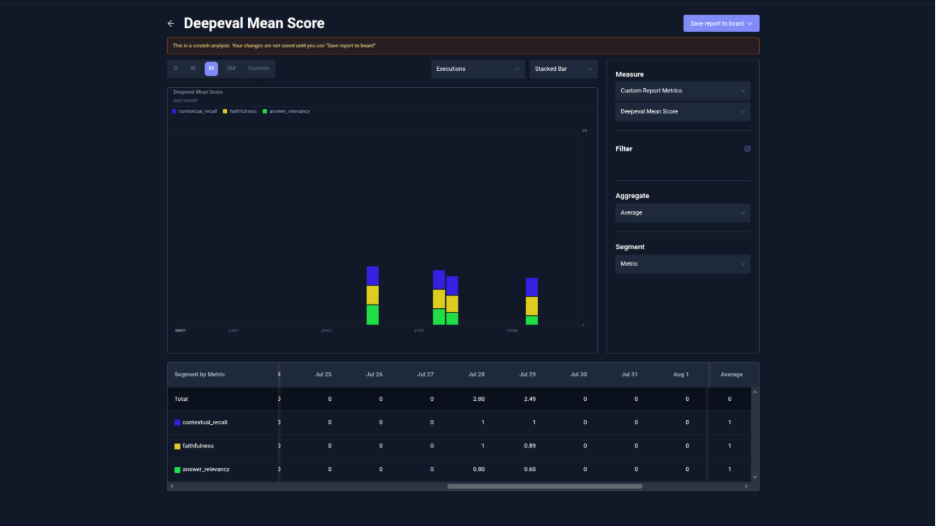
- Open the Testkube Insights dashboard to view AI quality metrics and trends.
- To create an insight:
- Navigate to the Insights tab.
- Select Create New Analysis.
- Set the measure to Custom Report Metrics.
- Select the metric you want to visualize from the dropdown menu.
- The dashboard displays metric cards with trend lines for recent evaluation runs, such as:
- Faithfulness: Tracks whether generated responses are grounded in the provided context.
- Contextual Recall: Measures whether the retrieved context contains the required information for generating accurate answers.
- Answer Relevancy: Evaluates how relevant the generated response is to the user query.
- These trends help teams identify AI quality regressions over time and make data-driven decisions before promoting changes to production.
Conclusion
Traditional CI/CD remains the foundation of modern software delivery, but AI-native applications require an additional layer of validation. Functional tests alone cannot determine whether generated responses are accurate, grounded, safe, or consistent enough for production use.
By integrating continuous AI evaluation throughout the delivery pipeline, teams can detect quality regressions earlier, establish measurable deployment quality gates, and continuously monitor AI behavior after release. Combined with evaluation frameworks, observability platforms, and Kubernetes-native orchestration using Testkube, AI testing becomes an automated part of the software delivery lifecycle, enabling teams to ship reliable AI applications with greater confidence.
About Testkube
Testkube is the open testing platform for AI-driven engineering teams. It runs tests directly in your Kubernetes clusters, works with any CI/CD system, and supports every testing tool your team uses. By removing CI/CD bottlenecks, Testkube helps teams ship faster with confidence.
Get Started with a trial to see Testkube in action.