Table of Contents
Start your free trial.
Start your free trial.

Start your free trial.



Table of Contents
Executive Summary
Shipping a large language model (LLM) application is not the same as shipping a reliable one. A request that reaches an endpoint and returns a response has passed a functional test, but that result says nothing about whether the response is accurate, grounded in the right context, or useful to the person who asked the question. For teams building retrieval-augmented generation (RAG) systems or other LLM-powered features, this gap between an application responding and a response being good is where most production issues originate, and conventional test suites were never built to close it.
The difficulty is compounded by the nature of large language models themselves. Their outputs are non-deterministic, meaning the same input can produce different, equally valid responses depending on the model version in use, the context retrieved at query time, or simple inference-time variation. Traditional testing relies on exact-match assertions that compare an actual output against a single expected string, and that approach breaks down quickly once a correct answer can legitimately take more than one form.
DeepEval addresses this by evaluating LLM outputs against a set of quantitative metrics rather than a fixed expected string, which turns response quality into something that can be scored, held to a threshold, and tracked over time instead of simply observed. Testkube complements this role by acting as the execution and observability layer that runs these evaluations as part of a broader testing pipeline and surfaces the results alongside an organization's existing test data.
This article continues from How to Integrate AI Testing in Delivery Pipelines and extends the same RAG application, DeepEval configuration, and Testkube workflow with JUnit reporting.
Understanding LLM Evaluation with DeepEval
An LLM can generate a response that looks perfectly reasonable and still be wrong, incomplete, or poorly grounded in the provided context. So instead of simply accepting the output, we need a way to systematically evaluate it against what we expect from the application.
This is where DeepEval comes in. It lets us define what "good" means for an LLM response, measure the output against those expectations, and turn those measurements into concrete pass/fail results that can be used in a test suite.
DeepEval Metrics
DeepEval evaluates the output of an LLM application against a defined set of metrics rather than a single expected answer. For a RAG application, the three metrics central to this article are:
- Faithfulness, which measures whether a response is supported by the retrieved context.
- Answer Relevancy, which measures whether a response actually addresses the question asked.
- Contextual Recall, which measures whether the retrieved context contained the information needed to answer the question at all.
Each DeepEval test case is built from four components: the input question, the context retrieved to answer it, the actual response generated by the application, and the evaluation criteria that define what a correct or faithful answer looks like. A RAG response is scored against whether its claims are supported by the retrieved context it was given, which is what allows DeepEval to detect a hallucinated answer even when that answer reads as fluent and confident.
Metric Scores and Evaluation Thresholds
Each metric produces a numerical score between 0 and 1, and that score is only meaningful once it is compared against a threshold. A Faithfulness threshold of 0.80, for instance, means any response scoring below that figure is treated as a failed evaluation, regardless of how well-formed the sentence itself reads.
One example from a run using a weaker candidate prompt illustrates this clearly. The user asks, "Do you accept credit cards?" The retrieved context states, "Yes, we accept credit cards." But the generated response came out as: "Absolutely! We accept Visa, MasterCard, and American Express—basically all the cool kids of the credit card world. So whip out that plastic and let's make some magic happen! Just remember, unlike your favorite pair of jeans, we can't stretch those payments beyond 30 days for refunds."
The retrieved context supports exactly one claim: yes, credit cards are accepted. The response added card brands, a payments remark, and a 30-day refund limit that appear nowhere in that context. Faithfulness scored 0.5 against the 0.80 threshold, so the evaluation failed. The application still returned a well-formed response, so a functional test would have passed this same output. That gap is what the evaluation exists to catch.
DeepEval Results as Test Results
In practice, DeepEval does not run as a standalone evaluation tool. It runs inside a pytest-based test suite, where each RAG question becomes a pytest test function and each DeepEval metric assertion becomes the condition that function must satisfy to pass. The result of running that suite is a structured set of evaluation outcomes: a metric score, a threshold, and a pass or fail state for every question in the benchmark. Those results need to leave the terminal, and JUnit XML is the standard format for that.
From DeepEval Metrics to JUnit Test Reports
What JUnit Reporting Is, and Where DeepEval Fits In
JUnit XML originated as a reporting format for Java's JUnit testing framework, but it no longer belongs to Java specifically. It has become the de facto result format that almost every CI/CD and test-reporting tool already knows how to parse, from Jenkins and GitLab CI to Testkube, regardless of the language or framework that produced the original results. That portability is what makes it a convenient target for a Python-based evaluation suite like this one.
pytest runs the RAG suite, and its built-in --junitxml flag writes each run into this format with no extra tooling. Because Testkube parses JUnit XML natively, the results appear in its execution view without a custom integration.
JUnit XML Representation
The resulting report follows a consistent structure. A single testsuite element wraps the full run and reports the suite-level totals (tests, failures, errors, and skipped cases), along with total execution time. Inside it, one testcase element represents each RAG question, and every test case lands in one of four states:
A failing case carries the full assertion message inside that failure block, including the metric that missed its threshold and the reasoning behind the score, as in this case from qa_016:
AssertionError: Faithfulness failed: score 0.67 < threshold 0.80
Reason: The score is 0.67 because the actual output incorrectly implies that customers have a whole month to decide on returns, when in reality returns must be initiated within 30 days of the original purchase date.

tests/test_rag_eval.py:79: in test_rag_quality_gate
    raise AssertionError(
E   AssertionError: Faithfulness failed: score 0.67 < threshold 0.80
E   Reason: The score is 0.67 because the actual output incorrectly implies that customers have a whole month to decide on returns, when in reality returns must be initiated within 30 days of the original purchase date.

The JUnit reporter has no concept of what Faithfulness means, and no ability to judge whether 0.67 is a meaningful score on its own. It only records that a named test case passed, failed, or errored, and reproduces whatever message the assertion behind it provided. All of the meaning behind that message comes from DeepEval.
Generating and Reporting DeepEval Metrics with Testkube
The RAG application, its DeepEval configuration, and the Testkube workflow that runs it are the same ones set up in How to Integrate AI Testing in Delivery Pipelines. The existing pipeline that converts DeepEval's JSON output into InfluxDB line protocol through testkube-ai-metrics-parser, feeding the Faithfulness, Answer Relevancy, and Contextual Recall views already live in Testkube Insights, also carries over unchanged.
What's New in This Workflow
There are two changes that separate this workflow from the one in the original post:
- The first is a
--junitxml=results/junit-report.xmlflag added to the existing pytest command, withresults/*.xmladded to the workflow's saved artifacts so the file persists after the pod terminates. - The second addresses a reliability issue in the evaluation process. DeepEval's evaluator in
test_rag_eval.pyuses an OpenAI model as the judge for all three metrics. Longer RAG responses were occasionally hitting the model's completion-token limit, causing the evaluation to fail before a score could be produced. This was resolved by switching the judge model to gpt-3.5-turbo, which reduced the likelihood of hitting the token limit during evaluation.
Here is the workflow used for the execution:
kind: TestWorkflow
apiVersion: testworkflows.testkube.io/v1
metadata:
  name: rag-quality-gate
  namespace: testkube
spec:
  config:
    prompt:
      type: string
      default: baseline
      description: Which system prompt the RAG bot uses, baseline or candidate
  content:
    git:
      uri: https://github.com/sarvaniswapnapriya/rag-quality-gate-demo.git
      revision: master
  container:
    workingDir: /data/repo
    image: python:3.11-slim
    env:
    - name: OPENAI_API_KEY
      valueFrom:
        secretKeyRef:
          name: openai-secrets
          key: api-key
    - name: RAG_PROMPT
      value: "{{config.prompt}}"
    - name: DEEPEVAL_RESULTS_FOLDER
      value: /data/repo/results
    - name: DEEPEVAL_TELEMETRY_OPT_OUT
      value: "YES"
  steps:
  - name: rag-quality-gate
    shell: |-
      set -euxo pipefail

      echo "=== Python Environment ==="
      which python3
      python3 --version

      apt-get update
      apt-get install -y --no-install-recommends curl

      python3 -m pip install --upgrade pip
      python3 -m pip install --no-cache-dir -r requirements.txt
      python3 -m pip install --no-cache-dir pytest

      echo "=== Installed Packages ==="
      python3 -m pip show pytest
      python3 -c "import pytest; print(pytest.__version__)"

      echo "=== Running RAG Evaluation ==="
      mkdir -p results
      export DEEPEVAL_PER_ATTEMPT_TIMEOUT_SECONDS_OVERRIDE=300
      export DEEPEVAL_TASK_GATHER_BUFFER_SECONDS_OVERRIDE=60
      python3 -m pytest tests/test_rag_eval.py -v --tb=short --junitxml=results/junit-report.xml
  - name: export-metrics
    condition: always
    container:
      image: docker.io/kubeshop/testkube-ai-metrics-parser:latest
      imagePullPolicy: Always
    shell: |
      testkube-ai-metrics-parser deepeval \
        -i 'results/test_run_*.json' \
        -o results/metrics.lp \
        --tag suite=rag-quality-gate \
        --stdout
  - name: save-results
    condition: always
    artifacts:
      paths:
      - results/**/*.json
      - results/*.lp
      - results/*.xml
Viewing LLM Evaluation Results in Testkube Insights
Everything generated in the previous two sections surfaces inside Testkube in two places:
- The first is the results view attached to a single execution, shown below, where every test case from that run is listed individually alongside its status and duration.
- The second is the Insights dashboard, where Testkube aggregates both the JUnit data and DeepEval's own metric scores across many executions into charts a team can return to over time.
Now let's look at both views in turn: what a single execution's results show, how those results look once aggregated into a trend, and where LLM evaluation fits alongside the rest of a team's existing test data.
Evaluation Results per Execution
Each Testkube execution surfaces the DeepEval test results for that single run, with all 20 cases (qa_001 through qa_020) listed individually, each carrying its own status and duration. That per-test view gives a reader a path from a suite-level failure straight to the exact question and metric responsible for it.
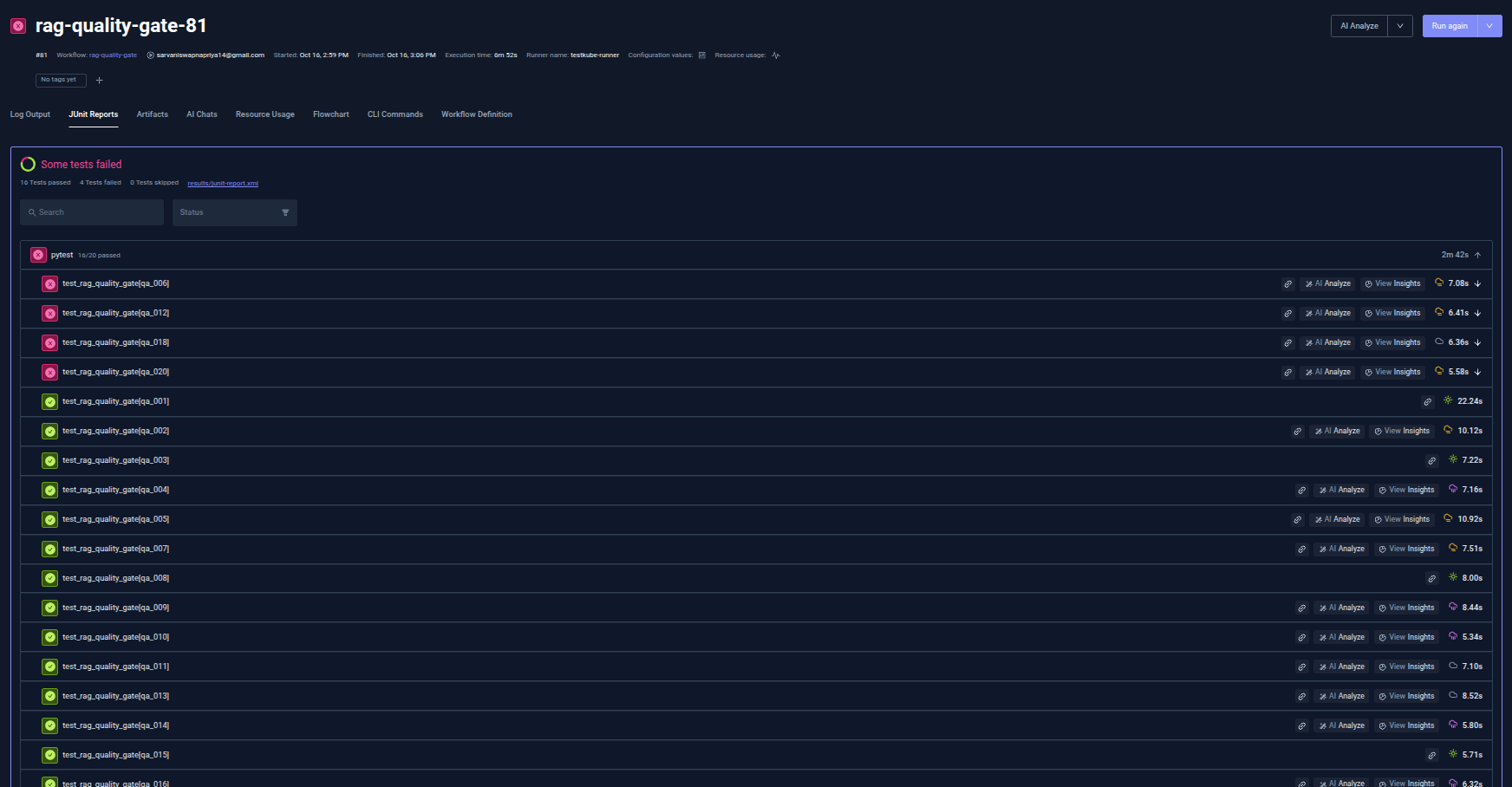
Two executions illustrate the range of outcomes this produces. rag-quality-gate-81, run against the baseline prompt, shows 16 test cases passing cleanly: 16 passed, 4 failed, 0 skipped.
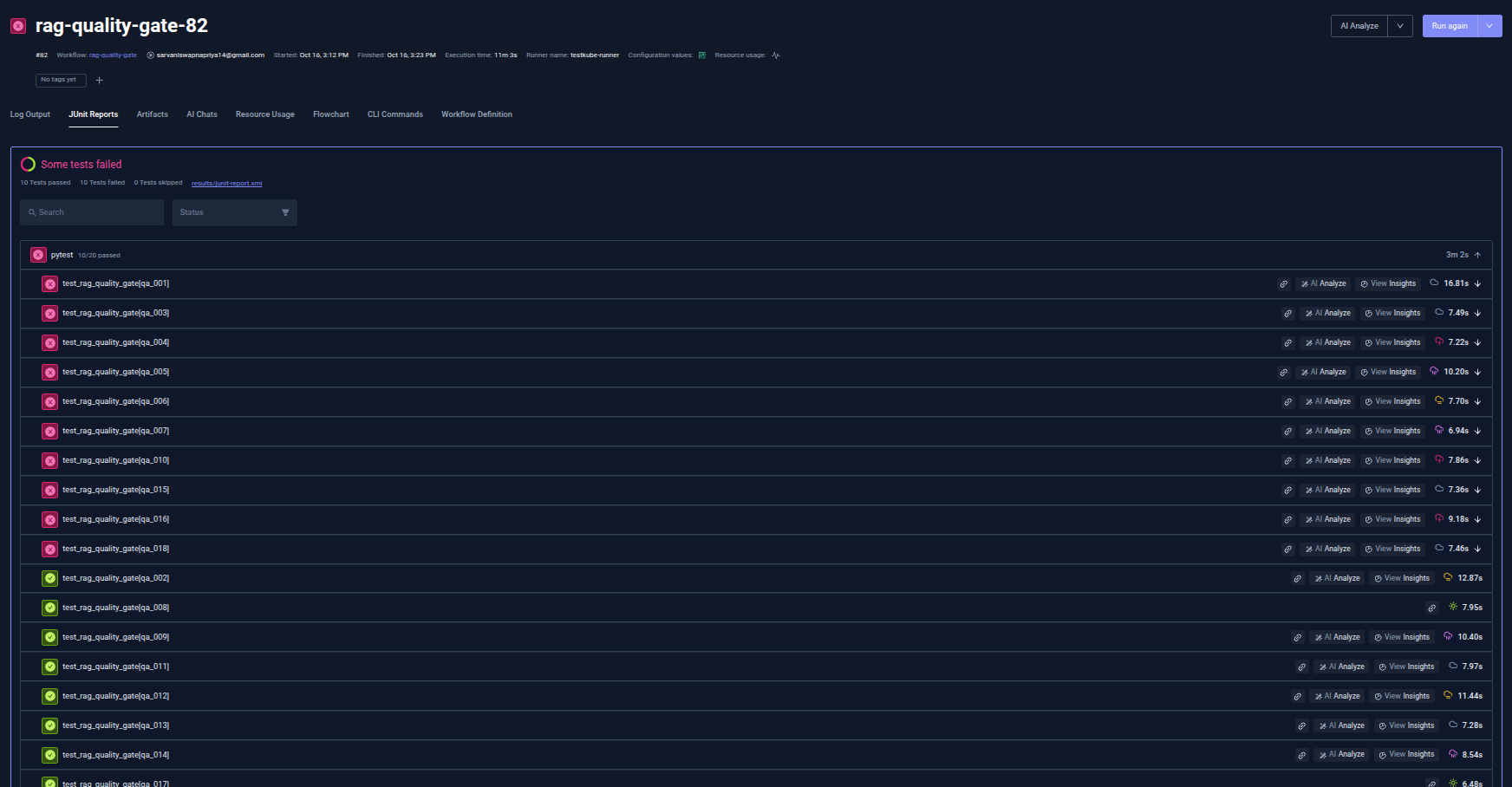
rag-quality-gate-82, run against the candidate prompt, shows 10 passed and 10 failed: genuine failures, with Faithfulness and Answer Relevancy scores that are present and visible but fall below threshold, as in the qa_016 case covered earlier.
This per-execution view is the most granular layer Testkube offers, and it answers a narrow question well: what happened in this one run. Testkube also aggregates the same underlying data across executions, which is where a trend, instead of a single result, becomes visible.
Tracking Evaluation Metrics
Beyond any single execution, Testkube tracks a JUnit Case count measure broken down by passed, failed, errored, and skipped, segmented by test case and charted across executions over time. A regression or a recovery becomes visible as a shape spanning multiple runs, something a single result cannot show on its own.
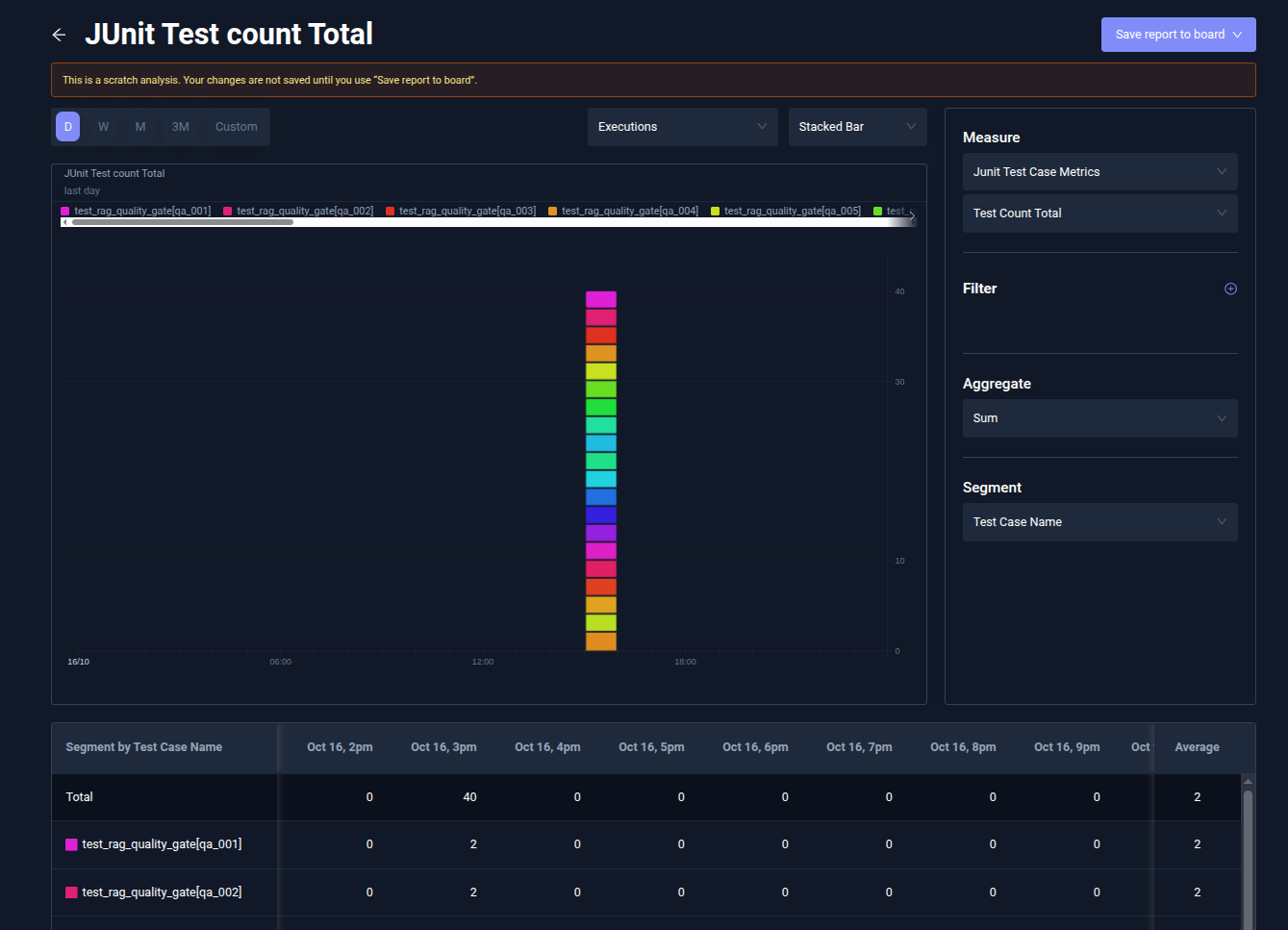
The Test Count Failed view makes the baseline-versus-candidate comparison concrete. The total-failures count sits at 4 for the baseline-prompt execution and 10 for the candidate-prompt execution, matching the 26 passed and 14 failed across both executions, as shown. Testkube Insights also supports a question-by-question breakdown underneath each chart, segmented by test case name, so a spike in failures can be traced back to the specific cases driving it, not just the count.
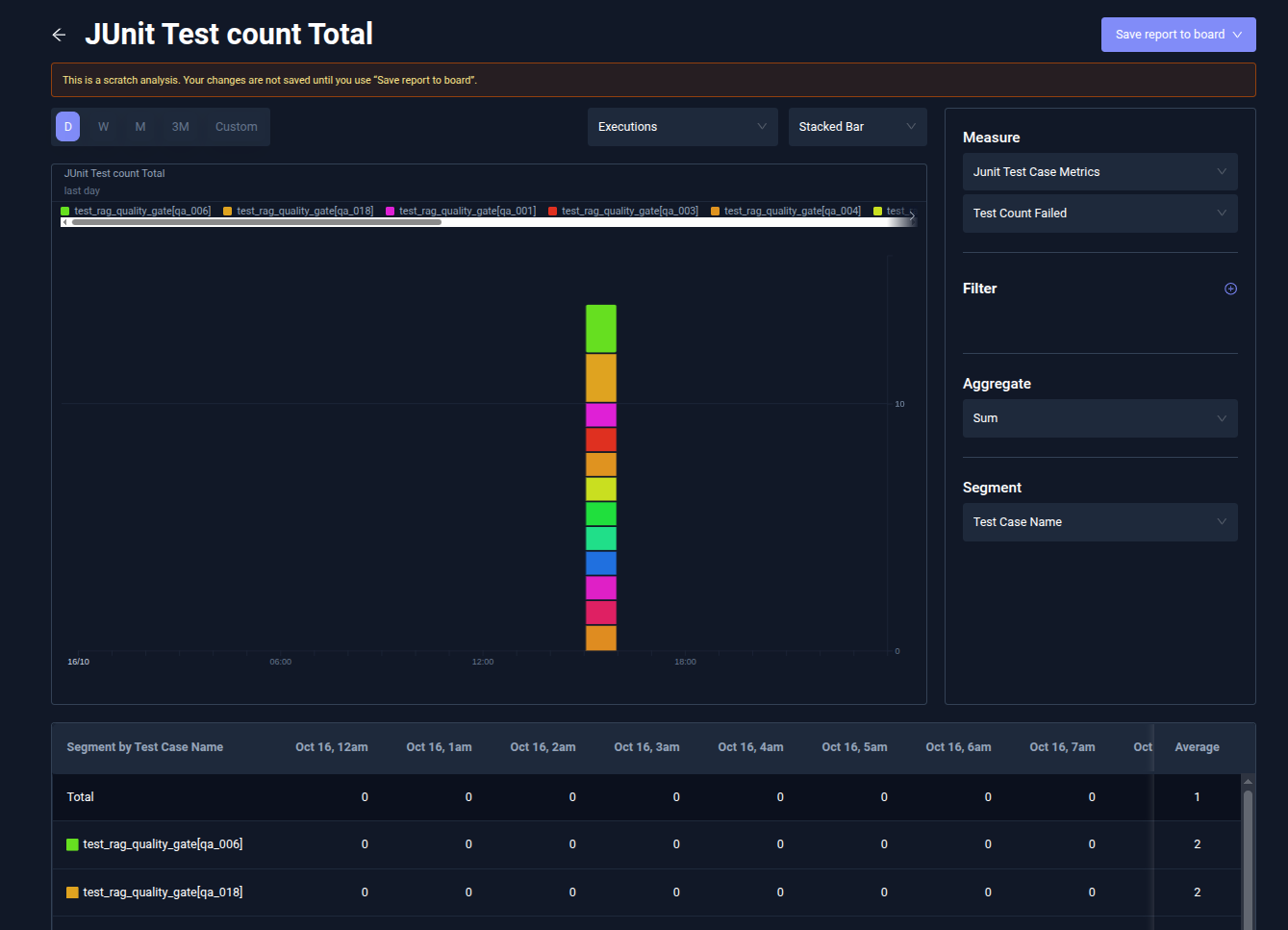
Workflow flip rate is a further signal worth tracking here: how often an entire run's outcome flips between pass and fail across executions. Demonstrating that effect as genuine non-determinism takes repeated runs of the same prompt compared against each other, a different comparison from the baseline-versus-candidate contrast used elsewhere in this piece, which measures a deliberate prompt change.
Trend data like this is still evaluation data viewed on its own, separate from everything else a pipeline tests. Where it sits relative to that broader picture is the last piece of this section.
LLM Evaluation Alongside Other Test Data
Testkube Insights does not treat LLM evaluation results as a separate category. They sit in the same view as conventional API, functional, and performance test results, which is what makes it possible to see a quality regression alongside everything else a team already tracks.
Within that view, the distinction between a failed case and an errored case remains the one worth watching. A failed case is a quality problem that DeepEval caught. An errored case is a pipeline problem: the evaluation breaking before it can render a verdict at all.
JUnit results and the trends built from them are one signal in that view. The DeepEval metrics view, showing the actual Faithfulness, Answer Relevancy, and Contextual Recall scores behind those results, is the complementary one, and Testkube displays both in the same dashboard.
Conclusion
DeepEval gives LLM output quality a quantitative basis, scoring Faithfulness, Answer Relevancy, and Contextual Recall instead of leaving response quality to a reviewer's judgment. Its thresholds are what turn that qualitative question into a concrete test outcome: a pass or a fail attached to a specific question and a specific reason.
JUnit is the standardized format that carries those outcomes forward, connecting DeepEval's evaluation to Testkube's existing test-execution data without requiring any custom integration work. Testkube, in turn, brings the results into the same test-data and observability workflow a team already relies on for everything else it tests, so an LLM-powered feature is held to the same bar as any other part of the system.
Reach out to us for a free trial to see how JUnit reporting and DeepEval metrics come together in your own Testkube Insights dashboard.
{{banner-get-started}}
About Testkube
Testkube is the open testing platform for AI-driven engineering teams. It runs tests directly in your Kubernetes clusters, works with any CI/CD system, and supports every testing tool your team uses. By removing CI/CD bottlenecks, Testkube helps teams ship faster with confidence.
Get Started with a trial to see Testkube in action.